Operations | Monitoring | ITSM | DevOps | Cloud

The latest News and Information on Microsoft 365 and related technologies.

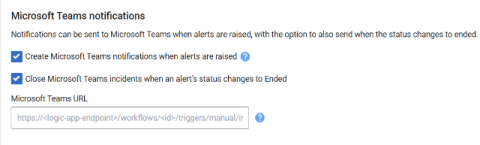
A New, Simpler Microsoft Teams Integration For Redgate Monitor

Microsoft is retiring Office 365 connectors, but there is now a new and easier way to send Redgate Monitor alert notifications to Teams, ready-formatted. Microsoft is retiring Microsoft 365 (Office 365) connectors on 31 March 2026. After that date, any Redgate Monitor alert notifications configured through the old connector method will stop appearing in Teams. From Redgate Monitor 14.1.0, there’s now a new and much simpler way to do it.

Microsoft Teams Monitoring to Troubleshoot & Optimize Performance

Microsoft Teams has become the collaboration backbone for businesses worldwide. But when call quality drops during a crucial client meeting or files won't upload before a deadline, productivity grinds to a halt. The frustration? These issues are usually preventable. The challenge with Teams is that problems can originate from multiple sources: user devices, network infrastructure, or Microsoft's platform itself.

Common Microsoft Teams Issues & How to Troubleshoot

Microsoft Teams is one of the most popular tools for work communication today. Whether you're chatting with your team, jumping on a video call, or sharing files, it helps keep everyone connected. But let's face it – MS Teams isn’t perfect. You’ve probably run into issues like calls dropping, bad audio, or slow Teams performance. These problems can be frustrating, especially when you’re in the middle of an important meeting or deadline.

Get Third-Party Outage Alerts in Microsoft Teams with StatusGator

When your company depends on dozens of SaaS tools, such as AWS, Atlassian, Zoom, or Microsoft 365, any cloud outage can ripple through your entire operation. The faster your team learns about an external service disruption, the faster you can respond. With StatusGator’s Microsoft Teams integration, your team can receive real-time third-party outage alerts in Microsoft Teams. The service also includes Early Warning Signals that detect potential issues before providers officially announce them.

Product Update - Turn Off Alerts, Use Microsoft Teams, and Custom Domains

Over the last few months IncidentHub has added several new features to make it easier to fine tune your alerts. IncidentHub now also integrates with Microsoft Teams and supports custom domains for your public status pages. Let's take a comprehensive look at what's new.

Microsoft Teams Troubleshooting for Teams Performance and Connection Issues

How many times has this happened? You're on a Microsoft Teams call, and your call disconnects, lags or freezes. so you go to Google to look up how to solve the problem. Well look no further! If you're using Microsoft Teams, there are proven ways to troubleshoot those pesky performance and connection issues that are putting a damper on your team's collaboration.

How to connect Microsoft Teams with OneUptime.

OneUptime is a comprehensive solution for monitoring and managing your online services. Whether you need to check the availability of your website, dashboard, API, or any other online resource, OneUptime can alert your team when downtime happens and keep your customers informed with a status page. OneUptime also helps you handle incidents, set up on-call rotations, run tests, secure your services, analyze logs, track performance, and debug errors.

Teams issues are inevitable - but your users don't need to know that

Our previous blog gave a quick overview of an all-too real scenario involving poor Microsoft Teams performance and frustrated VIP users. The situation, picking up on our recent Power Moves webinar, centered on a big board meeting held over Teams that suffered from multiple call quality issues — spurring the CEO to pay a stormy visit to IT. In that case, the issue had already happened, and our point was that with native Microsoft tools, it can be hard to get to a precise root cause quickly.

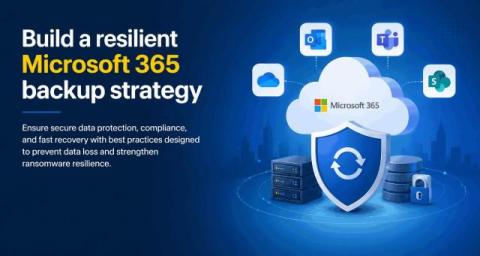
How 1Security Helps Businesses Strengthen Microsoft 365 Security and Compliance

In today's hybrid work environment, organizations rely heavily on Microsoft 365 to store sensitive data, enable collaboration, and support daily operations. However, as digital ecosystems grow more complex, maintaining visibility, compliance, and security becomes increasingly difficult. That's where 1Security steps in - a company that delivers AI-powered tools built specifically to help businesses manage and protect their Microsoft 365 environments.

How to Monitor Microsoft Teams Issues & Fix Microsoft Teams "We're sorry - we've run into an issue"

Welcome to the world of Microsoft Teams! When it comes to video conferencing and messaging, Microsoft Teams is one of the most popular players in the game. When we get error messages like Microsoft Teams “We're sorry—we've run into an issue,” or “something went wrong,” it’s important to have a tool to help monitor and troubleshoot Microsoft Teams performance issues and connection issues.