Operations | Monitoring | ITSM | DevOps | Cloud

How Status Pages can help you build better relationships with your customers

Uptime monitoring. You keep hearing us talking about it and you know why it’s important, hey, you might even have a StatusCake account. But do you know what to do if you do experience website downtime? Let’s do a little quiz. Your website has suffered two hours of downtime. Do you: If you answered a, you might be a lost cause (I’m only joking, you should just definitely read to the end of this post), and if you answered d, crack out the sales bell and start dinging!


Receiving PagerDuty alerts from MetricFire

One of the most critical aspects of monitoring your digital assets is getting a timely alert when something goes wrong. Even when you finish building a monitoring stack and expose metrics on a beautifully designed dashboard if you cannot notice abnormal behaviors and fail to take pre-emptive or follow-up actions swiftly, this means your monitoring system does not serve the purpose.

Tracing errors and surfacing collateral damage across your code base

Frontend technologies typically talk to several services in your backend, and those services talk to other services. At the root of every issue is a single event that causes a domino effect. A domino effect that impacts every operation from the first experience on the frontend to the backend API call. Sentry can show you how these exceptions and latency issues impact every one of your services. For example, take the ever common and seemingly simple to resolve 500 - Internal Server Error.

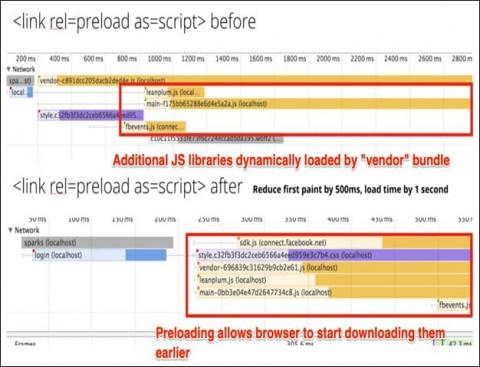
What Are Preload Resource Hints?

Preloads are a powerful optimization technique that can make significant improvements to crucial performance metrics such as Core Web Vitals. I have written on prefetching a DNS lookup or even preconnecting to a domain. Preloading is a much more powerful extension of these concepts because it enables you to download entire resources in advance. In this article, let’s look at.

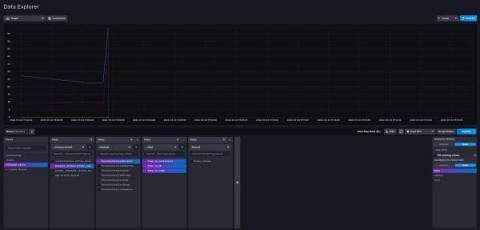
Monitoring Ruby on Rails with InfluxDB

Time series databases like InfluxDB are databases that specialize in handling time series data, which is data that is indexed by time. Unlike traditional databases, time series databases are optimized for reading and writing data with less performance consideration for updating or deleting data. Due to the time-dependent nature of time series data, time series databases are handy for application monitoring.

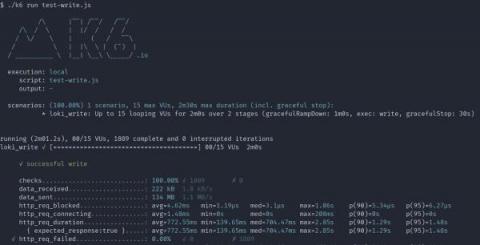
A quick guide to load testing Grafana Loki with Grafana k6

As a software engineer here at Grafana Labs, I’ve learned there are two questions that commonly come up when someone begins setting up a new Loki installation: “How many logs can I ingest into my cluster?” followed by, “How fast can I query these logs?” There are two ways to find out the answers.

Minimize MTTR to Mitigate Impact of Change Management

In the first blog this demo series, we showed you how to use Restorepoint to remediate after a network breach. In our second blog of this three-part series, we walk you through a change management instance—showing how to speed problem resolution and how to mitigate the impact of poor change management to minimize MTTR.

New Feature: Sitemap Monitoring

Our feature development has always been heavily influenced by our users. Some of our most popular features were directly requested by people using our products on a daily basis, which we believe is one of the best ways of developing a product such as ours. If one person wants to monitor something, chances are others will do too. Which is how our new feature: Sitemap Monitoring was incepted!

Regression testing your Java Agent Plugin

For developers who’ve created their own instrumentation with the Java Agent plugin, the next phase of the process is regression testing. By performing regression testing, you can ensure that your plugin functions the way it’s supposed to after you’ve made code changes or updates. You’ll have your own plugin, but to illustrate regression testing in this article, I’ll use the plugin in our example repo.

The ultimate logging series: Using the PHP system logger

Logging is essential to application development. Logs provide exhaustive, robust information that is useful for tracking all the changes made to an application's code. PHP logs help you track the performance of the method calls within your application, the occurrence of a particular event, and the errors in your application. With proper PHP logging techniques, you can track and optimize an application's performance.