Mailchimp
Not subscribed to OpsMatters Newsletter


In this update 744, we have added the module library to the console interface. We have also kept improving visual consoles, incorporating a new template with countries, as well as extending the alert correlation editor. Furthermore, our troubleshooting covers more than eighty issues, following our zero bugs 2020 policy.
As the outbreak of Coronavirus spreads rapidly, with new cases being confirmed in different parts of the globe, one can’t undermine the importance of rapid dissemination of information related to patient care.
One thing I love about working at OpsRamp is how we always come together to figure out new ways to manage complexity or achieve difficult development goals. Take, for example, managing application states. It’s historically one of the biggest challenges in front-end development. We’re a lean team, so we needed to figure out a better way. In this article, I’ll address how we accomplish this with React at OpsRamp, and how you can apply some of these practices in your own workday.
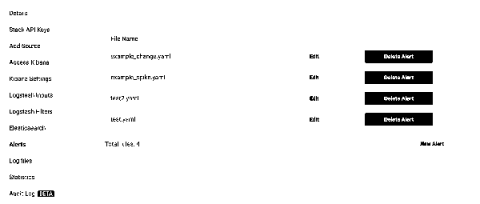
When you login your stacks are displayed on the dashboard. To enable alerts for a stack, choose the 'Settings' button. Next, choose 'Alerts' and then click 'Provision ElastAlert' for this stack
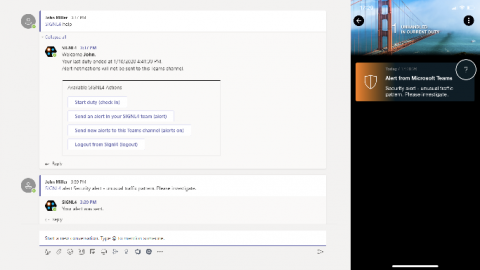
SIGNL4 provides plug-and-play chatbot integrations with Microsoft Teams and Slack, both via certified chatbot apps. Why does it makes sense to integrate SIGNL4 with chat tools after all? There are two basic uses cases that we address with the integration into Teams and Slack. By default, SIGNL4 notifies by mobile push, text and voicecalls, all according to user preference. The focus is clearly on mobile alert notifications. And of course, tracking and escalation of critical alerts is built-in.
This is a guest post from Ava Franklin of GoodCore Software. No matter how high your aspirations, you need someone to guide you through the initial steps of your career. For developers who have just started taking up real projects, we have prepared a checklist of best programming practices recommended by software development industry experts.
For a comparatively better user experience and more quality online traffic, all that’s required is a fast and lightweight website. The contribution of a lightweight and superfast website, towards comparatively better user experience and engaging online traffic, cannot be ignored. One of the most important aspects that has always kept the user hooked, engaged, has converted, ensuring optimal performance and reliability of the website is - load testing.
Your network is continuously becoming more complex. Whether you’re migrating to the cloud, deploying containers, or load balancing your applications, getting visibility into your network’s architecture is increasingly difficult—yet more important than ever.
If you're using a Linux server, you're probably familiar with the term load average/system load. Measuring the load average is critical to understanding how your servers are performing; if overloaded, you need to kill or optimize the processes consuming high amounts of resources, or provide more resources to balance the workload. But how do you determine if your server has sufficient load capacity, and when should you be worried? Let's dive in and find out.