Operations | Monitoring | ITSM | DevOps | Cloud

Managing VPN connections will help businesses face today's adversity as well as prepare for tomorrow's opportunity

The onslaught of the novel COVID-19 has caught businesses off guard, sending many of them into a tailspin. To survive this, most businesses are considering the idea of remote work, and some have already implemented work from home policies. Under these circumstances, a virtual private network (VPN) is an organization’s best bet for providing access to business-critical services remotely and to avert operational disasters.
Hardening Windows security: How to secure your organization-Part 3

This is the final blog of our three-part blog series on living-off-the-land (LOTL) attacks. If you missed last week’s blog, you can read it here. LOTL attacks are also known as “malware-free” attacks because your own tools are used against you, either to hide malicious activities under a legitimate system process, or to leverage genuine system activities for malicious purposes.

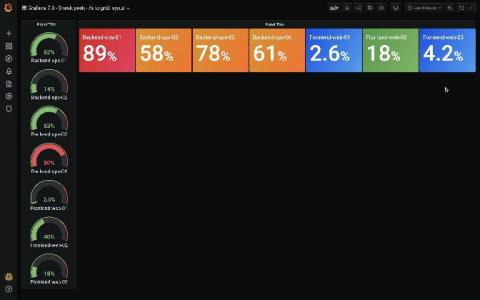
Grafana v7.0 is coming soon! Check out this sneak peek of the auto grid layout

Grafana v7.0 is coming next month! Here’s a sneak peek of one new feature: the auto grid layout. This new 7.0 feature is for the gauge and stat panels. Before, stat and gauge only supported horizontal or vertical stacking: The auto layout mode just selected vertical or horizontal stacking based on the panel dimensions (whatever was highest).

Integration and Shipping Okta Logs to Logz.io Cloud SIEM

Company security usually depends on your ability to come up with a diverse set of passwords and then manage them. Remembering all of them is considered a tad too difficult for most mere mortals, so a number of password storage apps have emerged. But they too have to be secured, and ultimately results in inefficient access and flawed security. Single-sign on (SSO) is still preferred, but to make it effective, companies like Okta have to secure integration across a number of apps.

How tech teams are making extraordinary progress in COVID-19 shutdown while working remotely?

COVID-19 has led businesses into extreme work challenges. To overcome these challenges, companies have shifted their working patterns and have embraced Remote Work to avoid any negative impact on employee’s health as well as the business. COVID-19 has made IT-sector office culture’s shift to remote work prominently. The tech teams, who already have DevOps processes in place, got huge benefits and did not get much impact while shifting their workplace from regular office to home.

How to Monitor the Event Log for Errors

The Event Log Monitor can monitor one or more event logs on the system, including the standard Application, Security and System logs as well as custom event logs. You have complete flexibility in specifying which types of events are important to you and which types you'd like to ignore. In addition, you can manually add dynamic event sources (event sources that register themselves, add an event, and then unregister themselves).

How to Use Smart Config

Video tutorial on how to use Smart Config in PA Server Monitor. The Smart Config feature is a very useful tool for quickly adding servers or devices to be monitored. You specify one or more servers, and the monitors inspect the servers/devices and create appropriate monitors for each one based on default settings. You can access the feature by clicking the Smart Config button at the top of the Console. You can paste a list of server names or IP addresses into an edit box. You can also press the Discover button to find a list of servers for you (more on that below).