Operations | Monitoring | ITSM | DevOps | Cloud

The latest News and Information on Microsoft 365 and related technologies.

Microsoft Teams Troubleshooting for Teams Performance and Connection Issues

How many times has this happened? You're on a Microsoft Teams call, and your call disconnects, lags or freezes. so you go to Google to look up how to solve the problem. Well look no further! If you're using Microsoft Teams, there are proven ways to troubleshoot those pesky performance and connection issues that are putting a damper on your team's collaboration.

Teams issues are inevitable - but your users don't need to know that

Our previous blog gave a quick overview of an all-too real scenario involving poor Microsoft Teams performance and frustrated VIP users. The situation, picking up on our recent Power Moves webinar, centered on a big board meeting held over Teams that suffered from multiple call quality issues — spurring the CEO to pay a stormy visit to IT. In that case, the issue had already happened, and our point was that with native Microsoft tools, it can be hard to get to a precise root cause quickly.

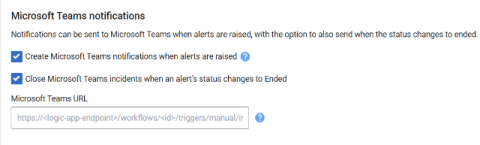
How to connect Microsoft Teams with OneUptime.

OneUptime is a comprehensive solution for monitoring and managing your online services. Whether you need to check the availability of your website, dashboard, API, or any other online resource, OneUptime can alert your team when downtime happens and keep your customers informed with a status page. OneUptime also helps you handle incidents, set up on-call rotations, run tests, secure your services, analyze logs, track performance, and debug errors.

How 1Security Helps Businesses Strengthen Microsoft 365 Security and Compliance

In today's hybrid work environment, organizations rely heavily on Microsoft 365 to store sensitive data, enable collaboration, and support daily operations. However, as digital ecosystems grow more complex, maintaining visibility, compliance, and security becomes increasingly difficult. That's where 1Security steps in - a company that delivers AI-powered tools built specifically to help businesses manage and protect their Microsoft 365 environments.

How to Monitor Microsoft Teams Issues & Fix Microsoft Teams "We're sorry - we've run into an issue"

Welcome to the world of Microsoft Teams! When it comes to video conferencing and messaging, Microsoft Teams is one of the most popular players in the game. When we get error messages like Microsoft Teams “We're sorry—we've run into an issue,” or “something went wrong,” it’s important to have a tool to help monitor and troubleshoot Microsoft Teams performance issues and connection issues.

Your big VIP Teams call just went south. Do you have the tools to troubleshoot - fast?

Imagine you’re the IT lead responsible for your organization’s Microsoft Teams experience. A big call with the board comes up, loaded with company VIPs — and it’s chock full of issues. Lag, choppy audio, bad connections. After the call, there’s a knock at your door. Not a happy knock. You answer and standing there is your CEO, stamping her foot demanding to know what went wrong.

Say hello to one-click call quality and SBC data correlation for Teams Phone

For IT teams managing Teams Phone performance, the SBC is kind of a ‘last frontier’. Issues that occur there are hard to track down. Critical information slips out of view or can’t easily be associated with what users are experiencing. Our latest update to Vantage DX closes the Microsoft Teams Phone SBC monitoring visibility gap with automated correlation of SBC records and Teams Phone quality data — the first solution in the industry to do so.

Solve Microsoft Teams Performance Troubles Before They Hit Your Inbox

Who Solves It Faster? Microsoft Native Tools vs. Vantage DX Tickets piling up. Execs on your case. Teams acting up. Microsoft’s tools only show part of the story—leaving you stuck reacting. Watch our pros do a no-fluff, side-by-side showdown: Microsoft Native Tools vs. Martello Vantage DX. Watch them tackle real Teams issues and see who finds and fixes the problem faster. What Attendees will learn.

SIGNL4 + Microsoft Teams Integration - Streamline Critical Alerts and Incident Response

Enhance your incident management workflow with the SIGNL4 Microsoft Teams integration. In this video, we walk you through how SIGNL4 connects seamlessly with Microsoft Teams to deliver real-time, mobile push notifications, chat-based incident collaboration, and faster response times for your team. Whether you’re in IT operations, DevOps, security, or facility management, this integration ensures that the right people are alerted instantly and can take immediate action – directly within Teams. What you’ll learn in this video.

Early Warning Signals: Now in Microsoft Teams

As promised, we’re continuing to expand our Early Warning Signals coverage. In addition to our recent integrations for Slack, SMS, and Webhooks, we’re excited to announce that Early Warning Signals now works in Microsoft Teams. This is another step toward making early outage alerts accessible wherever your conversations happen.