Operations | Monitoring | ITSM | DevOps | Cloud

Configuring Azure Logic App Failure Alerts To Stay Ahead

Azure Logic Apps is a cloud-based service provided by Microsoft Azure that allows users to create and run automated workflows. A trigger is the first step of a workflow that specifies the condition for running further steps in that workflow. Azure Logic Apps creates a workflow run each time the trigger fires successfully. The details of each run, including the status, inputs, and outputs of each step of the workflow instance, can be accessed in the run history section of the Logic App.

Goats on the Road: RSA 2023 Recap

Dr. Anton Chuvakin, a noted warrior/poet/security cybersecurity expert, sums up my thoughts about RSAC 2023 marketing messaging perfectly with this post on Twitter. For those who are new to the vendor hall, the amount of just bad marketing can be overwhelming and confusing. . There’s only one chance to get your message across to your prospects, so make it short and sweet. Anton’s guess of “zero click zero trust” is closer than you think to the truth.

A Log's Life Cycle in Coralogix

Coralogix is a full-stack observability platform that effortlessly processes logs, metrics, traces, and security data. More specifically, logs in Coralogix are processed in larger volumes than almost any other observability provider out there, making a log’s life cycle unique. This article will examine the different stages of logs and help you better understand one of the most sophisticated telemetry processing architecture on the market.

Transport Your Logs to AppSignal with Winston

AppSignal Logging gives you 360-degree insights into your application's performance. To help give you those insights, we wanted to ensure our logging solution allowed you to send AppSignal your logs your way. You can now use Winston transport to send your Node.js application's logs directly to AppSignal and take advantage of having access to all of your application's performance logs and metrics in one place.

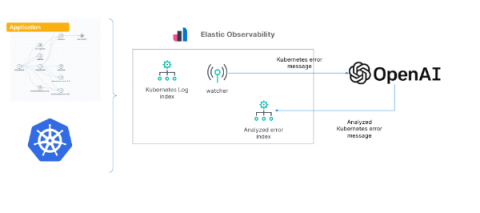
Gain insights into Kubernetes errors with Elastic Observability logs and OpenAI

As we’ve shown in previous blogs, Elastic® provides a way to ingest and manage telemetry from the Kubernetes cluster and the application running on it. Elastic provides out-of-the-box dashboards to help with tracking metrics, log management and analytics, APM functionality (which also supports native OpenTelemetry), and the ability to analyze everything with AIOps features and machine learning (ML).

The Top 5 Gambling Website Issues

Tune into any sports game and you’ll likely see an iGaming ad at some point. Sports betting or online slots have become so ubiquitous in the modern age that the United Kingdom now has one of the largest online gambling markets in the world. Due to their high-thrills gaming and transactional nature, gambling websites face more performance issues than most. This is why it’s so important to monitor website performance, looking at conversion rate optimisation and security.

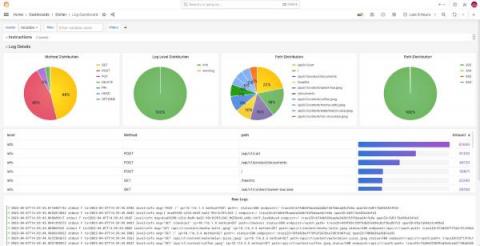
6 easy ways to improve your log dashboards with Grafana and Grafana Loki

Because of where you’re reading this post, I’m going to assume you already know that Grafana is a great tool for visualizing and presenting metrics, and persisting them on dashboards. Ever since the Grafana Loki query builder for LogQL was introduced in 2022, it’s been easy to display and visualize logs, too.

From logs to insights: Using Firewall Analyzer to monitor Squid proxy activity

Squid proxies are among the most popular open-source proxy servers preferred by companies across the globe to keep their networks safe and boost performance. Since Squid proxy’s release in 1996, companies have preferred it for its high-performance proxying, forwarding, and caching functions. Squid proxy logs contain information about the HTTP traffic passing through a server. This includes the source IP, destination IP, time of the request, and accessed URL.