Operations | Monitoring | ITSM | DevOps | Cloud

CLIs are more token-efficient than MCP. Or are they?

MCP servers have a reputation: they eat your context window. CLIs paired with skills, on the other hand, are more token efficient. But is this still true? I dropped all my MCP servers five months ago. Five months is a long time in AI land. When Anthropic came up with the concept of skills, many people stopped using MCP servers in favor of CLI tooling and skills.

When Status Pages Lie: The Incident Detection Gap

On July 28, 2026, roughly 30,000 people flooded Downdetector with reports that Reddit was broken. Feeds would not load, logins failed, and the mobile app hung. Reddit's own status page, meanwhile, showed a calm wall of green: all systems operational. That contradiction is the whole story, and it is not unique to Reddit. It is one of the most common and most damaging failure modes in modern on-call, and it has a name: the incident detection gap.

Year-End Bookkeeping Checklist for Canadian Small Businesses

TL;DR: Year-end bookkeeping for Canadian small businesses involves reconciling accounts, reviewing payroll records, organizing receipts, preparing financial statements, and getting ready for tax filing. Completing these steps before December 31 helps you escape penalties, maximize deductions, and start the new year with clean books. The end of the fiscal year is a critical point in your business calendar. Properly closing your books impacts your tax obligations, cash flow visibility, and growth planning. With an organized checklist, year-end can be manageable.

Faster Construction Estimates Start With Better Takeoff Control

Estimating pressure has always been part of construction. Plans come in late, bid dates stay firm, and estimators are expected to move quickly without missing scope. The problem is not only speed. The real challenge is producing a number that can survive review, negotiation, award, and handoff to the project team.

The Technologies Shaping the Future of Work

Work is changing fast. The old nine-to-five grind feels outdated. People want flexibility. They want meaning. They want to avoid soul-crushing repetition. Technology drives this shift. New tools handle the boring stuff. They connect teams across continents. They make work more human, not less. The future workplace looks different than anyone predicted. It is more collaborative. It is more creative. It is powered by smart machines that amplify human potential. This transformation is already happening. Here is what it looks like.

Is Machine Learning Helping People Access Legal Support?

Machine learning describes a branch of artificial intelligence that lets computers learn from data and make choices without a human needing to write exact rules or steps. Instead, it uses data and patterns to improve itself over time. Machine learning has proved helpful in many industries by predicting trends and automating complex tasks, including healthcare, finance, and manufacturing. It may also be valuable for people seeking legal help in the following ways.

GPU monitoring in OpManager: Full visibility for every AI workload

AI has moved to be a core part of enterprise infrastructure. GPUs are the engines behind that shift. Every training run, every inference request, and every fine-tuning job depends on GPU chipsets that are expensive and delicate. A GPU that overheats, runs out of memory, or sits idle for hours doesn't just slow a project down, it quietly drains the IT budget. Most monitoring tools weren't built with this hardware in mind. This leaves AI and DevOps teams blindsided when a job fails or a chipset degrades.

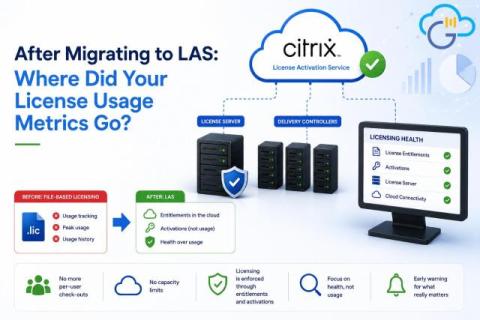
LAS Migration Aftermath: What Happened to Your License Usage Metrics?

When Citrix introduced License Activation Service (LAS), customers transitioned from the traditional file-based licensing model to a new cloud-connected licensing architecture. For most administrators, the migration itself was straightforward. The biggest surprise came afterwards, when familiar licensing metrics such as licenses in use, licenses available, and peak license usage disappeared from the Citrix License Server. The answer is no.

Choose a group when adding monitors

We’re making it easier to organize your monitors from the moment you add them. Previously, clicking Add would immediately add a monitor to your board. If your board already contained one or more groups, new monitors were automatically placed in the Ungrouped section, requiring an extra step to move them into the correct group. Now, clicking Add opens a list of your monitor groups, allowing you to choose exactly where the monitor should be added.