Logit Improves Platform Speed Between 5x to 10x With NVMe Disk Upgrade
Logit Improves Platform Speed Between 5x to 10x With NVMe Disk Upgrade


Network Monitoring solutions, much like the diagnostic and surgical tools of a medical professional, make it easier for the IT team to discover and locate devices installed within the network or operated via the cloud. These systems make it easier for the IT operations team to understand the ongoing issues in real-time, as and when they occur. Whether it is uptime, disk space, or any other performance issues.
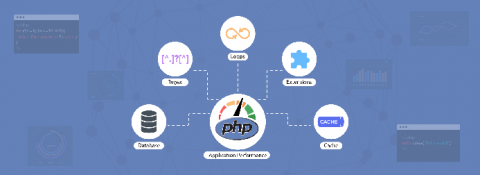
With its open-source nature, PHP has evolved into one of the most popular languages among web developers. According to w3techs, 78 percent of websites across the globe use PHP as their server-side language. Even amongst the top 1,000 ranked sites, PHP is dominant, being used by more than 50 percent of them.
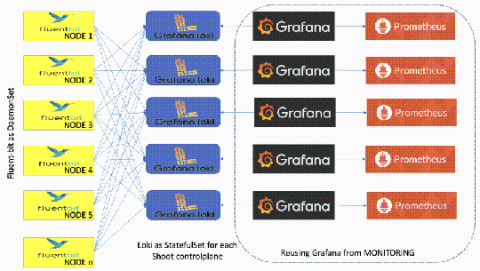
Kristian Zhelyazkov is a developer at SAP working on Gardener, the SAP-driven Kubernetes-as-a-service open source project. In this guest blog post, he explains why the project is moving its logging stack to Loki.
Production environment stability and high availability are the holy grail of every SaaS company. R&D organizations put a lot of effort into achieving these goals by implementing different monitoring and alert methodologies and by utilizing a variety of systems and tools. Mean-time-to-detect (MTTD) and mean-time-to-repair (MTTR) are two crucial KPIs that help R&D management personnel determine the efficiency and proficiency of their teams’ responses to production incidents.
This article provides an overview of managing and analyzing Docker logs and explores some of the complexities that may arise when looking through the log data. We will go through the default logging approach, as well as look at some more advanced configurations that will make diagnosing issues in your Docker-hosted applications much easier going forward.
Kibana is considered the “window” to Elasticsearch and indeed it’s a powerful UI for searching, filtering, analyzing, and visualizing Elasticsearch data, but Kibana settings are also used to configure, administer and monitor the Elasticsearch cluster. In this lesson, we’re going to explore how Kibana settings can be tweaked for collaborative teamwork. Without further ado let’s jump right into spaces!