Operations | Monitoring | ITSM | DevOps | Cloud

The latest News and Information on Log Management, Log Analytics and related technologies.

Log Management & Log Analyzer - Insights in a few clicks from download!

XpoLog is a fully automated log management tool - automated log collection and parsing! Immediate insights using dozens of out-of-the-box analytic apps - ready to use dashboards and reports, log viewer and advanced log search with filters and apptags. Powered with AI to auto-discover problems and errors, log monitoring and many other tools to access and manage your data.

Logging Kubernetes on GKE with the ELK Stack and Logz.io

An important element of operating Kubernetes is monitoring. Hosted Kubernetes services simplify the deployment and management of clusters, but the task of setting up logging and monitoring is mostly up to us. Yes, Kubernetes offer built-in monitoring plumbing, making it easier to ship logs to either Stackdriver or the ELK Stack, but these two endpoints, as well as the data pipeline itself, still need to be set up and configured.

Rethink Analytics: Don't be fooled by cloud washing

The choices facing today's enterprise executives are far more complex than whether to adopt cloud or not - that is mostly decided. The question is how to do it well. In particular, are the tools they are using to monitor performance and security truly built to run and scale in their cloud environment. Many vendors are "cloud washing" customers by simply adding the word "cloud" to their service offerings without truly being able to deliver on their promises.

How to debug your Logstash configuration file

Logstash plays an extremely important role in any ELK-based data pipeline but is still considered as one of the main pain points in the stack. Like any piece of software, Logstash has a lot of nooks and crannies that need to be mastered to be able to log with confidence. One super-important nook and cranny is the Logstash configuration file (not the software’s configuration file (/etc/logstash/logstash.yml), but the .conf file responsible for your data pipeline).

Collect, Monitor, and Process AWS Logs and Metrics at Scale with Cognitive Insights

Famed management thinker Peter Drucker is often quoted as saying, “You can’t manage what you can’t measure.” Tracking and analyzing data of a system provides metrics to measure, predict, and improve the underlining health of the system. Logging data is the simplest act of collecting data for measurement and plays an important role in modern enterprises, as it provides a way to measure the health of hardware devices and software applications alike.

How to Look for Suspicious Activities in Windows Servers

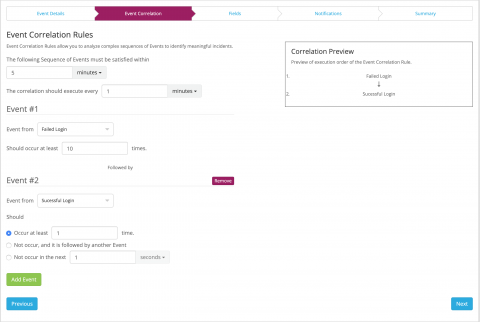
Scenario You are running a large production environment with many Windows servers. There are multiple forests in the network and some forests have multiple domain controllers. Your Windows server security is paramount – you want to track and audit suspicious activities and view detailed Windows reports extracted from the Windows servers event logs.

How to collect, standardize, and centralize Golang logs

Organizations that depend on distributed systems often write their applications in Go to take advantage of concurrency features like channels and goroutines (e.g., Heroku, Basecamp, Cockroach Labs, and Datadog). If you are responsible for building or supporting Go applications, a well-considered logging strategy can help you understand user behavior, localize errors, and monitor the performance of your applications.