Operations | Monitoring | ITSM | DevOps | Cloud


The latest News and Information on Service Center Operations Manager and related technologies.
NiCE Digital Experience Monitoring Tutorial 2020Q4
Get the full picture with SquaredUp's ServiceNow Tile (Part 1)
ServiceNow is one of the most widely deployed ITSM tools within enterprise IT environments, and for good reason – they provide a highly customisable platform that allows organisations build the tools they need to their exact requirements. But you’ve got more than ServiceNow to manage and monitor – there’s SCOM, Splunk, and Solarwinds monitoring your infrastructure, also your APM and CI/CD tools too.
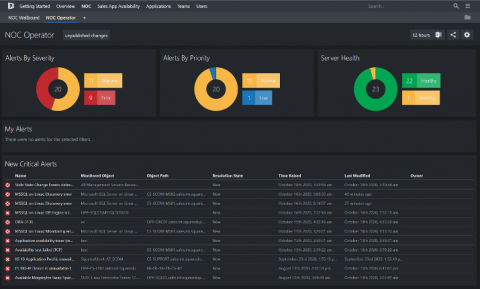
Get detail AND insight from your metrics
We who use SCOM know about its extensive monitoring capabilities, but the static nature of the SCOM console is not one of its strong points. You can’t drill down to see the data, or correlate data with other data types or alerts for the same object. To the delight of our customers, SquaredUp allows you to do all that and much more – so that you can get all the detail and insight you need, from the metrics you are already collecting.
NiCE DB2 Management Pack 4.41 for SCOM released
The NiCE DB2 Management Pack enables advanced health and performance diagnostics for DB2 databases using the Microsoft System Center console. Leverage your existing investment, reduce costs, save time, and build efficiencies that will last beyond your expectations.
Free NetLogon Secure Channel Compliance MP
Why is it important to reduce the size of my SCOM Data Warehouse?
A company’s data warehouse is usually the largest database a company uses when dealing with SCOM data, this means it is often the most expensive to manage and maintain. They can also be a drain on your infrastructure, taking a long time to backup, slowing down reporting, consuming more hardware space and can be very time consuming to recover, if they go down.
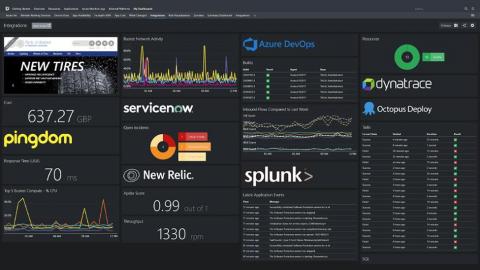
Reduce monitoring silos with SquaredUp WebAPI and SQL tiles
SCOM is a great solution to monitor your infrastructure. Everything you need for in-depth monitoring is provided out-of-box or with a dedicated management pack. If your organization is genuinely invested with SCOM, you probably also know that you can get in-depth monitoring with SCOM’s Application Performance Monitoring (APM) functionality, and collect events across your servers with SCOM’s Audit Collection Services (ACS).
Elevate your Oracle Monitoring and Service Management now and get 20% off!
Get above and beyond Oracle monitoring on SCOM by creating actionable ServiceNow incidents from your SCOM alerts with real-time, two-way synchronization. Cookdown and NiCE have joined forces to help you leverage your SCOM and Oracle monitoring investment while increasing your IT Service Management quality, in the best possible way.
Tuning to save resources
Typically when tuning SCOM we talk about saving time and reducing alert noise, but today I’m going to make a quick post on saving database space through tuning. If you’d like to get an idea of what your current database usage is, take a look at this tool from scom2k7.com. This will give you a breakdown of where space is used in the SCOM Data Warehouse.