Operations | Monitoring | ITSM | DevOps | Cloud

Guidelines for picking where to send monitoring alerts

If you've ever had to be on the receiving end of a monitoring system that uses email for alerts, you know how noisy things can get. Particularly if you're working in an agency or freelance-like environment, with dozens of client sites to maintain. You get so many emails that you start looking into integrations with third-party services like Zapier, and coming up with more and more complex rules to try reduce the noise.

What if You Could Autonomously Monitor Across Your Databases?

When DevOps teams talk about monitoring a database, the primary motivation is to ensure that the database won’t suffer a performance hiccup. Long queries, timeouts and table scans are among the most popular causes behind lousy customer experience. However, in recent years, more data has been shifted to cloud databases.

How to get mobile push notifications from any service

Love 'em or hate 'em, mobile push notifications can be very useful. They are not as intrusive as a phone call and have better information formats and control than text messages. Which is why it can be very frustrating to not get push notifications for your favorite product because it doesn't have a mobile app. In this post, we will see how to get mobile push notifications from any service, even if they don't have a mobile app.

How to get mobile push notifications from Spike.sh

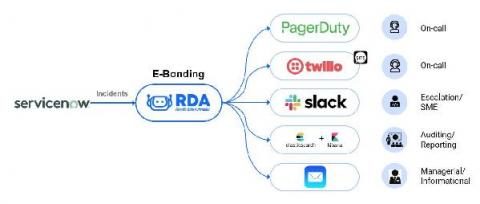
When an issue happens in your software in production, the channel to send the alert on depends on multiple factors. If it's a critical issue requiring immediate attention, you should alert the team member via phone call. But not all issues require a phone call, and in fact it may become annoying if your phone keeps ringing for minor issues. This is where other channels like SMS, Slack and mobile push notifications come in.