

|
By Kaushik
Today, we are introducing Spike’s new logo, a new website, and honestly, a new identity from the ground up. This is very exciting day for all of us at Spike. More companies are being built today than at any other point in history. Small teams are making big products. And no matter the size of the team, every single one of them needs reliability. Reliability should not be a second-class citizen for any company, no matter where they are in their journey.

|
By Sreekar
Two weeks ago, we asked ourselves a simple question: How can we improve the reading experience of Spike’s blog? There are about two hundred articles on the blog, covering alerting, on-call, incident response, and more. Kaushik and I discussed each of these topics thoroughly before turning them into articles. But when someone landed on the blog, they couldn’t easily discover these articles. It was mostly one long scroll, and though we had some categories, they weren’t organized well.

|
By Damanpreet
You probably spend most of your day next to an AI now. Code reviews, debugging, writing, it all happens in Claude Code, Cursor, or a chat window. But when an incident fires, you still have to leave. Open Spike, read the payload, copy the important bits over, explain the background, and only then start fixing. That gap is gone. Spike now has an MCP server. Your AI can fetch incident payloads, dig into root causes, acknowledge and resolve incidents, and set up on-call schedules and escalation policies.

|
By Damanpreet
We are launching a new version of our Slack app for Spike. New architecture, a proper incident workflow you can run end to end without leaving Slack, and our first real go at bringing AI into the mix. We didn’t get here in a straight line though. This is the story of why we rebuilt our Slack app from the ground up, how we did it, and what we ran into along the way.

|
By Kaushik
Today I’m really excited to share the new look of our blog. Spike has had this blog for a while. Early on, it was just me and I wrote about the decisions I was making as we built Spike. Then we slowly started growing and wrote about incidents, response, escalations, on-calls and even many guides. It’s safe to say now that we are doubling down on this space! With the new design, we have intentionally kept it minimal and put the content first.

|
By Kaushik
Last Christmas, after everyone had gone quiet for the holidays, I sat down with a pen and some paper and started drawing Spike. Not the Spike we actually had, but the Spike I wanted, the one I had been carrying around in my head for a long time without ever really putting it down anywhere. A little while later I brought a few of those screens into Figma and showed them to the team over coffee one afternoon.

|
By Sreekar
Reducing alert noise involves drawing a line between incidents that need an immediate response and ones that do not. Get this distinction wrong and your team is either interrupted unnecessarily or misses something critical. In this guide, we’ll help you make that distinction clear. We’ll cover what counts as noise and how to reduce it without missing what matters.

|
By Sreekar
Alert fatigue doesn’t announce itself. It builds quietly over weeks and months until one day a critical incident triggers and nobody responds with the urgency it deserves. By that point, the damage is already done. This guide walks through what alert fatigue actually is, how it happens, and what you can do about it.

|
By Sreekar
When you launch a new service in production, you’re working with a lot of unknowns. You don’t yet know how it behaves under real traffic or which incidents are worth waking someone up for. That makes alerting for a new service a little different from what you’re used to with an established one. The goal in the early days isn’t to get everything perfectly configured. It’s to learn enough about the service to get your alerting right.
|
By Sreekar
Not every incident alert needs the same kind of response. One incident may need to wake someone up right away. Another may simply need to be picked up when the team starts work in the morning. Without a clear way to tell them apart, every incident feels equally urgent. That usually adds noise and makes incident response decisions harder than they need to be. This is where two questions help: In this guide, we’ll discuss what those questions mean and the four combinations that follow.

Connect Spike to Claude, Cursor, or any MCP-compatible tool and manage incidents through natural language. Ask your AI what's critical. Tell it to acknowledge an outage. Have it build an on-call schedule. Spike is now wherever you work.

The new Spike app for Slack brings incident response into the channel your team already works in. This walkthrough covers the @Spike AI assistant, the redesigned incident alert template, Statuspage syncing, and on-call overrides. To get started, head to Slack settings inside Spike and reconnect the app. Chapters Statuspage syncing is available on all plans. Spike is an incident response and on-call management platform. Alert routing, escalation policies, on-call schedules, and incident management, built for engineering teams.

The new Spike app for Slack brings incident response into the channel your team already works in. This walkthrough covers the @Spike AI assistant, the redesigned incident alert template, Statuspage syncing, and on-call overrides. To get started, head to Slack settings inside Spike and reconnect the app. Chapters Statuspage syncing is available on all plans. Spike is an incident response and on-call management platform. Alert routing, escalation policies, on-call schedules, and incident management, built for engineering teams.

Spike has a brand-new UI, and this is the full walkthrough. Kaushik takes you through the redesigned dashboard, incidents, on-call, and escalations, along with the dozens of quality-of-life and under-the-hood improvements that come with it.

Live Call Routing is a direct line that connects incoming calls to on-call engineers. It captures human-reported incidents that monitoring tools might miss—closing the loop between automated alerts and real-world observations so nothing falls through the cracks. It helps you respond to critical incidents faster by eliminating manual call routing, reducing response times from minutes to seconds.

Spike.sh is a modern incident response platform that brings every alert into one place—phone calls, SMS, Slack, Teams, WhatsApp, Telegram, and more. It auto-generates clear incident titles, detects severity in real time, and logs every action so your team can move from alert to resolution faster. In this video, you’ll see how to.

Discover how the Spike Raycast Extension brings critical incident management and on-call functionalities to your Mac. With this productivity shortcut, you can stay on top of incidents, check details, and take actions — all without leaving your workflow. In this video, you’ll learn how to: Designed for fast and efficient workflows, the Spike Raycast Extension ensures all the essential Spike features are right at your fingertips.
|
By Spike
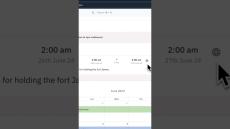
Today, we are bringing enhancements to on-call overrides. For many remote teams using Spike, we are addressing the need to manage overrides across multiple time zones. This new design makes it easy to see override times in the local time of the person taking over. It adds clarity and helps you be mindful about on-call times. We also focus on clearly showing who is taking over on-call duties, enhancing overall management and coordination.

|
By Spike
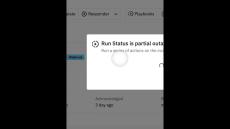
"🚀 Automate Your Status Pages with Playbooks! 🚀 In this video, we're diving deep into the world of incident response automation. Join us as we explore how you can streamline your status page updates with Spike's powerful Playbooks feature. Learn step-by-step how to create and configure Playbooks to automate your status page notifications, ensuring your stakeholders are always kept in the loop during incidents. With a live demo and practical insights, you'll discover how easy it is to set up automated responses tailored to your organization's needs.
|
By Spike
Discover how simple it is to set up automated responses, saving you valuable time during critical incidents. Say goodbye to manual updates and hello to effortless automation!
- September 2026 (1)
- August 2026 (1)
- July 2026 (6)
- June 2026 (2)
- May 2026 (3)
- April 2026 (2)
- March 2026 (10)
- February 2026 (12)
- January 2026 (6)
- December 2025 (3)
- November 2025 (14)
- October 2025 (6)
- September 2025 (2)
- August 2025 (5)
- July 2025 (6)
- June 2025 (4)
- May 2025 (1)
- April 2025 (5)
- March 2025 (3)
- January 2025 (1)
- December 2024 (7)
- November 2024 (2)
- June 2024 (1)
- April 2024 (4)
- February 2024 (5)
- January 2024 (2)
- December 2023 (1)
- November 2023 (1)
- October 2023 (3)
- September 2023 (3)
- May 2023 (2)
- April 2023 (1)
- January 2023 (1)
- September 2022 (3)
- July 2022 (1)
- March 2022 (1)
- December 2021 (1)
- November 2021 (1)
- September 2021 (1)
- August 2021 (2)
- April 2021 (11)
- March 2021 (6)
- February 2021 (2)
With unlimited alerts and integrations, Spike helps you bring clarity in incidents and decrease resolve time with complete transparency.
Gain customer confidence with every incident. We alert you of your incidents before your customers do. Stop losing customer faith in IT outage. Spike helps you bring clarity in incidents and decrease resolve time with complete transparency. Spike aims make it simple by un-complicating the platform with our enhanced features. Real-time platform health, easy escalation policies, suppressing repeat incidents, activity logs and more.
Features you will actually use:
- Group repeat incidents: Incidents which are repeated are automatically grouped together telling you how many times it has occurred along with it's first occurrence and last occurrence.
- Mute incidents: Mute an incident for a period of time, we will not send any alerts but still create an incident and group them too.
- Auto resolve incidents: Our integrations make sure that incidents are resolved automatically on Spike when they are fixed on your monitoring tool.
- Unlimited services: Come full circle by adding incident tracking to all your services. Scope your incidents, reports and health of each service.
- Affected services: Monitor the services which are affected the most by open incidents. Prioritise and resolve to increase customer satisfaction.
- Simple escalation policies: Alert one or more persons at the same time. Alert via phone preferred channel to every team member with time intervals.
- Unlimited alerts: We provide you unlimited alerts across all the supported channels. No more predicting your monthly billing cycle.
We alert you of your incidents via Phone call, SMS, Slack and Email before your customers do.