Operations | Monitoring | ITSM | DevOps | Cloud

Sponsored Post

5 Tips to Improve Employee Digital Experiences

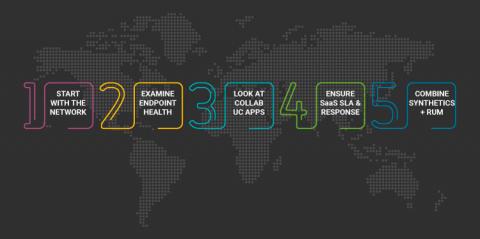
Companies' reliance on technology grows daily. However, with Information Technology (IT), infrastructure complexities on the rise, overall system performance fluctuates. Any network, app, or service delay hinders individual and corporate performance. Identifying the source of these digital pain points resembles searching for a needle in a haystack. What follows are a handful of tips, so you sift through the hay faster, reduce outages, and improve employee digital experiences.

Troubleshooting Microsoft Teams

Issues with Microsoft Teams can be very impactful for organizations. There is a huge loss in productivity associated with teams performance issues and outages, it is also extremely disruptive to workflows. There are also financial costs to these issues, at the end-user level this can cause end users to miss deadlines and delay projects and the cost of IT Teams spending time troubleshooting or requiring external consultants or even Microsoft to assist, this cost adds up over periods of time.

The Experience Watchtower: Top 22 Digital Experience Monitoring Tools

In today's digital landscape, where user experience can make or break the success of a business, organizations are increasingly prioritizing the monitoring and optimization of their digital experiences. Enter the world of digital experience monitoring (DEM) tools, which serve as vigilant guardians, ensuring that every user interaction is seamless, satisfying, and impactful.

What's Missing in Free User Experience Monitoring Tools?

You get what you pay for is a common axiom, one that even applies to infrastructure management solutions. Cloud vendors bundle Digital Experience Management (DEM) solutions with their services, seemingly at no extra charge. But such products lack the capabilities needed to understand how enterprise computing resources function. As a result, corporations do not make needed adjustments and lose time, revenue and increase user frustration.

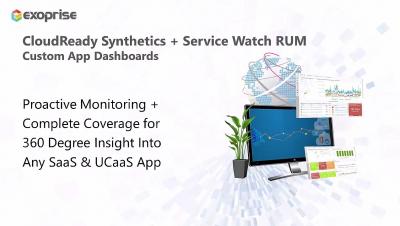
Synthetics and Service Watch Dashboards

Combining Service Watch and CloudReady synthetics is easy to do and extremely powerful. Quickly pinpoint where the issues are occurring and skip the troubleshooting where the issues aren't which will speed up their resolution time, saving your organization money and time. Combining this information will also provide your app owners a quick and thorough view into how the user experience is going and how the application is performing in general. When issues do occur, they’ll have all the information available making it easy to prove the vendor is at fault and recover SLA credits
Sponsored Post

Build the ROI Case for Improving Employee Digital Experience

Budgeting for user experience management solutions has been dynamic recently. When the pandemic hit, corporations freely opened the purse strings to ensure that employees had the tools to work outside the traditional office. The Return on Investment (ROI) for improving the overall Digital Employee Experience (DEX) didn't matter so much. With inflation now the main topic in executive meetings, the strings for DEM/DEX investments have been drawn tighter. Gartner has published a report titled "Market Guide for Digital Experience Monitoring" which states that "enterprises that invest in DEM solutions can expect a 30% reduction in Mean Time to Resolution (MTTR) and a 20% reduction in downtime."

4 Differences Between DEM & RUM You Should Know

If you want to deliver an outstanding user experience you must know the differences between DEM and RUM. In this modern world, businesses are embracing digitization to provide better services to their customers. However, customer expectations and preferences have changed drastically over time. To address customer demands, businesses have started investing in systems and applications that enhance the user experience.

Device Groups in Dashboards

Utilizing device groups inside of dashboards is extremely powerful and will allow you to present all the information collected by Service Watch for whatever you are trying to accomplish. Whether you are looking to benchmark the devices of your remote workforce or figure out which office is performing better or worse after changes, you’ll find it extremely easy to visualize this information.

Introduction to Device Groups

Device Groups help prioritize what needs to be done to improve user experience. Customers use them to group by department, line of business, geography, VIP users, and any way they want. With device groupings, it’s easy to understand who has the worst digital experience and why - in real time. Combined with built-in groupings - by network connection, type of device, even by ISP - you'll have fewer issues to deal with, and when issues pop up, you'll fix them faster.
Sponsored Post

Building vs. buying a digital experience monitoring tool

It's usually possible, and often tempting, to build your own tools. For engineers in particular, there's a strong appeal to having total control over a custom-built product that will perfectly meet your specific requirements. Raygun itself originally came from an internal tool we built to monitor errors in a different product. But as our business matured and we started to think more strategically, we recognized the hidden, lingering costs to our DIY approach, and began to believe that internal tools were a misuse of the time and skills of our development team.