The latest News and Information on IT Networks and related technologies.
One of the positive things that came out of events in 2020 was that many of us started working from home. At first, it was kind of weird. But once we realized that what we needed was available online, it became easier. All we had to do was figure out a few new apps, like Slack, Asana and Google Docs. Then, after a couple of weeks of working from home, many of us started having thoughts like, “I wonder if I could wear shorts and my favorite slippers?
The capacity to scale and process high data traffic by monitoring appliances is a critical requirement for organizations aiming to enhance or improve their security and protection from external threats. Excessive incoming traffic demands high-monitoring capabilities as it overwhelms the monitoring tools and places computational bounds that increase exponentially.
In this article, we will explore why it is imperative to constantly monitor network security metrics, what Aruba Clearpass is, and how it helps us manage network security. Then we will look at what Graphite and Grafana are and how to analyze metrics with their help. Finally, we will learn how MetricFire can make it easier for us to work with Graphite and Grafana.
This blog post is part of our data centre networking series: In the previous blogs, we covered the architecture and main drivers behind software-defined networking. In this one, we discuss the impact of softwarisation on the other important data centre building blocks, culminating in software-defined data centres (SDDC).
NGINX is a popular web server featuring a wide range of capabilities, including reverse proxy, mail proxy, HTTP cache, and load balancing. It offers TLS offloading and a health check of the backends and supports gRPC, WebSocket, and HTTP/2. In short, NGINX is a one-stop solution for most of your web server needs. When using NGINX, monitoring its metrics is crucial for tackling issues.
Network monitoring tools gather and analyze network data to provide network administrators with information related to the status of network appliances, link saturation, the most active devices, the structure of network traffic or the sources of network problems and traffic anomalies.
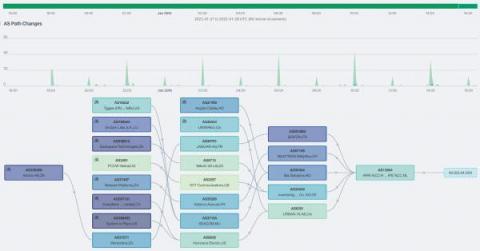
It is crucial for network admins to fully understand their network topology. Even basic troubleshooting can be needlessly complicated without a network topology diagram which is vital for building and maintaining a network. A network topology diagram shows how the various components work together; it shows the devices, connections and pathways of a network visually so you can figure out how devices interact and communicate with one another.