Mailchimp
Not subscribed to OpsMatters Newsletter


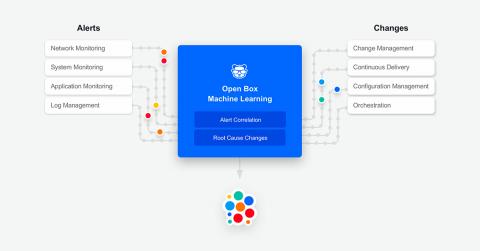
TL;DR: Fast-moving IT stacks see frequent, long and painful outages. Thousands of changes – planned, unplanned and shadow changes – are one of the main reasons behind this. Until now, IT Ops, NOC & DevOps teams didn’t have an easy way to get a real-time answer to the “What Changed?” question – the answer that can help reduce the duration of outages and incidents in these fast-moving IT stacks. Now, with BigPanda Root Cause Changes, they do.
If you have anything to do with the world of cloud computing or even programming for that matter, then I’m sure you’ve heard of different terms being tossed around such as “serverless computing” or “containers,” and even “monolithic architectures.” A lot of people who understand such computing methods can have a bad habit of using these terms without leaving any explanation as to what they are.
First time this year, multi-cloud enterprises, as a customer segment of Sumo Logic, have grown faster than any other segment: 50% Y/Y. What took so long? In my conversations with enterprises over the last 5 years, there was only one strategy for public cloud and it was multi-cloud. But evidence of multi-cloud usage was sparse at best. Data from our Continuous Intelligence Report in previous years didn’t find much to support that the strategy for multi-cloud was being implemented.
A Syslog server allows for the collection of logs into a centralized log repository. This centralized log repository allows for quick searching of your logs across your organization through different visualization tools. The Syslog web interface will provide the easiest access to the logs, and allows for easy secured remote access.
Whether you’re slinging code, managing developers, wrangling servers, or filling most other roles in the modern tech firm, you care about keeping your software running while bringing home the bacon. If your website or application is down, you’re not making money. (Or, if you aren’t in this for profit, your message isn’t getting to the people who need it.) Therefore, it’s everyone’s job to keep things running smoothly.
Amazon MQ is a managed ActiveMQ messaging service hosted on the AWS cloud. Amazon MQ’s brokers route messages between the nodes in a distributed application. Each broker is a managed AWS instance, so your messaging infrastructure doesn’t require the maintenance and upfront costs of a self-hosted solution.
In Part 1 of this series, we saw how Amazon MQ routes messages between services in a distributed application, and we looked at some of the key metrics that describe the performance of the message broker and its destinations. Now that we’ve introduced the metrics and their meaning, we’ll look at some tools you can use to collect and query metrics from Amazon MQ:
In Part 2 of this series, we showed you how to use CloudWatch to monitor metrics and logs from Amazon MQ. With CloudWatch, you can easily create ad-hoc graphs to visualize the performance of your messaging infrastructure and other AWS services you use (such as EC2, Lambda, and S3). But to monitor your Amazon MQ brokers, destinations, and clients alongside the rest of your applications and infrastructure, you need a monitoring platform that easily integrates with your whole technology stack.
To centralize logging from your entire stack—from traditional infrastructure to serverless components—Datadog is announcing native support for the launch of FireLens for Amazon ECS. FireLens streamlines logging by enabling you to configure a log collection and forwarding tool such as Fluent Bit directly in your Fargate tasks. We’ve partnered with AWS to provide built-in Fluent Bit support for Datadog so that you can now seamlessly route container logs from AWS Fargate.