Operations | Monitoring | ITSM | DevOps | Cloud

Monitoring Java using JMX and custom metrics

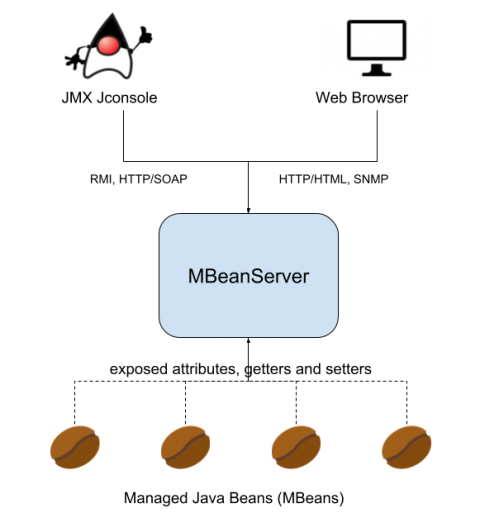
JMX (Java Management Extensions) is a set of specifications conceived to monitor and manage Java applications. To implement the JMX technology, you need to create and register MBeans (Managed Beans) as part of your Java code. Using JMX technology and tools, Java application developers can get the dynamic state of the application and use it for performance tuning, troubleshooting and debugging.

Monitoring Java applications: Memory usage, threads and other JRE metrics

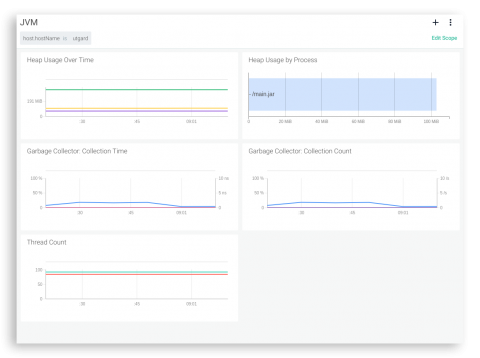
In this post we will cover how to monitor the Java Runtime Environment (JRE). You will learn how to assess the performance of your Java application by profiling its memory usage, the garbage collector metrics, monitoring Java daemon and user threads and other fundamental JRE metrics. We will finish with a real Java JRE troubleshooting example using opensource Sysdig and Docker.

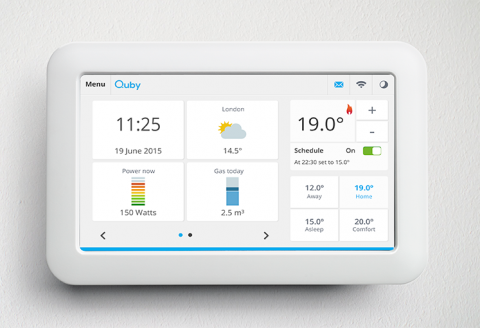
Monitoring and securing Java apps at Quby.

Moving to a Docker-based cloud for Java apps orchestrated by Mesos Marathon required a different approach to monitoring and security for Quby, the Amsterdam-based developer of smart home solutions and maker of smart thermostat and service platform ‘Toon.’ That’s when they found Sysdig. The Sysdig Cloud-Native Intelligence Platform helps Quby resolve issues faster, and reduces monitoring system administration effort by 400%.

Troubleshooting Java Application Deadlocks - Diagnosing 'Application Hang' Situations

It is 2 am in the morning and you get woken up by a phone call from the helpdesk team. The helpdesk is receiving a flood of calls from application users. A business-critical partner application, powered by Java, is reported to be slow and sluggish. Users are complaining that the browser keeps spinning and eventually all they see is a ‘white page’.

6 Java debugging tools for 2018 and beyond

In an ideal world, bugs would never reach production. But, software errors are an inevitable part of a developer’s life. Java debugging tools exist to help us resolve errors faster, so we can get on with doing what we do best. This list of Java debugging tools will help you evaluate your options quickly so you can find the best for the job.

Raygun and Java: Better error monitoring with Breadcrumbs and more

Raygun Crash Reporting has supported the Java Framework since we launched. As a Java customer, you’ve always been able to catch errors pre and post-production, receive alerts, and provide one source of truth for errors on your whole team. Now, Raygun provides full feature support for Raygun4Java. Java customers now have access to all our favorite Raygun features, like Breadcrumbs, offline support, web service support, and sensitive data filtering.

How to Get Java Code-Level Visibility

The toughest IT performance problems to solve today are the ones where a user complains that their application access is slow. An IT administrator must then figure out the cause of the problem: is it the browser, the network, the server, the storage, the cloud infrastructure on which the application is hosted, or the application code?

Garbage Collection Settings for Elasticsearch Master Nodes

Elasticsearch comes with good out-of-the-box Garbage Collection settings. So good in fact that the Definitive Guide recommends not changing them. While we agree that most use-cases wouldn’t benefit from GC tuning, especially when it turns out there simply isn’t enough heap, there are exceptions. We found that G1 GC, for example, works well on big heaps. This allows you to have less, bigger nodes, which in turn means less network traffic in a large cluster.

Top 10 Java Performance Problems and How to Solve Them

Java is one of the most popular technologies for application development. Tens of thousands of enterprise applications are powered by Java and millions of people use them daily. Java has been evolving over many decades and there are so many web frameworks, middleware, data access technologies and protocols built on Java.