Operations | Monitoring | ITSM | DevOps | Cloud

Enterprise AI ROI: proving returns at scale

Enterprise AI ROI is the return on AI investment measured across a portfolio: dozens of initiatives, multiple business units, shared platforms, and one board asking for the total. It fails differently than single-project ROI, usually because baselines and unit costs were never established, and it's proven with per-initiative denominators rolled into portfolio-level reporting.
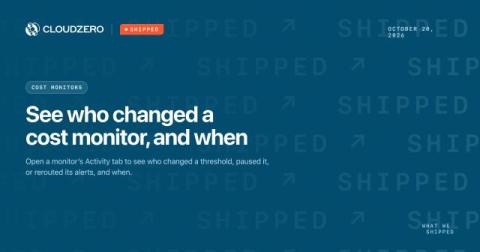

Shipped: See who changed a cost monitor, and when

A cost monitor is only useful if people trust its settings. When a threshold moves or a monitor goes quiet, the team needs to know who made the change and when. Every monitor in CloudZero keeps that record. You can check it yourself in a few seconds, confirm a change was intended, and put a setting back if it wasn’t.

ChatGPT Enterprise pricing in 2026: seat costs, minimums, and the new token rate card

ChatGPT Enterprise has no public list price. Reported 2026 contracts average about $60 per user per month within a $45 to $75 range, with 150-seat minimums and annual prepayment, putting the floor near $108,000 a year. Newer eligible agreements add usage-based billing under OpenAI's published token rate card.

Cloud Monitoring and Incident Response: A Guide to AWS, Azure, and Google Cloud

Effective cloud monitoring and incident response starts with understanding service health, collecting useful diagnostic data, and establishing a clear process for investigating and resolving problems. Whether you use AWS, Azure, Google Cloud, or several providers, the goal is to understand how your systems are performing and take action when reliability is at risk. A dashboard showing healthy virtual machines does not necessarily mean customers can complete a transaction.

Feature Spotlight: Session-based Replay #trafficanalysis #api #developertools #techtutorial

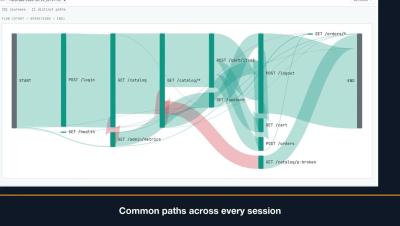
This video provides an overview of using Sessions to group traffic by actor credentials, track individual user journeys chronologically, and analyze request flows. It also covers how to check replay readiness for JWT sessions, replay recorded user journeys at their original pace, verify pass/fail counts, and save or sample specific sessions for easy sharing. Learn more: speedscale.com.

Feature Spotlight: Import & Export to Load Testing Tools #api #postman #openapi #loadtesting #devops

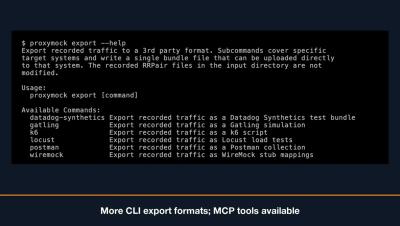
Proxymock allows you to import existing Postman collections, browser HAR files, and OpenAPI specifications to instantly create test requests and mock responses. You can also pull traffic directly from cloud storage buckets, or export your requests into load testing scripts for tools like K6, Gatling, and Locust. Coding agents can even manage these imports and exports using integrated MCP tools. Learn more: speedscale.com.

Feature Spotlight: Testing GraphQL #graphql #apitesting #developertools #techtutorial #devops

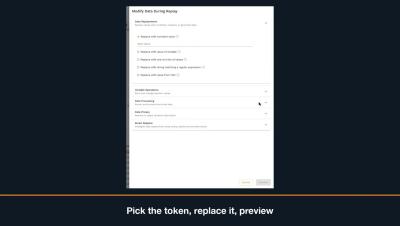
Learn how to resolve failed GraphQL session queries by updating expired tokens before replaying your snapshot. This video demonstrates how to find the GraphQL operation, edit variable values by path, and successfully pass replay checks. Learn more: speedscale.com.

Feature Spotlight: Automatic Testing with Proxymock MCP Skills #aiagents #mcpserver #softwaretesting

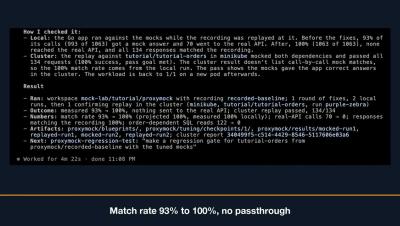
Learn how to integrate your AI coding agent with Speedscale using the MCP server to record, replay, tune mocks, and analyze reports directly within your workspace. Streamline your testing workflow by letting your agent automatically capture traffic, resolve failing responses, and optimize match rates. Learn more: speedscale.com.

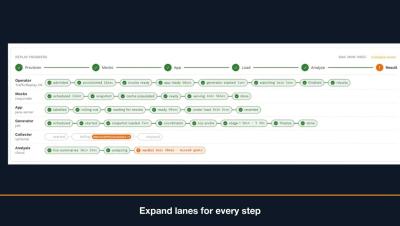
Feature Spotlight: Replay Progress Tracking #kubernetes #mocktest #devops #appperformance

Learn how to track cluster performance in real time using the replay progress panel, which highlights key phases including provision, mock, app, load, analyze, and result. You will also discover how to easily troubleshoot failed runs by expanding component lanes to review specific step reasons and cluster events. Learn more: speedscale.com.