Operations | Monitoring | ITSM | DevOps | Cloud

With M1 Mac Minis, The Future is Bright for Mobile Device Testing

WebPageTest tries to use real browsers and devices for testing whenever possible, but doing that at scale has some serious challenges, particularly when it comes to testing mobile browsers. There are a lot of different moving pieces, from the device itself to everything that needs to be in place for traffic shaping. The phones themselves pose significant reliability challenges.

5G and the Journey to the Edge

Recently, AT&T Cybersecuritypublished important findings in the tenth edition of their Insights report entitled, “ 5G and the Journey to the Edge.” Ivanti was thrilled to contribute to the report, which outlines the most pressing security concerns organizations face in a world embracing the revolutionary transformation to 5G and edge technology.

Manage IT on the go with our incredibly effective mobile apps!

Even an insignificant network issue can wreck havoc on your IT infrastructure when left unmanaged. This makes it vital that your IT team is alerted instantly whenever an issue arises, so they can troubleshoot it quickly, and ensure network stability. However, IT teams aren’t sitting at their desks waiting for problems to happen. It’s not uncommon for IT staff to be away from their workstations addressing network issues such as a router failure or a faulty LAN cable.

How to debug Android Chrome from Windows, Linux, or Mac

Testing and debugging websites and web apps on mobile devices can be challenging. Browsers on phones and tablets often don’t have built-in debuggers, and emulating mobile devices is never as accurate as you’d like. To debug mobile websites on Android, the desktop version of Chrome provides a solution with remote debugging. This article will show you how to use remote debugging with Chrome from your computer. You can use one of the common desktop operating systems like Windows, macOS, or Linux.

Top 10 ways to make your Mattermost end users happier

If you’re running Mattermost self-managed editions, there are configuration options and features available to improve the Mattermost user experience. Here are our top ten recommendations to make your Mattermost end users happier and more productive. Your users will thank you! Mattermost gets massively better with every release, and upgrading only takes a few minutes.

Remote troubleshooting made easy with Mobile Device Manager Plus

System administrators play a vital role in every organization’s IT department, and one of the key responsibilities they have is to troubleshoot employees’ devices in case of device issue or malfunction to prevent loss of productivity. With employees working from remote locations, especially now during the pandemic, troubleshooting can be challenging without the device being physically present.

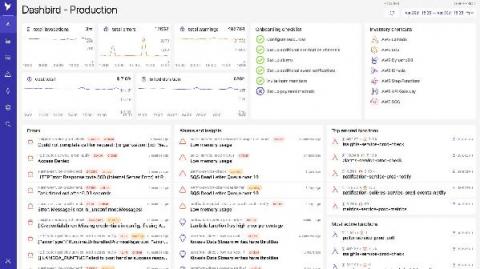
Dashbird app got a facelift!

Today, we launched a new and improved version of Dashbird’s main screen – a single pane of glass, designed to give you an overview of the most important events and metrics across your serverless environment. During the past year, we have invested heavily into building the next stages of our platform, expanding our offering to include services like API Gateway, SQS, DynamoDB, Step-Functions, ECS, and Kinesis, with many more coming in the next months.