

Operations | Monitoring | ITSM | DevOps | Cloud

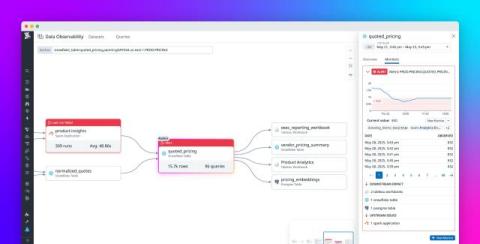
Ensure trust across the entire data life cycle with Datadog Data Observability

As data systems grow more complex and data becomes even more business-critical, teams struggle to detect and resolve issues that impact data quality, reliability, and, ultimately, trust. Engineers have to rely on manual checks and ad hoc SQL queries to catch data quality issues—often after teams relying on the data have noticed something has gone wrong.

Improve performance and reliability with Proactive App Recommendations

As your organization grows, you may operate in increasingly complex environments and manage more services and larger teams to maintain them. Evolution like this can lead to an explosion of telemetry data from across your stack, including metrics, traces, logs, and frontend interactions. The benefit of greater visibility is often outweighed by the challenge of acting on the data you collect, and you can easily fall behind on implementing the fixes your services require to operate reliably and efficiently.

Automatically identify issues and generate fixes with Bits AI Dev

Developers lose hours each week to a familiar troubleshooting loop: chase down telemetry across dashboards, decipher vague errors, and juggle alerts to find the signal worth fixing. Production issues, performance regressions, and security vulnerabilities all demand attention, but they often come with little context for taking action.

CI/CD Observability with OpenTelemetry - A Step by Step Guide

In the fast-paced world of CI/CD, understanding the performance and behaviour of your pipelines is crucial. GitHub Actions has become a popular choice for automating builds and deployments, but anyone who's debugged a flaky workflow or long-running job knows how challenging it can be to get visibility into what's happening under the hood. We usually rely on build logs, timing data, or guesswork when something goes wrong.

Built for Impact: What Happens When LogicMonitor Edwin AI Meets Infosys AIOps Insights

Today’s IT environments span legacy infrastructure, multiple cloud platforms, and edge systems—each producing fragmented data, inconsistent signals, and hidden points of failure. This scale brings opportunity, but also operational strain: fragmented visibility, overwhelming alert noise, and slower time to resolution. With good reason, public and private sector organizations alike are moving beyond basic visibility, demanding hybrid observability that’s context-aware and action-oriented.

Moving from Relational to Time Series Databases

I’ve been building apps with SQL Server for years. Everything worked well until I started dealing with sensor data, stock trade volume, and IoT telemetry. As the volume of time-stamped records grew into the millions, I saw relational databases struggling with workloads they weren’t designed for. That’s when I explored time series databases. The performance improvements were significant, but what surprised me was the mental shift required.

Datadog MCP Server: Connect your AI agents to Datadog tools and context

As development teams adopt AI-powered tools and build services that make use of AI agents, they want to extend their AI capabilities to incorporate familiar tools and observability data. However, AI agents struggle with regular API endpoints and frequently fail when parsing complex nested JSON hierarchies or incorrectly handling errors. As a result, these agents often fail to retrieve relevant results.

Optimize and troubleshoot AI infrastructure with Datadog GPU Monitoring

As organizations bring more AI and LLM workloads into production, the underlying GPU infrastructure that supports these workloads becomes even more critical in ensuring these workloads remain fast, reliable, and scalable. Inefficient GPU resource usage, for instance, can lead to longer runtimes and reduced throughput, negatively impacting overall model performance. Additionally, idle and underutilized GPUs can quickly drive up costs and lead to needless spending.

How to Monitor Kafka Producer Metrics

Your Kafka producer pushed a million messages yesterday. Nice. But can you tell if they all made it? Or why did latency spike at 2 PM? Producer metrics help you determine that. They expose how long messages take to send, whether messages are getting stuck, and whether retries are piling up. Let’s go over which ones help while debugging and how to monitor them.