Operations | Monitoring | ITSM | DevOps | Cloud

How to keep Ingress NGINX Controller metric volumes manageable and still meaningful

The Ingress NGINX Controller is a widely used Kubernetes component for managing HTTP and HTTPS traffic routing. While it provides powerful observability through Prometheus metrics, it’s also notorious for generating an excessively high number of time series. The root cause lies in how the controller labels its metrics—tracking requests across multiple dimensions such as ingress name, host, path, status code, and upstream response times.

Grafana Campfire - Data Visualization Tips and Best Practices (Grafana Community Call- April 2025)

Creating dashboards in Grafana gives you some very good built-in features to manipulate your data by using transformations, variables, filtering, overriding,, annotations for your data and with addition of Community plugins (data sources, panels and apps) increases the user experience to a whole next level. Still, many users do not either know about these features or do not use it correctly and why is the reason?

Why Observability is Getting Expensive and OpenTelemetry is Becoming More Popular | Grafana Labs

Grafana Labs' Jen Villa shares the latest insights into how organizations are rethinking their observability strategies — with cost now taking center stage. This video covers: Chapters: Grafana Cloud is the easiest way to get started with Grafana dashboards, metrics, logs, and traces. Our forever-free tier includes access to 10k metrics, 50GB logs, 50GB traces and more. We also have plans for every use case.

All about OTel and Logging on Kubernetes with Loki (Loki Community Call April 2025)

In this pre-recorded Loki Community Call, we talk all about OTel and logging on Kubernetes with Cyril Tovena, Ward Bekker, Jay Clifford, and Nicole van der Hoeven at KubeCon EU 2025 in London. We discuss when why you should switch to OTel and why you shouldn't, what OTLP is exactly, and best practices for ingesting data through an OTLP endpoint.

Introducing the Causely data source plugin for Grafana

Endre Sara is a Co-Founder of Causely, where he’s building a causal reasoning platform to continuously assure service reliability and eliminate human troubleshooting. Previously, Endre was VP of Advanced Engineering at Turbonomic and a VP at Goldman Sachs. At Causely, we believe observability tools shouldn’t just collect more data—they should enable you to understand it.

How to Get Started with Grafana Infinity Data Source Plugin | Grafana Labs

In this Grafana Learning Journey supplementary video, Developer Advocate Marie Cruz shows how to start with the Grafana Infinity Data Source plugin, from installation to building a dashboard using CSV and JSON data. CHAPTERS Grafana Cloud is the easiest way to get started with Grafana dashboards, metrics, logs, and traces. Our forever-free tier includes access to 10k metrics, 50GB logs, 50GB traces and more. We also have plans for every use case.

How to get started with frontend observability: A quick Grafana Faro example

Modern cloud-native applications and web browsers are highly complex, making it challenging to gain visibility into their performance. Without an effective way to track and measure frontend performance, it becomes difficult to monitor real user experiences, detect critical issues, assess website health, and ensure optimal functionality. But what if you could see exactly what your users are experiencing in real time?

New in Adaptive Logs: user-facing temporary pauses, exemptions, and per-service recommendations

We launched Adaptive Logs last year to help you optimize your log volumes and costs in Grafana Cloud, and we’ve been hard at work ever since making improvements based on your feedback. Over the past couple of months, we’ve delivered several new features to help reduce toil, apply recommendations with precision, and—what we’re most excited about—confidently optimize your log ingestion while still providing peace of mind to your end users!

How to Connect Prometheus to Grafana in Under 2 Minutes | Tutorial | Grafana Labs

In this step-by-step tutorial, we’ll walk you through how to get Prometheus and Node Exporter running locally on an ARM64 Mac (like the M3 MacBook Pro), and how to connect it all to Grafana Cloud for beautiful dashboards and metric insights.

How a cooking platform whipped up a new observability plan with Grafana Cloud

As any good cook knows, if you want to create a top-notch dish, you have to use the best ingredients. So when the engineering team for Cookidoo — an online platform and app that features more than 80,000 guided recipes for the Thermomix, an all-in-one kitchen small appliance — realized the observability tool they were using to monitor the platform wasn’t delivering what they needed, they decided to switch to Grafana Cloud and OpenTelemetry.

Grafana Cloud updates: new testing features in Grafana Cloud k6, enhanced troubleshooting in Kubernetes Monitoring, and more

We consistently roll out helpful updates and fun features in Grafana Cloud, our fully managed observability platform powered by the open source Grafana LGTM Stack (Loki for logs, Grafana for visualization, Tempo for traces, and Mimir for metrics). In case you missed them, here’s our monthly round-up of the latest and greatest Grafana Cloud updates.

An Overview of the Grafana Infinity Data Source Plugin | Grafana Labs

Do you have data formats you want to visualize in Grafana that are not supported natively? Or maybe you want to quickly prototype a dashboard and grab data from various endpoints such as REST APIs, CSV, JSON, or GraphQL? If you answered yes, then this video is for you! In this video, Developer Advocate Marie Cruz provides an overview of the Grafana Infinity Data Source Plugin and talks about the value and benefits it can bring.

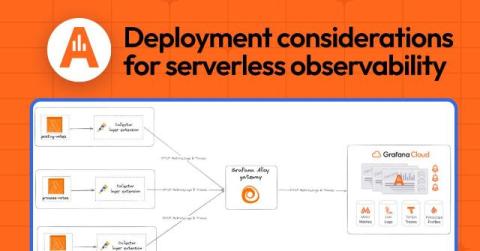
AWS Lambda, OpenTelemetry, and Grafana Cloud: a guide to serverless observability considerations

In our increasingly serverless world, observability isn’t just a “nice to have”—it’s essential. Serverless functions such as AWS Lambda bring incredible benefits, but they also introduce complexities, especially around monitoring and debugging. In a previous article, I provided a quick, practical guide for sending AWS Lambda traces to Grafana Cloud using OpenTelemetry.

Why you should embrace more incidents (seriously!)

We’re all looking for ways to improve on our incident response. We investigate various metrics and methodologies—all in the name of making sure our customers see the reliable and performant systems we’ve sought to build. In fact, all these efforts are leading us, as an industry, to finally realize the power of surprising anomalous events in our systems. They give us an opportunity to reexamine our expectations and see how our models of the sociotechnical system differs from reality.

OpenTelemetry vs. Prometheus Usage: 2025 Observability Survey Analysis | Grafana Labs

Myrle Krantz, Director of Engineering at Grafana Labs, talks about vendor lock-in, OpenTelemetry vs. Prometheus, open source adoption, and other tooling findings from Grafana Labs’ third annual Observability Survey — featuring insights from over 1,200 practitioners across the globe.

How SpotOn overhauled its observability strategy with standardized tagging and Grafana Cloud

Many engineers would agree: migrating to a new observability platform can be a serious undertaking. But it’s also the perfect opportunity to step back, revisit some of the foundational practices that drive your observability strategy — and reap some major benefits, as a result. This was the case at SpotOn, a provider of restaurant point of sales systems and business software, which recently migrated from four disparate observability tools and consolidated on Grafana Cloud.

How to use constant variables in Grafana dashboards

In this video we'll look at constant variables. Constant variables let you add a value to a dashboard that can be changed by an editor or administrator, but not edited by viewers of the dashboard. Grafana Cloud is the easiest way to get started with Grafana dashboards, metrics, logs, and traces. Our forever-free tier includes access to 10k metrics, 50GB logs, 50GB traces and more. We also have plans for every use case.

Opsgenie alternative: How to migrate to Grafana Cloud IRM

In recent years, we’ve seen many organizations migrate from legacy incident response tools to Grafana Cloud IRM — our unified incident response and on-call management application hosted on Grafana Cloud — as they look to improve reliability, reduce costs, and consolidate their tooling. To help guide those efforts, we offer several IRM migration tools that allow you to more seamlessly migrate away from those legacy solutions and start using Grafana Cloud IRM.

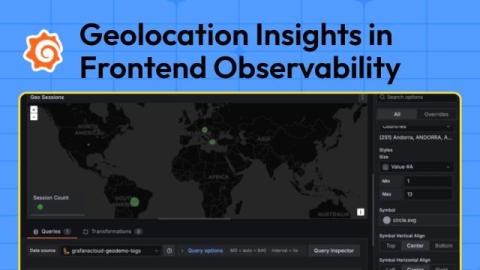
A privacy-first, data-driven approach to optimize the user experience: Introducing Geolocation Insights in Frontend Observability

Grafana Cloud Frontend Observability is a real user monitoring (RUM) solution that provides immediate, clear, and actionable insights into the end-user experience of web applications. Understanding where those end users are located can provide valuable insights into frontend performance, error patterns, and overall user experience.

Best Practices and Demo: Grafana Cloud's End-to-End IRM Solution | Grafana Labs

Grafana Cloud’s Incident Response and Management solution provides workflows that span creating alerts and SLOs, managing on-call and incident response, and learning from postmortems – all within the context of your observability stack. In this session, you’ll learn best practices for making the most of this IRM solution, including leveraging the historical incident data that’s accessible within Grafana Cloud.

How to Set Up Geolocation Insights | Grafana Cloud's Frontend Observability | Grafana Labs

Want to set up geolocation insights in Grafana Cloud's Frontend Observability? In this step-by-step tutorial, we'll show you how to configure geolocation tracking, use MaxMind's offline database for geocoding, and apply filters for precise location-based insights.

How to use custom variables in Grafana dashboards

Custom variables let you define your own options for dashboard viewers to select. They're a way to fine-tune how your dashboard behaves. In this video we'll look at how to use custom variables in your own dashboards. Grafana Cloud is the easiest way to get started with Grafana dashboards, metrics, logs, and traces. Our forever-free tier includes access to 10k metrics, 50GB logs, 50GB traces and more. We also have plans for every use case.

Executive Buy-In is Driving Observability Maturity: 2025 Observability Survey Results | Grafana Labs

In this video, CTO Tom Wilkie from Grafana Labs breaks down some of the most compelling findings from our third annual Observability Survey, based on over 1,200 industry responses. The big takeaway? Executive involvement is on the rise—and it’s accelerating adoption of advanced observability practices like distributed tracing, profiling, and SLOs. He also explores how SaaS adoption, the maturation of central observability teams, and new instrumentation methods like eBPF and Beyla are reshaping the observability landscape.

New Google Cloud Run Visualization in Grafana Cloud | Demo | How to Monitor Google Cloud Run

Perfect for troubleshooting, performance tuning, and cost optimization, this new feature helps you stay in control of your Cloud Run workloads. With this sophisticated dashboard, you can: Monitor CPU, memory, network traffic, and active requests at a glance Drill down into individual services and containers with a single click Identify resource usage spikes and optimize performance Use the Right-Sizing View to find the top resource-heavy services & containers.

Adaptive Metrics in Action: How The Trade Desk Optimized Observability Costs | Grafana Labs

Managing observability costs at scale is no easy task — especially when metrics volume grows fast. In this talk, Paul Givens, Head of Observability at The Trade Desk, shares how they implemented Adaptive Metrics to control costs without sacrificing visibility. How Adaptive Metrics works to reduce cardinality and cost Real-world implementation lessons from a high-scale AdTech environment Key takeaways for teams managing large Prometheus-like metric sets.

Kubernetes Monitoring: One view for observing all your storage volumes

If you want to observe your entire Kubernetes environment, you need visibility into all of your resources, including storage volumes. But monitoring Kubernetes storage hasn’t always been easy, especially if you wanted to see how it related to other parts of your infrastructure.