Operations | Monitoring | ITSM | DevOps | Cloud

How to Debug Code You Didn't Write (your AI did)

I was looking at a customer’s error report last week. A TypeError buried three callbacks deep in a checkout flow that made no sense. The code around it was clean, well-structured, and completely wrong about how the Stripe API actually works. Turns out it was vibe-coded. Someone prompted their way through the integration, it passed code review because it looked reasonable, and it worked fine right up until a customer’s card got declined for the first time. That’s the new normal.

Who Watches the Vibe Coder?

AI didn’t replace developers. It replaced the part where you were forced to understand what you just shipped. Now you can prompt your way to a feature, skim the diff, and merge something that “seems reasonable.” And then production does what production always does: finds the one weird browser + one slow network + one user flow that turns your “reasonable” code into a bonfire. So who watches the vibe coder?

The Hidden Architecture of Autonomy: How Skydio Drones Think, See, and Connect

Summary In today's Coredump Session, François Baldassari and Chris Coleman sit down with Ross Yeager, VP of Device Platform Software at Skydio, to explore how autonomy is reshaping modern robotics and what it takes to build drones that can truly think for themselves. Ross shares his journey from Boosted Boards to Skydio, unpacking how the company pioneered fully autonomous flight, built a vertically integrated manufacturing operation in California, and created a foundation that blends cutting-edge software and hardware.

Seer: debug with AI at every stage of development

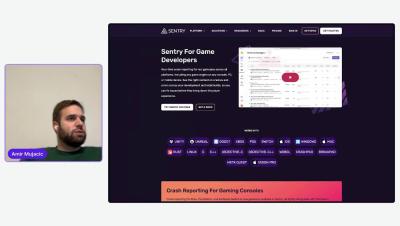
When we launched Seer, our AI debugging agent, we built it on a core belief: production context is essential for understanding the complex failure modes of real-world software. Seer uses the detailed telemetry that Sentry collects (errors, spans, logs, metrics, and more) to accurately root cause and fix bugs. Because this telemetry is trace-connected, Seer can deterministically traverse all the data relevant to a problem rather than relying exclusively on imprecise time-range searches.

Session Replay | Debugging Next.js Applications with Sentry

Session Replay lets you see how your users experienced your Next.js application before a crash happened. Aside from how the user used your app, it also captures the console output of the browser, the network requests, and the memory snapshot, so you get all the information needed to debug the issue. In this video you’ll learn how to use Session Replay and implement it in your Next.js application.

Getting Started with Seer - Sentry's AI Debugging Agent

Seer is Sentry's AI Debugging agent that has access to all the context that Sentry pulls together from your applications. Sometimes it shows up predicting bugs before they ship to prod. Sometimes it's catching issues in prod and bringing you the fix. Seer pulls from distributed traces, logs, profiles, stack traces, errors, and your codebase, and helps you find the broken parts of your application and fix them faster.

Let Your LLM Debug Using Production Recordings

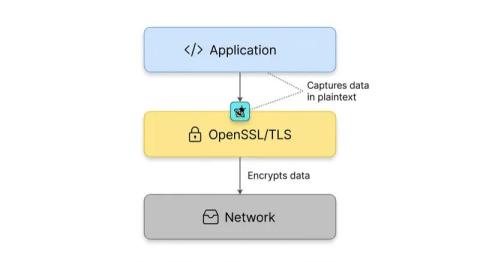
Modern LLM coding agents are great at reading code, but they still make assumptions. When something breaks in production, those assumptions can slow you down—especially when the real issue lives in live traffic, API responses, or database behavior. In this post, I’ll walk through how to connect an MCP server to your LLM coding assistant so it can pull real production data on demand, validate its assumptions, and help you debug faster.

Debug Faster with Chrome + Rollbar Debugging Assistant

Context switching is one of the biggest hidden productivity killers in debugging. Jumping between multiple open browser tabs slows momentum and increases cognitive load, especially when you’re trying to diagnose an issue under pressure. Google Chrome's new split screen feature, paired with Rollbar Debugging Assistant, enables a faster, more focused way to troubleshoot errors without constantly losing your place.

7 Senior-Level AI Debugging Tools Compared

Every dollar spent on engineering is a bet on the future. But look at your engineering team's sprint backlog and you’ll see a non-trivial amount of that capital is spent on repairing the past. For the last ten years, if you asked a VP of Engineering what the solution was, the answer was always the same: better monitoring. Throw more telemetry at the wall. Build a bigger dashboard. Send more alerts at 3 AM. It was the only available tool, so it became the entire thesis.