Operations | Monitoring | ITSM | DevOps | Cloud

The 2023 Network IT Management Report Part 4: Solutions for End-Users

This is the fourth in a four-part series focusing on the findings from our 2023 annual Field Report for IT Management. We surveyed 4500 IT professionals from internal IT teams and MSPs across North America to gauge where their organizations are heading from a network management perspective. In part four, we’ll discuss the needs of the end-user and how IT teams can contribute to their productivity. You can read the full 2023 field report and compare your own IT statistics here.

Top 25 Server Monitoring Tools

By implementing a server monitoring tool, you can keep better track of your entire IT infrastructure, and make sure your servers aren’t experiencing downtime. If downtime does occur, server monitoring tools like ours at Dotcom-Monitor will act to alert you to issues so you can your team can take prompt action and minimize impact for your users, in addition to identifying the root cause of the problem to avoid further unplanned downtime.

How to get the client IP in ASP.NET Core even behind a proxy

Part of implementing an error monitoring platform like elmah.io is dealing with the IP addresses of the clients generating errors. In this post, I'll show you parts of how we have implemented this in ASP.NET Core, to make sure that different hosting scenarios still produce the correct IP address. Let's jump right in. ASP.NET Core supports getting the client IP directly on the HttpContext object available throughout various places.

ChatGPT praise and trepidation - cyber defense in the age of AI

ChatGPT has taken the world by storm, so much so that we are all left guessing how far this will go. And it’s not a trivial question, as it relates to the future of humanity itself. On one extreme, technology is increasing rapidly enough to synthesize some of the most fundamental parts of our existence—communicating naturally with one another. That can be a scary thought.

What is a log management tool?

Log management and analysis tools provide you real-time visualization of how your users are interacting with your apps and systems. Many of these log management tools include a sophisticated visual dashboard to immediately analyze data. They also offer your DevSecOps teams deeper insights and possibilities to enhance code quality, boost productivity and reduce risks. What should the best log management tools do for your team to be successful?

What is log management, and why is it important?

Logs are like digital footprints or a letter that developers write to themselves for the future. They track every action or event that takes place within your software, applications and IT infrastructures. They provide important information such as when an action took place, host name, type of action, application used and more.

What are the benefits of log management?

Log management turns the huge volume of raw information created as logs into something usable for an organization's DevOps, IT and security teams. When log management is done correctly, its benefits include: Let’s take a closer look at some of the benefits of log management and how they apply to specific areas.

Project Permissions are now available in Bitbucket Cloud

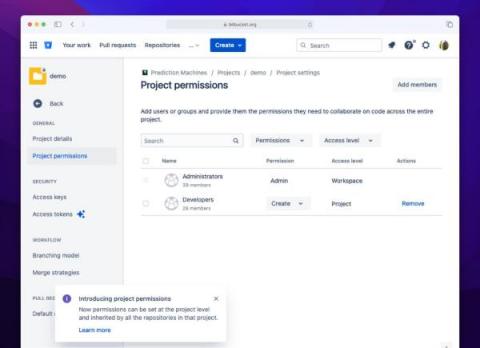
Today is a big day for Bitbucket Cloud as we begin rolling out project permissions and permission inheritance to align with Bitbucket Server and Data Center. We will be progressively rolling this out over the next month, so you will see the changes in your workspace before the end of April. Project permissions has been a long anticipated update for Bitbucket Cloud and represents one of the largest administration improvements for Bitbucket Cloud since we rolled out Workspaces in April 2020.