CircleCI introduces server 3.x to bolster security, compliance for enterprise engineering teams
Leading CI/CD platform advances private network CI/CD capabilities with Kubernetes offering.


The latest News and Information on Continuous Integration and Development, and related technologies.
Server 3.x, which is now available to all CircleCI customers, was designed to meet the strictest security, compliance, and regulatory restraints. This self-hosted solution can scale under heavy workloads, all within your team’s Kubernetes cluster on your private network, but with the dynamically scaling cloud experience of CircleCI. Offering an exceptional on-premise service means keeping that service up-to-date with the latest releases.
Most applications begin with a small to medium-sized user base. Even with migration projects, you would not immediately open your new application to the entire existing user base. Instead, you would first test with some internal users, then open up to early adopters. Nevertheless, if your application is successful, at some point you will face the need to scale it. Nevertheless, if your application is successful, at some point you will face the need to scale it.
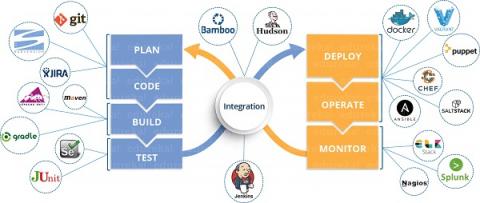
Keeping up with customer demand and staying ahead of the competition requires fast releases and efficient code. This is where DevOps comes into play. Where DevOps is the practice, mindset, and culture of combining software development (i.e. Dev) and IT operations (i.e. Ops) to accelerate the development lifecycle and provide continuous delivery without compromising quality.