
Operations | Monitoring | ITSM | DevOps | Cloud

Not All AI Tools Will Survive the Shakeout

Not every AI tool has staying power, and the ones that last are the ones that fit your organization’s strategy. AI is following the same arc as the cloud push and the dot-com era: a massive boom, then a contraction. Before you invest, ask what will actually make a difference in your org, and build from there. Watch the full IT Leadership Lab session — linked above.
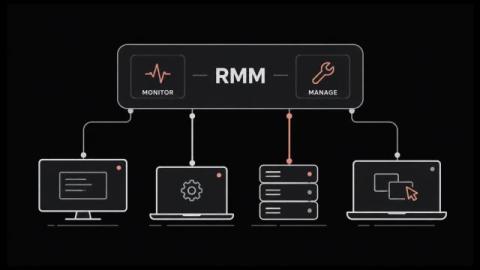
What Is RMM (Remote Monitoring and Management)?

RMM lets one small team look after thousands of machines nobody will ever physically touch. It grew up inside managed service providers. The whole category runs on agent-based monitoring, which means a small program sits on every endpoint and phones home on a schedule. That agent is also why attackers have taken such an interest lately. In this blog, you'll see: By the end you'll know what the category covers and where it stops. RMM stands for remote monitoring and management.

How to Integrate NinjaOne with a SIEM

In this episode of NinjaOne01, Jeff Hunter, Field CTO at NinjaOne, walks through NinjaOne’s new SIEM Exporter App. The app is a dedicated place to set up and monitor the webhooks that send NinjaOne activity data to your third-party SIEM (Security Information & Event Management) system. Note: this is an early access feature, so contact your account manager to have it enabled for your account. What this video covers.

How to Say No: Protecting Your Bandwidth

In IT, you’re pulled in a hundred different directions, sometimes those directions completely conflicting others. And when you finally fix one problem, another pops up in its place, like a technological whack-a-mole. So what do you do if you find yourself stuck in a tough spot? Your first inclination may be to fix the problem. After all, you’re a fixer by nature, so you should be able to take care of it all… right?

Take Support Mobile Without Losing the Record

IT issues never wait until you're back at your desk. They hit during a client visit, a coffee run, or halfway across a parking lot — and being stuck without your laptop turns a five-minute fix into a fire drill. Meanwhile, back at the console, proving what happened during a remote session — for an audit, a compliance check, or a "wait, what did the tech actually do" conversation — is its own headache. And technicians and end-users sharing one login experience but needing two completely different views adds friction nobody asked for. What you'll learn.

Never Get Blindsided by a Ticket Again

A P1 ticket sits before anyone notices it's close to breaching. A config change goes out and three days later nobody can say for sure who signed off on it. The information exists somewhere — an email thread, a spreadsheet, someone's memory — but not on the ticket itself, which means by the time you go looking, it's already a bad conversation with a client or an audit finding waiting to happen. What you'll learn.

Top 10 RMM (Remote Monitoring and Management) Tools for IT Teams in 2026

Managing a growing IT environment requires more than reacting to problems as they appear. IT teams and managed service providers (MSPs) need continuous visibility into endpoints, servers, networks and other infrastructure so they can identify potential issues, perform maintenance and resolve problems remotely. That is where remote monitoring and management (RMM) software comes in. RMM tools provide IT teams with a centralized way to monitor and manage distributed IT environments.

Document the Process, Not the Kernel Version

When people say "document everything," they don't mean literally everything — they mean document what matters. Nobody needs to know the exact kernel version on a server build years from now. What they need is the process: how to get there again, step by step. Watch the full IT Leadership Lab session — linked above.