Explore RubyGems data with Honeycomb
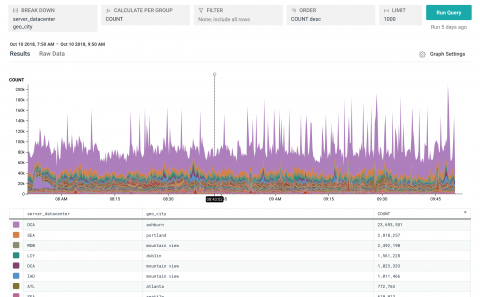
Our new RubyGems.org public dataset is now available — use it to analyze global download traffic of all gems hosted on RubyGems!
Last week we released version 4.0.0 of the honeybadger Ruby gem. This release includes a long-awaited feature which makes it even easier to customize your error reports before they are sent to Honeybadger. We also did some much-needed refactoring, and made a few removals and deprecations for good measure. Don't worry, though—most of the API remains unchanged, so upgrading should be a relatively painless process for most users.
Logging is an important part of understanding the behavior of your applications. Your logs contain essential records of application operations including database queries, server requests, and errors. With proper logging, you always have comprehensive, context-rich insights into application usage and performance. In this post, we’ll walk through logging options for Rails applications and look at some best practices for creating informative logs.
In a previous post, we walked through how you can configure logging for Rails applications, create custom logs, and use Lograge to convert the standard Rails log output into a more digestible JSON format. In this post, we will show how you can forward these application logs to Datadog and keep track of application behavior with faceted log search and analytics, custom processing pipelines, and log-based alerting.
Most scientific papers are unlikely to change your day-to-day approach as a Rails web developer. How not to structure your database-backed web applications: a study of performance bugs in the wild Yang et al., ICSE’18 is the exception to that rule. This study examined 12 popular, mature, opensource Rails apps for ActiveRecord performance anti-patterns. And boy, did they find some issues.
In this post, we’ll show you how to use Datadog to collect metrics, request traces, and logs from a Rails application running on Passenger, Apache, and MySQL. (Though we will focus on these integrations in this guide, you can also monitor NGINX servers and PostgreSQL database systems with Datadog.)
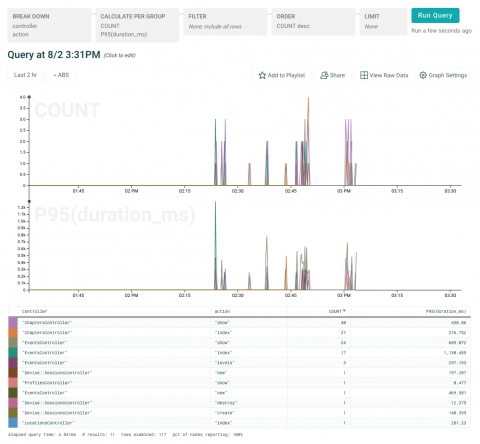
Meet the Honeycomb Beeline for Ruby. Like our Beelines for Go and Node, it understands the common packages you’re using and automatically instruments them to send useful events to Honeycomb. Then once you’ve got a chance to explore your app’s behavior, you can add custom fields specific to your app with just one line of code.
You’ve always been able to get observability for your Ruby apps by instrumenting them with our SDK, affectionately known as libhoney. Unfortunately, instrumenting code you’ve already written is nobody’s favourite job. If only there were some way to automate the repetitive parts, so you could get instant insight into what your app is doing in production, and then focus your effort on augmenting that insight with the information that’s unique to your app!
Browser development tools - like Chrome Dev Tools - are vital for debugging client-side performance issues. However, server-side performance metrics have been outside the browser's reach. That changes with the Server Timing API. Supported by Chrome 65+, Firefox 59+, and more browsers, the Server Timing API defines a spec that enables a server to communicate performance metrics about the request-response cycle to the user agent.