Prometheus Remote Storage
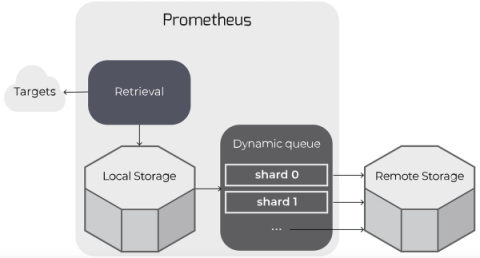
Prometheus can be configured to read from and write to remote storage, in addition to its local time series database. This is intended to support long-term storage of monitoring data.


Prometheus can be configured to read from and write to remote storage, in addition to its local time series database. This is intended to support long-term storage of monitoring data.
SharePoint, born from the tech giant Microsoft, is not just another application; it’s a robust platform that’s been transforming the way businesses handle their internal processes for years. At its core, SharePoint is designed to streamline collaboration and document management. But what does that mean in layman’s terms? Imagine a vast digital library, where instead of books, you have documents, images, videos, and other digital content.
In the age of customization, SharePoint’s ability to provide a personalized experience is pivotal for user engagement. Just like a tailor-made suit fits better than a generic one, a SharePoint interface tailored to individual users resonates more deeply.
Azure File Share is a cutting-edge service offered by Microsoft’s Azure platform. This robust solution allows seamless integration of serverless file sharing capabilities accessible through industry-leading protocols such as SMB, NFS, and Azure Files REST API. When effectively utilized, Azure File Share can drastically improve the file-sharing experience for cloud-based and on-premises deployments. In the realm of Dynamics 365 Business Central SaaS, it has demonstrated unparalleled benefits.
SharePoint is a Microsoft-owned platform that provides an extensive range of solutions for content management and collaboration within and outside an organization. Built on a web-based technology stack, it integrates seamlessly with Microsoft Office 365 and offers features like document libraries, team sites, intranets, extranets, and advanced search functionalities. It can be deployed both on-premises or in the cloud.
Before you dive into SharePoint, you may wonder, “Why do I need a technical guide?” The simple answer? To unlock SharePoint’s full potential. Understanding its nuts and bolts will empower you to customize it to your needs, optimize its functionality, and elevate your overall user experience. This article goes beyond the surface-level features to explain the underlying architecture, data storage mechanisms, and much more. Ready to unlock the mysteries of SharePoint? Buckle up!
So, you’re knee-deep in the world of Microsoft SharePoint, huh? If you’re an IT professional, you’re well aware that SharePoint is no longer just a “nice-to-have” but more of a “must-have.” You’ve got two flavors to choose from: SharePoint On-Premise and SharePoint Online. Which one is the right fit for your organization? Buckle up, because we’re about to dive deep into the nitty-gritty differences, pros, cons, and everything in between.
Hello, tech aficionados and IT professionals! If you’re in the business of managing digital assets, workflows, or intranets, chances are you’ve crossed paths with SharePoint. But do you ever wonder how this versatile platform has evolved over the years? Or perhaps you’re curious about what future enhancements are on the horizon? Well, buckle up, because we’re about to embark on a comprehensive journey through the fascinating world of SharePoint.