How we manage plans & features in our SaaS app
How do you deal with what a user can do on their account in a SaaS app? Can Jane on the "Starter" plan create another widget when she is near the limit of her plan? What if she's a trial user?


How do you deal with what a user can do on their account in a SaaS app? Can Jane on the "Starter" plan create another widget when she is near the limit of her plan? What if she's a trial user?
This is a run down on the basic multi-tenant SaaS data model underlying Checkly. Users, accounts, plans, that type of stuff. When building this, I found it surprisingly hard to find any solid info in the gazillions of developer and startup blogs; most where just to vague on the implementation details.
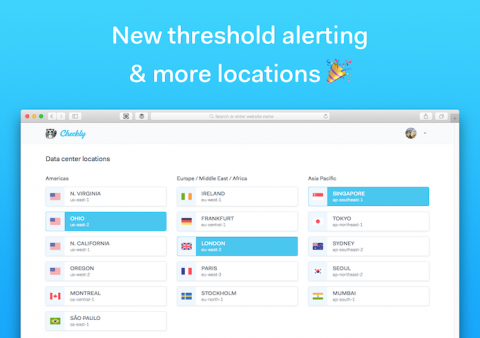
We’re super happy to announce some big upgrades to Checkly’s alerting features for 2019 . We listened to what our customers were missing alerting wise and what parts we could polish and upgrade. Two things popped up again and again...
2018 was an interesting year for Node.js frameworks and open source software in general. Developer communities discussed the role of corporate sponsorship and how to maintain a project used by millions but not supported financially.
At Checkly, we run our browser checks on AWS EC2 instances managed by Terraform. When shipping a new version, we don’t want to interrupt our service, so we need zero downtime deployments. Hashicorp has their own write up on zero downtime upgrades, but it only introduces the Terraform configuration without any context, workflow or other details that are needed to actually make this work in real life™.
The world of DevOps is a pretty confusing place for folks just starting out. Even figuring out what “DevOps” means can be hard. Is it CI/CD with Kubernetes and Serverless to drive Agile product iterations? Or is it SSH-ing into a box and restarting Apache? You guessed it. All of the above and most things in between.
Since launch, we didn’t pay too much attention to the front end performance of the main Checkly web app. Shame on us. What better reason to dive into this than the publishing of the excellent The Cost of Javascript in 2018 by Google’s Addy Osmani? TL;DR: it took about half a day to go from an abysmal 34 to a 100 Lighthouse score on our Vue.js app.
Last week, we shipped an initial version of Puppeteer Recorder, a Google Chrome extension that records your browser interactions and generates a Puppeteer script. It turns out Chrome extension development is almost like real web development, but with a weird dash of quasi embedded development mixed in. This post talks you through the development lifecycle when creating an extension and lists some of the architectural gotcha’s. Source code for the extension in question is on github.