
Managing Digital Display Infrastructure in Multi-Location Businesses
For businesses with many locations-like busy retail chains or large office campuses-managing digital display systems is more than a tech upgrade. It’s a business need. You must coordinate hardware, software, content, and internet connections across different sites so every screen shows the right message at the right time. When it’s done well, separate screens work together as one clear communication system for both employees and customers, no matter the location.
What Is Digital Display Infrastructure for Multi-Location Businesses?
Digital display infrastructure for a multi-location business is the full set of tools and systems used to show visual content across all physical sites. Think of it like the “control system” for your visual messages, making sure every screen-whether it’s a lobby video wall or individual QSR menu boards -works together. It’s not just plugging in screens. It’s building a secure, scalable setup that supports a consistent communication plan across every location.
Key Components of Digital Display Infrastructure
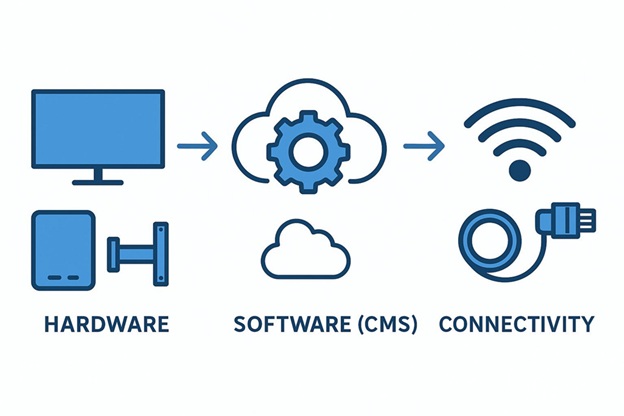
A strong digital display setup is built on three main parts: hardware, software, and connectivity.
- Hardware includes the screens (LCD, LED, touchscreens), media players, and extra equipment like mounts and controllers. Hardware choice depends on where and how the screen will be used-viewing distance, lighting, indoor vs. outdoor, and how many hours it runs each day. In busy places, commercial-grade screens built for long, continuous use are usually worth the cost.
- Software is mainly the Content Management System (CMS). This is where content is created, scheduled, and sent out to screens. A good CMS supports multi-zone layouts, live content, instant updates, and scheduled playback.
- Connectivity (wired Ethernet or stable Wi-Fi) connects everything so screens can receive updates and report status. Many businesses use cloud systems, so each site needs fast, reliable internet for remote updates and control.
Multi-Location Network Considerations
Going from one screen to hundreds (or thousands) in many locations adds extra planning work. The hardest part is usually not making content-it’s keeping control and keeping the experience consistent across the whole network. Instead of managing displays one at a time, the goal is to run the entire network from one control point.
Key points to plan for include:
- Standard hardware and software settings so screens behave the same way everywhere
- Local content options so each region can show relevant messages
- A central tracking system to support audits, spot repeat issues, and record what each site needs
The target is one unified system that still has room for local updates, all managed from a single dashboard.
Why Do Multi-Location Businesses Need Effective Digital Display Management?
Customer attention is hard to win. Good digital display management is no longer a “nice to have.” It helps improve customer experience, reduce manual work, and support sales and communication across many places.
Benefits for Brand Consistency and Engagement
A consistent digital signage plan helps every location deliver the same brand experience. Using the same logos, colors, fonts, and message style builds recognition and trust. Companies that focus on brand consistency often see stronger growth.
Digital screens also let brands tell richer stories than printed signs can. You can use:
- Sequenced messages across multiple screens
- Synced visuals in large spaces
- Video walls for high-impact messages
Digital content often gets more attention than static signs. And when content is relevant-like local promotions in a store or live KPIs in an office-it’s more likely to drive action and keep people engaged.
Risks of Poorly Managed Display Networks
If displays are not managed well, problems show up fast. The clearest issue is an uneven customer experience. If one store has modern interactive screens and another has outdated or mismatched content, customers may get confused or feel the brand is inconsistent.
From an operations point of view, mixed hardware and scattered tools create extra work:
- Different devices may need different update methods
- Troubleshooting becomes slower and harder
- Maintenance costs rise
- Downtime increases
Without a central monitoring system, finding and fixing problems across many locations can become slow and overwhelming.
What Are the Core Elements of a Scalable Display Infrastructure?
A system that grows with your business needs the right base pieces. Scalability is not just adding screens-it’s growing without losing performance, consistency, or simple management.
Selecting Reliable Digital Signage Hardware
Hardware is the visible part of your signage network, so it must be dependable. Multi-location businesses usually need commercial-grade displays made for long daily use. Consumer TVs are often not built for constant operation in public spaces.
When choosing displays, focus on:
- Resolution and wide viewing angles for clear viewing
- The right brightness for the environment
- Compatibility with your CMS and media players
- Support for future upgrades and integrations
Standard hardware across all sites makes rollout and support much easier. This includes screens, media players, mounts, and controllers. It also simplifies training and reduces compatibility issues. Before buying more equipment, it helps to audit what you already have and decide what can stay and what should be replaced.
Choosing the Right Content Management System (CMS)
The CMS is the control center for your signage. For multi-location use, the CMS should be centralized, scalable, and easy to use. It should support managing content for all sites from one dashboard.
Key CMS features often include:
- Content creation and scheduling
- Multi-zone layouts
- Live and data-driven content (weather, news, KPIs)
- Fast updates across many locations
- User roles and permissions by team or site
- Integrations with other business tools and data sources
Network Connectivity and Bandwidth Requirements
Your network keeps the whole system working, even though it’s mostly invisible. If you use a cloud CMS, each location needs stable internet for updates, monitoring, and remote control.
Common options include:
- Ethernet for stable performance, especially for video-heavy screens
- Wi-Fi for flexible placement and easier setup in some buildings
- 4G/5G for remote sites or temporary signage where wired internet isn’t possible
Bandwidth needs depend on content. High-resolution video uses more data than simple slides. The goal is smooth playback with minimal delay across every site.
Should Multi-Location Businesses Choose Cloud-Based or On-Premise Solutions?
Choosing cloud vs. on-premise affects cost, scalability, security, and daily management. Both can work, but multi-location networks often benefit more from cloud.
Comparisons of Cloud vs On-Premise Infrastructure
Cloud signage platforms reduce the need for physical servers and heavy IT setup. They usually allow:
- Fast scaling by adding screens through a subscription plan
- Remote content control from anywhere
- Real-time updates
- Built-in security features
- Analytics and reporting tools
On-premise systems often require:
- Higher upfront spending (servers and related hardware)
- Ongoing maintenance by internal IT
- More hands-on security work
- More effort to support many locations
On-premise can offer tighter control of data, but it often becomes harder to manage as the number of locations grows.
Key Factors in Decision Making
Here’s a simple comparison table of common decision factors:
|
Factor |
Cloud-Based |
On-Premise |
|
Upfront cost |
Lower |
Higher |
|
Scaling to new sites |
Usually easy |
Often slower and more work |
|
Remote management |
Built-in |
May require extra setup |
|
IT workload |
Less internal work |
More internal work |
|
Security tools |
Often strong and updated by provider |
Managed fully by your team |
Other things to weigh:
- Budget and preference for predictable monthly costs
- Growth plans (new sites, more screens)
- Available IT staff and skill
- Security and compliance needs
- How often you need fast updates across many locations
For most multi-location businesses, cloud systems win on scaling and easier management.
How Should Hardware Be Standardized and Deployed Across Locations?
Rolling out screens across many sites takes careful planning and strict standardization. This helps lower support costs and keeps brand presentation consistent.
Criteria for Hardware Standardization
Standard hardware makes a big difference for multi-location signage. It supports a uniform look and also makes updates and support easier. If all devices are similar, staff learn one process and your team deals with fewer compatibility issues.
Steps and criteria often include:
- Audit current screens and players to see what can be reused
- Choose commercial-grade displays for long daily operation
- Use consistent screen sizes where possible
- Pick media players and mounts that work across all locations
- Select equipment that works with your CMS, such as Look Digital Signage, and can support future updates
The goal is a predictable equipment setup that is easier to manage for years.
Guidelines for Large-Scale Installation Rollouts
Large rollouts need a clear plan to limit downtime and avoid delays. Common rollout methods include:
- Phased rollout: install a few screens at a time across all sites
- Location-by-location: finish one site fully before starting the next
Good rollout practices:
- Place screens in similar “key spots” across sites (entrances, checkouts, lobbies)
- Keep screen types and sizes consistent to simplify content design
- Document each install for repeatability and later troubleshooting
- Coordinate deliveries so all parts arrive on time
- Use trained installers for safe mounting and proper protection
- Include on-site staff during installation so they understand the basics
- Schedule work during quiet hours to reduce disruption
What Are the Best Practices for Content Management at Scale?
Content management for many locations requires balance: central control to protect the brand, plus local freedom to keep messages relevant.
Centralized vs Localized Content Strategies
A practical approach is:
- Centralize control
- Standardize design
- Localize messages where needed
A cloud CMS helps a central team push core brand messages to all locations. At the same time, local teams can show content that fits their area, like regional promotions or community events. Many CMS tools support location-based scheduling and quick local updates so each site stays relevant without breaking brand rules.
Scheduling Content Updates Across Multiple Locations
Content gets old quickly. If screens show the same message too long, people stop paying attention. Regular updates help keep content fresh.
Cloud CMS tools can automate scheduling and distribution. You can:
- Plan updates during non-business hours
- Sync content with marketing campaigns
- Push urgent updates in real time
- Schedule updates in batches
Update frequency depends on the business:
- Retail and QSRs may update daily or hourly (prices, promos, menus)
- Offices, healthcare, and other settings may update weekly or monthly
Review your schedule often and adjust based on results and feedback.
Content Localization for Diverse Audiences
Localization is more than translating words. It means adjusting the message and visuals so they fit local culture, language, and needs.
Examples:
- Use local event info or store-specific announcements
- Show local weather or news where it matters
- Use visuals that fit the local community
Analytics can help you learn what people watch and respond to. You can also change content by time of day (morning vs. evening traffic) and test different versions to learn what works best.
Using Templates and Automation Tools
Templates and automation make content easier to manage across a large network. Templates help keep a consistent look and make it simple for non-designers to create good content.
Useful tools and methods include:
- CMS templates for common layouts and screen types
- Design and video tools for higher-quality content
- Collaboration tools for teams working across locations
- APIs and data feeds for live content (social feeds, stats, news)
Automation reduces manual work and helps keep screens updated.
How Is Security Ensured for Digital Display Infrastructure?
Security matters for multi-location signage. It protects data, prevents unwanted content changes, and lowers the risk of attacks.
Data Protection and Access Controls
Start with strong access controls. Only approved people should be able to change content or settings. Many enterprise CMS platforms support detailed user permissions, so each team can access only what they need.
Common security features include:
- Role-based permissions by location or department
- Single Sign-On (SSO)
- Two-Factor Authentication (2FA)
Choosing a signage provider that takes security seriously helps protect both your data and your brand.
Compliance and Privacy Considerations
Many businesses must follow privacy and compliance rules, depending on industry and country. Examples include GDPR, HIPAA, and local privacy laws. Some platforms also have security certifications like ISO-27001.
Accessibility also matters. ADA-friendly content and interfaces help make screens usable for more people. Regular security checks and staying current with changing rules should be part of the plan.
Mitigating Cybersecurity Threats
Protecting a signage network requires layers of defense, such as:
- Firewalls and intrusion detection
- Encryption for data sent over the network and stored in systems
- Regular monitoring and security audits
- Keeping software and firmware patched and updated
Physical protection also helps:
- Locked enclosures
- Security cables
- Tamper-evident seals
Using both digital and physical safeguards lowers risk across the network.
How Can Display Networks Be Monitored and Maintained Remotely?
Remote monitoring and maintenance is a must for multi-location signage. It reduces downtime and keeps screens working consistently.
Real-Time Status Monitoring and Alerts
Central management tools let admins monitor screen health across all locations. This can include device status, network connection, and playback performance.
Alerting tools can warn you about:
- Hardware failures
- Lost internet connections
- Playback errors
- Missing content
Dashboards also help compare locations and spot patterns, so problems can be fixed faster.
Remote Troubleshooting and Support Protocols
Remote tools often let teams fix problems without a site visit. Typical actions include restarting a player, re-sending content, or changing settings.
It also helps to have a clear support plan:
- Who responds to urgent issues
- When to escalate to vendors
- A shared log of common problems and fixes
Training local staff with simple guides and videos helps them solve basic issues quickly.
Routine Maintenance and Update Schedules
Regular maintenance prevents many problems. Plan schedules for:
- Software updates
- Security patches
- Performance improvements
Remote deployment tools can push updates to many sites at once, usually during quiet hours. Reliable internet and backup options can also reduce downtime.
What Role Does Employee Training Play in Display Management?
Even strong technology can fail if teams don’t know how to use it. Training and adoption help the system deliver results across all sites.
Onboarding Teams for System Use
Training should cover:
- Creating and scheduling content
- Using the CMS
- Basic troubleshooting
- Permission and access basics
Different roles may need different training. For example, outdoor sites may need weather-related maintenance knowledge, while high-traffic sites may need touchscreen cleaning processes. Use hands-on sessions, online tutorials, and clear manuals so staff feel confident with daily tasks.
Change Management and Ongoing Support
Digital signage changes over time. Keep support going by:
- Asking for feedback and content ideas from staff
- Assigning “site champions” at each location to help with basic support and coordination
- Sharing best practices across locations
Support resources like knowledge bases, help channels, and ongoing training help the network run smoothly long-term.
How Can Businesses Measure the Impact of Digital Displays?
To get full value from digital signage, you must measure results and improve over time. Signage should perform like any other communication or marketing channel.
Metrics to Track Network Performance
Common metrics include:
- Engagement (touches, interactions, clicks)
- Dwell time (how long people look)
- Content performance (which items get attention)
- Conversions (purchases, QR scans, sign-ups)
For internal signage, you may track employee engagement or how well key updates are seen. Many CMS platforms include analytics tools for this across all sites.
Evaluating Audience Engagement and ROI
Success depends on your goal: more sales, better communication, or stronger engagement. Compare your KPIs to those goals to estimate ROI.
Examples:
- Which menu items get the most interaction
- Which promotions lead to more QR scans
- Which content playlists get watched longer
Surveys and feedback forms add human insight that metrics can miss.
Leveraging Analytics for Content Optimization
The real value of data is using it to improve content. If analytics show poor performance in one region, you can swap content quickly through the CMS. You can also run A/B tests across locations to learn what style and message work best.
Regular review helps you:
- Rotate content before people tune it out
- Adjust timing based on foot traffic
- Improve messages based on real results
Common Questions About Managing Multi-Location Digital Displays
Managing multi-location signage often leads to the same questions. Here are clear answers.
Can Different Content Run on Different Screens Simultaneously?
Yes. This is a key benefit of a strong CMS. You can group screens by location, department, or purpose, and show different content at the same time. User permissions can also let local teams manage their own screens while keeping brand rules in place.
Example:
- Lobby video walls show brand messaging
- Department screens show KPIs
- Cafeteria screens show daily menus
All of this can be managed from one platform.
Is Outdoor Digital Signage Managed Differently Than Indoor Systems?
Yes. Outdoor signage needs special hardware and extra management features. Outdoor displays must handle heat, cold, rain, dust, and direct sunlight. Many setups use weather-resistant LED screens.
Outdoor systems may also need:
- Brightness control based on daylight
- Environmental monitoring (temperature, humidity)
- More detailed installation and maintenance steps
Content scheduling is similar, but equipment and upkeep are more specialized.
How Difficult Is Rebranding Across a Multi-Location Network?
With the right signage platform, rebranding is usually straightforward. You can update master templates in the CMS (logos, colors, fonts, messaging) and push changes to all locations at once. This avoids manual updates on each screen and helps keep the new brand look consistent everywhere, while still allowing local content where needed.
Conclusion
Managing digital display systems across many business locations takes planning, but it brings real benefits. With standardized hardware, a strong CMS, secure access controls, and remote monitoring, businesses can turn separate screens into one clear and powerful communication tool. Ongoing improvement matters too-using analytics and feedback to keep content useful and effective.
Looking ahead, digital display management will keep improving. AI and machine learning will help suggest more personalized messages and adjust content based on real-time behavior. Interactive screens will also become more advanced, creating deeper engagement and better data. As businesses add more locations, the ability to manage large display networks well will matter even more. Working with an experienced provider that offers secure, scalable tools-and the know-how to put them into place-can help businesses get long-term value from multi-location digital displays.