
JPGtoText Review 2026 - How Well Its OCR Tools Handle Text, Spreadsheets, and More

Image Source: depositphotos.com
We all know that turning images into editable text and spreadsheets is now possible, thanks to OCR-powered tools. However, it is also true that this process isn’t always as smooth and accurate as many tools claim.
In fact, numerous factors such as image quality, layout complexity, lighting conditions, etc., play a key role in determining the final output. That’s where the real difference between average and high-performing OCR tools becomes evident.
There are a bunch of tools available claiming to be highly accurate. One of them is JPGTOTEXT.com. It is available in free and paid versions. It has a good ranking in the SERPs and positive user reviews as well.
So, today in this detailed blog post, I am going to review JPG to Text to understand how well OCR tools perform.
JPGtoText.com – An Overview
As mentioned earlier, Jpgtotext.com is a freemium platform that is primarily known for turning pictures into text. Besides this, it also offers a wide suite of tools for converting images into spreadsheets, Word, and PDF files.
The tool features a simple design so that users with average technical knowledge can navigate through it without any hassle. Let’s discuss it in detail.
Understanding How Effectively JPG to Text Handles Text Extraction
Tool: Image to Text Converter
The image to text converter works to automatically extract text from photos, screenshots, handwritten notes, and invoices. All you need to do is simply upload the required image, click the button, and review the extracted text.
Key Features:
- It allows you to process up to 5 images in one go
- It is capable of extracting text in multiple languages
- It supports numerous image formats, i.e., JPG, PNG, JPEG, and more.
- It also has browser extensions for both Chrome and Edge.
Testing its Text Extraction Capabilities
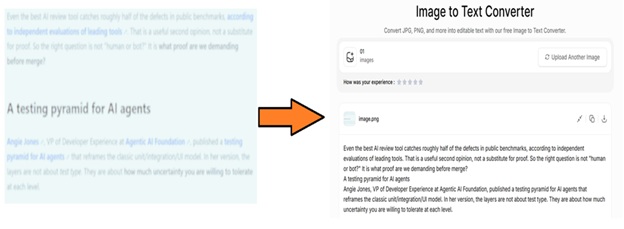
Now, I am going to test the text extraction capabilities of this Image to text converter by passing a blurry picture to determine how accurately it extracts text.
Below is the input and output screenshot.
Try Now: https://www.jpgtotext.com
Verdict: Surprisingly, the JPG to text converter has accurately extracted all the text from a blurry photo while retaining formatting. That clearly showcases its versatility and reliability.
Understanding How Effectively JPG to Text Performs Image to Excel Conversion
Tool: JPG to Excel Converter
This tool quickly transforms photos into well-formatted Excel sheets with a single click. This makes it an ideal option for data entry operators, HR professionals, or anyone who needs to perform JPG -to-Excel conversions. You can modify, copy, or even download the output sheet as per your specific needs.
Key Features:
- It perfectly retains formatting during the conversion process
- It does not require a sign-up/registration
- It supports conversion in different languages
Testing its JPG to Excel Conversion Capabilities
Just like the previous tool, I am going to evaluate the working potential of the JPG to Excel converter.
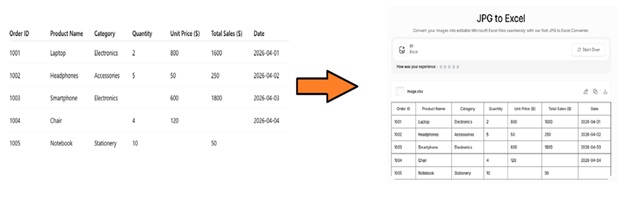
I will be processing an image containing tabular data. The thing that should be noted here is that my input image contains missing values in different columns and rows.
Now, let’s see how things will go.
Try Now: https://www.jpgtotext.com/jpg-to-excel
Verdict: Impressive! The Image to Excel converter smartly extracted all the tabular-based data, along with the missing entities.
Understanding How Effectively JPG to Text Performs Image to Word Conversion
Tool: JPG to Word Converter
JPG to Word converter allows you to convert images into editable MS Word files. In the free version, users can add up to 20 images in one go. To bypass the limit, a premium subscription will be required.
Key Features:
- It supports batch processing
- It retains image quality during the conversion process
- It works in multiple languages
- It accepts images in diverse formats
Testing its JPG to Word Conversion Capabilities
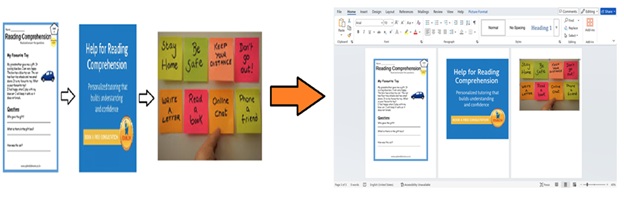
Last but not least, I am going to verify the conversion capabilities of this JPG to Word converter. I will be converting images into Word that contain mixed elements, such as irregular spaces, fonts, and slightly skewed text alignment.
Try Now: https://www.jpgtotext.com/jpg-to-word
Verdict: My input images were different in size, layout, and text, but still, the tool has successfully converted them into an editable Word file without damaging their quality in terms of resolution. This is a clear indication of its effectiveness.
Pricing:
When it comes to pricing, JPG to Text offers multiple plans to meet the budget requirements of different audiences.
Monthly plan:
- Lite: $4.5
- Standard: $6.9
- PRO: $9
Yearly plan:
- Lite: $43
- Standard: $58
- PRO: $86
Final Thoughts
JPGTOTEXT.COM is a freemium tool that utilizes advanced OCR technology to effectively convert images into editable text, Excel, Word, and many more formats. It is widely considered a reliable solution when it comes to performing conversions. To verify this, I have personally used and verified its OCR capabilities by conducting a range of tests. I have also explained its functionality and key features.
Hopefully, you will find this blog valuable and interesting!