Operations | Monitoring | ITSM | DevOps | Cloud

Announcing the beta for MacOS Runners in Bitbucket Pipelines

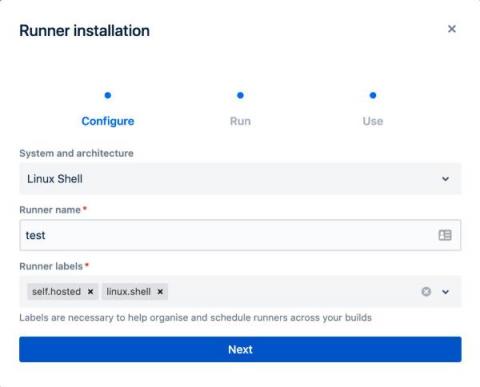
We are happy to announce that Bitbucket Pipelines now supports MacOS self-hosted runners. This is currently in beta. You can now create a self-hosted runner and run it on your MacOS infrastructure to run MacOS and IOS builds. Since you’re using your own runner, you won't be charged for Bitbucket Pipelines build minutes. This self-hosted runner will be non-containerised allowing your CI/CD step to access the host's hardware, such as the graphics card or any connected external devices.
Introducing Bitbucket's redesigned Branch page

We are excited to announce that improvements to the Branch page will be available in Bitbucket Cloud in the coming weeks! Comparing two branches can be a critical step before creating a pull request. We recognize that it can be a cumbersome experience to see the Branch page displayed differently than the Pull request page.

Predefine values of custom pipeline variables

Recently, we introduced support for default values in custom pipeline variables. Today, we're happy to announce the ability to make pipeline variables configuration more flexible with predefined values. We added a property to predefine values that can be assigned to a variable. It helps avoid errors, and improves the user experience. Instead of typing a variable value, you can choose it from a dropdown.

Log4shell fix with the Bitbucket Cloud and Snyk integration

By now, you’re probably assessing your level of exposure — or are in the middle of remediating — the recently disclosed vulnerability known as Log4Shell. We recently introduced a native integration with Snyk, a leading provider of developer security solutions, to help you address zero-day vulnerabilities. Once enabled, Snyk scans your code and its dependencies, and alerts you about security vulnerabilities, including Log4j. All current versions of Log4j 2 up to 2.14.1 are vulnerable.

Configuring multiple Docker services with different memory limits

Bitbucket Pipelines provides a feature that enables you to configure memory in Docker services (learn more on that here). We have related highly voted suggestion where customers would like to configure multiple Docker services, each with different memory configurations. Here’s a working example of how you can set memory limits to multiple Docker services and use the appropriate service depending on the step requirements.

Bitbucket Cloud has landed in AWS

In July and August of this year, I revealed to our community for the first time that Bitbucket Cloud was engaged in a project to migrate to a new platform. As I wrote in July: I am thrilled to announce that, in late August, we officially completed this project and Bitbucket Cloud has been operating in AWS, data center-free for over 2 months. So how does this benefit our customers? This is one of the most technically complex projects we've ever tackled as a team.

Announcing the Bitbucket Cloud Migration Assistant

We are excited to announce the launch of the Bitbucket Cloud Migration Assistant (BCMA). The BCMA is an Atlassian-supported app built to help Bitbucket Server customers automate the migration process from Bitbucket Server to Bitbucket Cloud. If you are considering a move to Bitbucket Cloud, this is the easiest way to get started. Download the BCMA from the Atlassian marketplace.

Introducing default values for custom pipeline variables

Support for including default values in custom pipelines has been a highly requested feature. We are happy to announce that this feature is now live. Providing a default value helps avoid errors when you manually trigger a custom pipeline. If you often rely on the same value for certain variables, it can be frustrating to get a failed build when you forget to specify the value or have a typo when providing the value.

Faster CI Builds with Docker Remote Caching

Bitbucket Pipelines provides a Docker caching feature that can help improve build times. However, the limitation is that only compressed caches under 1GB are saved and can be used. In this blog, we outline a process showing how you can use compressed caches that are larger than 1GB. With Docker versions >= 19.03, you can use the BuildKit feature. With BuildKit, you don’t need to keep the cache locally before building the Docker image since it caches each build layer in your image registry.