Operations | Monitoring | ITSM | DevOps | Cloud

Using logging for your apps running on Kubernetes Engine

Whether you’re a developer debugging an application or on the DevOps team monitoring applications across several production clusters, logs are the lifeblood of the IT organization. And if you run on top of Google Kubernetes Engine (GKE), you can use Cloud Logging, one of the many services integrated into GKE, to find that useful information. Cloud Logging, and its companion tool Cloud Monitoring, are full featured products that are both deeply integrated into GKE.

Manage logs from multiple clouds and on-premises workloads together

We’ve heard from our customers that you need visibility into metrics and logs from Google Cloud, other clouds, and on-prem in one place. Google Cloud has partnered with Blue Medora to bring you a single solution to save time and money in managing your logs in a single place. Google Cloud’s operations management suite gives you the same scalable core platform that powers all internal and Google Cloud observability.

Distributed tracing with OpenTelemetry - Stack Doctor

Wanting to measure the latency of user requests, and know how long each microservice takes to return a response? In this episode of Stack Doctor, we’ll walk you through how to use OpenTelemetry for tracing, and how this tool shows how your requests traverse your service and how each service contributes to overall latency.

Debugging in production with Stackdriver Debugger - Stack Doctor

Did you know you can debug your code while it’s still in production? In this video, Yuri Grinshteyn speaks about the Stackdriver Debugger, and how you can use it with Node.js. More importantly, he talks about the two ways in which this tool can debug by creating snapshots, or logging in real-time. Product: Google Cloud Operation Suite; fullname: Yuri Grinshteyn;

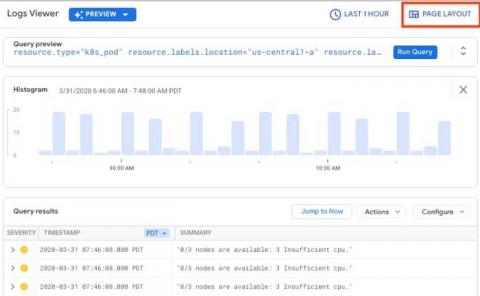
Find and fix issues faster with our new Logs Viewer

Monitoring your cloud infrastructure is an essential part of making sure your operations are running smoothly. Since announcing the new Cloud Logging interface in February, we’ve heard from users that the new interface is making it faster and easier to meet logging needs, including troubleshooting issues, verifying deployments, and ensuring compliance. One of those users, Arne Claus, is a site reliability engineer at trivago, and has taken advantage of the new interface already.

Use SRE principles to monitor pipelines with Cloud Monitoring dashboards

Data pipelines provide the ability to operate on streams of real-time data and process large data volumes. Monitoring data pipelines can present a challenge because many of the important metrics are unique. For example, with data pipelines, you need to understand the throughput of the pipeline, how long it takes data to flow through it and whether your data pipeline is resource-constrained.

Use the Dashboard API to build your own monitoring dashboard

Using dashboards in Cloud Monitoring makes it easy for you to track important system metrics. Creating dashboards by hand in the Monitoring UI can be a time-consuming process, especially if you want to use them in multiple different Monitoring Workspaces. With the recent GA announcement for the Cloud Monitoring dashboards API, you now have a way to programmatically create dashboards.

Stackdriver Push to Splunk

During my career (in technology), I have dealt with many clients to whom security was one of the main areas of concern. As such, there’s always room for improvement but without a shed of a doubt, communications direction and stateful firewalls are some of the very first elements to consider. When it comes to logging and audit information, as a rule of thumb, it’s good to have a log aggregator stored outside of the scope of a cloud provider. A great log correlation out there is Splunk.