
Matchday Traffic Spikes: How to Run In-App Fan Chat Reliably (SLOs, Backpressure, Incident Playbooks)
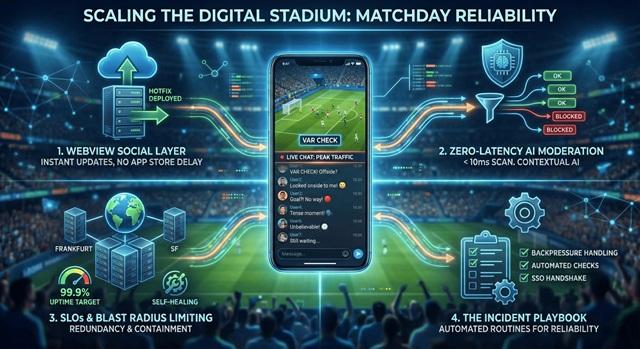
Traffic in sports apps is rarely steady. There are long periods of quiet, followed by short bursts — for example during a VAR decision at the end of a game, when everyone wants to post their reaction at once.
If chat doesn’t work in those moments, fans stop trusting the app. Successful app community features and fan chat start by accepting this traffic pattern and designing the “digital stadium” around it.
1. WebView Based Social Layer
Many teams use native SDKs for their social layer. That’s fine, unless something needs fixing under pressure.
On match day, there’s no time to wait for a new native build and App Store review just to fix a UI element that’s acting up under load. That’s where a “WebView First” social layer comes in:
- Changes are deployed on the server.
- Fixes go live for all users within minutes.
- No need to wait for app updates or OS versions.
For a sports club or a streaming platform, this is a real benefit. The social layer can be fine-tuned during the season without disrupting the mobile app release cycle.
2. Zero-Latency Moderation
Effective chat moderation is not just about bad words. At scale, it’s also about latency. If a moderation API takes 500 ms to scan a message, real-time chat doesn’t feel real-time anymore.
A working in-app fan chat on matchday usually relies on several layers that run in milliseconds:
- Pre-moderation filters: simple rules catch obvious cases before they even go into the main moderation workflow.
- Contextual AI: the model looks at the context of the conversation to distinguish between heated football talk, abuse, scams and bot spam.
- Automatic data masking: phone numbers, emails and bank details are automatically obscured if users paste them in public rooms.
This way, the chat stays usable during peak times while messages are still checked for risk.
3. SLOs and Limiting the “Blast Radius”
On matchday, traffic should be treated like any other surge, not like a rare exception. That’s where service targets and architecture come into play.
A good fan chat infrastructure should include:
- Uptime targets: for example, 99.9% uptime on paid plans with 24/7 monitoring.
- Redundancy: microservices deployed in multiple locations (like Frankfurt and San Francisco), so issues in one place do not bring down the entire service.
- Self-healing: backpressure management that can isolate or restart unhealthy parts of the service, so issues in one large room do not affect other rooms.
The idea is to make sure that whatever goes wrong, the impact stays small and contained.
4. The Incident Playbook
It is not just infrastructure that needs to be highly available — it is also important to have clear routines.
A ready-to-use social layer helps, but the important part is the playbook around it, not just the text box:
- Backpressure: how queues are handled when they start to grow.
- Automated dependency checks: how often third-party libraries are checked to avoid surprise failures in the middle of a weekend.
- SSO handshake: a stable connection between the user database and the social layer, so users remain logged in and their status (VIP, Gold, etc.) stays correct even during peak load.
This reduces the number of manual decisions engineers have to make during a live event.
Why Reliability on Matchday Matters
Keeping an app “silent” on matchday can prevent some problems, but it also moves the conversation to other platforms — along with the data and the opportunity to build a real community.
If a club or platform offers matchday discussion inside its own app, reliability becomes part of the experience. Building for spikes, latency and moderation turns chat from a constant risk into a predictable part of the matchday routine. For teams that prefer not to build this infrastructure from scratch, Watchers offers a ready-made social layer with matchday chat, in app community features and chat moderation that plugs into existing sports apps without a full redesign.