
Best AI for Technical Interviews When Trade-Offs Count More Than the Code

Generative AI can crank out code, yet interviewers judge how you think. CoderPad’s 2026 survey found that 66 percent of hiring leads praise candidates who fix AI errors, while 56 percent reward clear trade-off explanations. Stack Overflow’s 2025 Developer Survey echoes this: 66 percent of developers name AI solutions that are “almost right, but not quite” as their biggest AI frustration. Canva agrees, applauding applicants who “offer alternative approaches and weigh trade-offs thoughtfully.”
This guide ranks 12 AI helpers on that same skill. We sort them into three lanes and rate each on eight factors, from trade-off depth to privacy clarity, so you can pick the partner that helps you defend every decision.
What best AI means in a technical interview
The best AI helper sharpens your judgment, clarifies requirements, surfaces trade-offs, and catches false positives, not just types lines of code.
First comes permission. If an employer bans outside help, no overlay or prompt library can save you. When permission is granted, we rate each tool on eight weighted signals drawn from real hiring feedback:
- Reasoning and trade-off depth (25 percent). Does it make you state assumptions, compare approaches, and flag failure modes?
- Technical breadth (15 percent). Coding, debugging, system design, diagrams, even full-repo tasks.
- Communication and follow-ups (15 percent). Prompts you to speak concisely and adapt when constraints change.
- Workflow realism (15 percent). Mirrors the interview IDE or whiteboard with minimal clicks.
- Personalization (10 percent). Ties advice to your résumé and the job description.
- Data and privacy transparency (10 percent). States how audio, transcripts, and code are stored or deleted.
- Practice and feedback loop (5 percent). Provides actionable reports and retry paths.
- Value and pricing clarity (5 percent). Scores the shortest commitment, not an annualized teaser price.
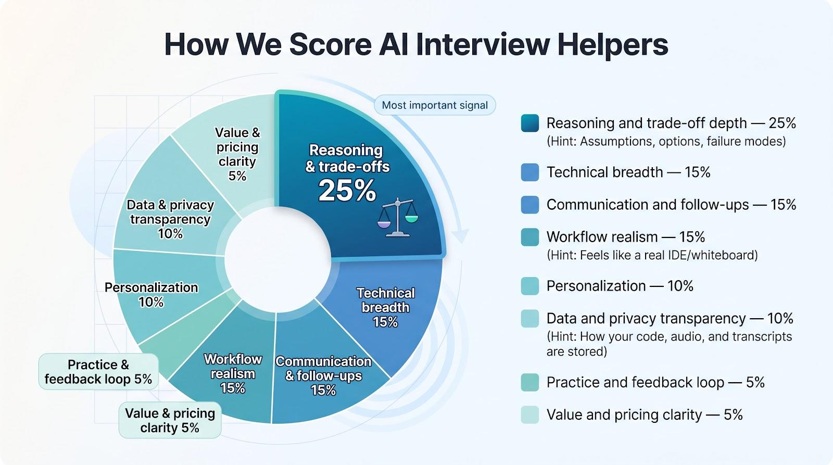
Reasoning tops the list because 66 percent of hiring leads reward candidates who fix AI output and 56 percent value clear trade-off explanations, according to CoderPad’s 2026 survey. Canva’s interviewer guide echoes this, noting that strong candidates “offer alternative approaches and weigh trade-offs thoughtfully.”
Each tool earns a numeric score inside its permission lane, so you can compare practice platforms with practice platforms and live copilots with live copilots, then pick the assistant that strengthens your weakest muscle, not the flashiest marketing claim.
1. Interview Copilot: live guidance that knows your background
Interview Copilot is a lightweight desktop overlay that listens to interview audio, detects each new question, and flashes concise talking points you can scan without breaking eye contact.
Context is its edge. Before the call, you upload your résumé and the job description; every suggestion then references your stack, projects, and impact metrics. Instead of a flat “mention scalability,” Copilot nudges you to cite that Kafka pipeline you tuned to handle a ten-fold traffic spike.
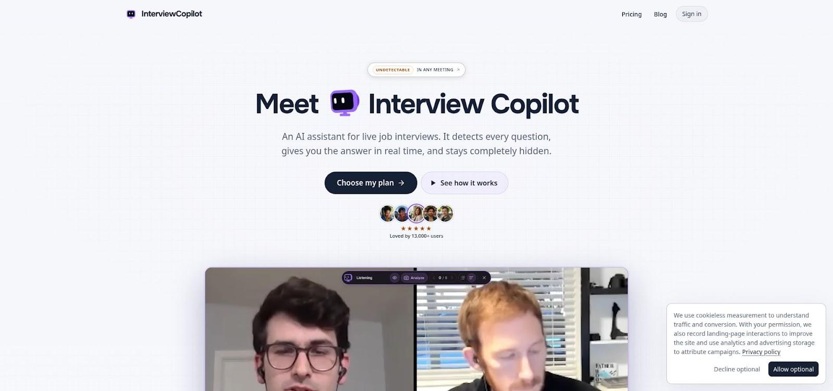
Interview Copilot Live Desktop Overlay Interface Screenshot
For coding prompts, one shortcut launches Interview Copilot's coding help, which reads the screen and outlines an approach, complexity analysis, and likely pitfalls, exactly the kind of trade-off awareness hiring managers reward.
Price is straightforward: $49 for one month or $149 for a full year, with every feature unlocked and no credit caps. The app is free to download and test on a practice interview with no credit card, though a live interview requires a subscription. Every payment carries a 100 percent money-back guarantee if you email [email protected] within 7 days.
Caveats: the company says the overlay does not appear in screen shares, recordings, or screenshots, but it advises against using a work, school, or managed computer because those often run monitoring software. The company also notes that interview audio is streamed for transcription, not stored, while final transcript segments and analyzed screenshots are stored with the account. Interview data is not used to train public models. Always secure explicit employer permission before running any external assistant.
If your interviewer allows outside AI and you want prompts tailored to your own experience, Interview Copilot remains the most purpose-built live option.
2. HackerRank AI Mock Interviews: best all-round technical simulator
HackerRank’s candidate suite mirrors the interview environment you already know: the same code editor, whiteboard, and timer many employers use. Practice modes span algorithm drills, voice-based technical screens, full system-design rounds, and a new “AI-fluency” scenario that asks you to direct a model rather than just write code.
After each session you receive a rubric-driven report on approach, complexity, communication, and test coverage, touching every high-value signal in our scorecard. The whiteboard even reads your diagram and pushes back with capacity or failure questions, echoing a human interviewer’s classic “What happens when traffic spikes?” probe.
Pricing is credit-based. A Basic plan includes one coding AI mock; higher tiers add more mocks across round types, but exact dollar figures appear only at checkout. Documentation also conflicts on whether purchased credits expire, so capture the terms before you pay (according to HackerRank’s documentation page).
In live employer interviews, recruiters can enable the same AI assistant and view every prompt you enter, so practicing here builds muscle memory for those transparency rules.
3. Hello Interview: system-design practice that drills your architecture story
Most AI interview coaches start with algorithms and bolt on architecture later. Hello Interview flips that order. You begin on a whiteboard canvas that understands shapes, arrows, and text, then work through a five-step flow recruiters know:
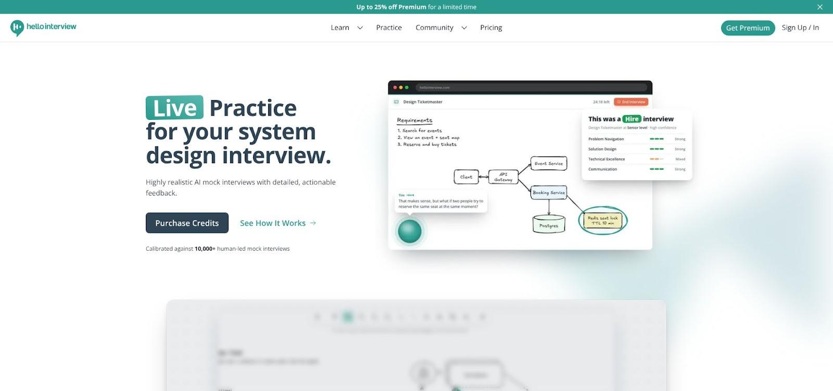
Hello Interview System-Design Whiteboard Practice UI Screenshot
- Clarify requirements
- List key entities and APIs
- Sketch the high-level design
- Dive into data flow, scaling, and failure modes
- Summarize trade-offs and next steps
At each stage the coach follows up. Propose a global cache and it checks consistency; suggest sharding and it presses on rebalance strategy. The session feels like a seasoned staff engineer playing devil’s advocate, perfect for senior loops.
Hello Interview also supplies AI-assisted coding tasks that prompt you to review and refine before committing, rewarding thoughtful editing over quick pastes.
Pricing changes by promotion. Recent pages list a one-month pass at $47 to $59, with one-year and lifetime options under $100 and $350 respectively, all as one-time payments. Confirm the figure at checkout.
Choose Hello Interview when your upcoming round leans on architecture diagrams, capacity planning, and crisp trade-off narration; the tool keeps asking “why?” until every box and arrow has a reason.
4. Nyrion: best fit for AI-assisted code-base rounds
Modern interviews often share a live repository and an AI helper, then let you steer a feature change. Nyrion exists for that format.
Instead of single-file puzzles, it gives you a gated repo: each checkpoint unlocks only when your tests pass, so weak fixes cannot slip through. You outline a plan, direct the built-in assistant to implement it, and review every line: pair programming where you remain tech lead and the model plays junior dev.
Afterward, a debrief asks you to justify design choices, critique generated code, and propose next steps, mapping neatly to our highest-weighted signals: reasoning depth, communication, and workflow realism.
Pricing is clear: a free tier for light practice, then Pro at $19 a month or $149 a year with unlimited assistant use. The vendor also states it does not train models on your code or conversations, which appeals to privacy-minded candidates.
Limitations: Nyrion focuses on AI-assisted coding, not classic DSA or whiteboard architecture. Interview-format guides on its site can be anecdotal, so confirm specifics with your recruiter. If your loop includes an AI helper inside a real repo, Nyrion is the closest rehearsal available.
5. interviewing.io: human calibration when every detail counts
AI drills build volume, yet a seasoned engineer can still reveal gaps no model spots. interviewing.io covers both needs. You can run unlimited free sessions with its AI interviewer, then book an anonymous mock with a senior developer from companies such as Google or Stripe.
The flow stays light: choose a round (coding, system design, machine learning, or engineering-manager behavioral), enter a shared code editor with voice chat, and tackle real-time probes and shifting constraints. Afterward, you receive a rubric score and written feedback that surfaces narrative or prioritization blind spots automated reports miss.
Price is the trade-off. A single expert session starts at $179, making it a dress rehearsal for high-stakes loops rather than nightly practice. On the plus side, the platform keeps you anonymous: no video, no last name, no casual timezone quiz.
When you need to know whether your explanations land with an actual hiring engineer, one focused session on interviewing.io can replace multiple rounds of self-directed guesswork.
6. Final Round AI: one account for practice, live help, and debrief
Final Round AI bundles three stages: scenario-based drills, a desktop overlay for live coding or system design, and an automatic debrief that flags weak trade-off explanations.
That breadth is the draw. Résumé grounding, code hints, system-design scaffolds, and behavioral frameworks live under one login, so you avoid switching tabs seconds before the call.
The range, however, brings cost and data trade-offs. The checkout page lists $150 for a true month-to-month plan, while the headline rate starts at $25 per month with unlimited live copilot sessions if you commit to a full year. The privacy policy notes that session audio is recorded and selected transcripts or résumés may be used for model training. Trustpilot reviewers also mention billing and reliability issues, so test the cancellation flow well before interview week.
If your employer explicitly allows external copilots and you want everything in one place, Final Round offers the widest feature set. Budget for the plan length you will use and confirm how your data is stored.
7. LockedIn AI: broad device coverage, premium price tag
LockedIn AI works as a desktop overlay, browser extension, and mobile app, delivering real-time coding hints, system-design scaffolds, and a quick mock-interview mode that helps when recruiters call on the go.
Flexibility carries a cost. LockedIn’s pricing page lists a standard month-to-month price of $139.98; its Credits plan shows $49.99 per month with a promotional code applied, billed every three months. According to the vendor, audio and video files are discarded after processing, but text transcripts remain on LockedIn’s servers and may pass through external speech-to-text and model providers. Trustpilot removed questionable reviews in 2026 and no longer shows an aggregate score, so rely on primary documentation rather than star averages.
Choose LockedIn when you need live AI support across devices and have a budget that extends beyond a single interview cycle.
8. Aced: peer practice plus a deep lesson library
Some skills land only after you hear yourself explain them aloud. Aced taps that insight by pairing you with another engineer for real-time mock interviews and layering an extensive course library on top.
Each month you receive five free peer mocks and alternate roles: interviewer and candidate. The shared editor supports DSA drills, system-design sketches, SQL queries, and frontend tasks. Every session ends with a rubric you both complete for fast, concrete feedback.
Prefer solo reps? An AI voice coach helps with pacing and structure, though documentation notes it does not support live coding.
Pricing rewards commitment. The Pro plan drops to $12 a month when billed annually, while a true month-to-month subscription is $79. The Expert tier adds the full AI coaching suite for $20 a month on an annual plan.
Aced suits engineers who learn best by teaching others and want structured lessons across round types. Schedule peer mocks early to handle time-zone logistics, and verify which AI features cover technical questions before relying on them.
9. Yoodli: polish your delivery, not only your answers
Clean code can still fall flat if you mumble through the explanation. Yoodli fills that gap as an AI speaking coach rather than a coding tutor.
Start a role-play, paste the job description, and the tool becomes a conversational interviewer: it times pauses, flags filler words, and scores clarity, pace, and confidence. Upload a meeting recording and you get the same review. The loop is quick; run a new take, watch the metrics rise, and feel your nerves settle.
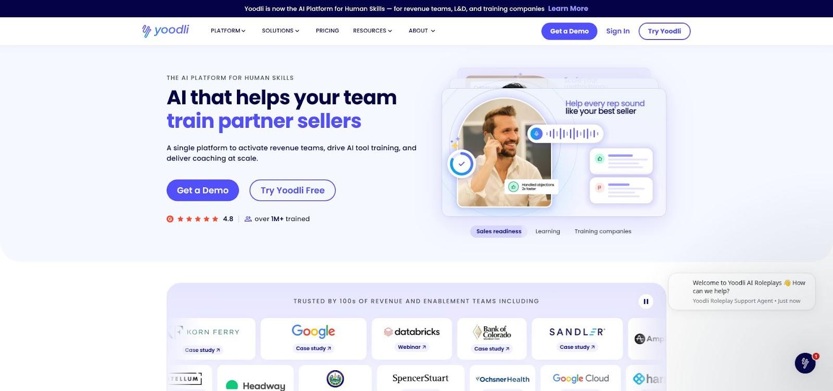
Yoodli AI Speaking Coach Dashboard with Delivery Metrics
Pricing begins with a free tier that includes five lifetime role-plays. Pro is $8 a month (billed annually) for ten weekly sessions; Advanced is $20 a month (billed annually) for unlimited practice and, by default, keeps your data out of model training, a plus if you rehearse NDA-heavy project stories.
Reach for Yoodli when algorithms feel solid but delivery feels shaky; ten minutes of focused vocal reps can boost interview presence more than another LeetCode grind.
10. LeetCode Ask Leet: algorithm volume, your way
When you need high-volume reps, Ask Leet turns every LeetCode problem into an on-demand study partner inside the familiar editor.
Rather than handing over a full solution, the agent can brainstorm approaches, generate boundary tests, or pinpoint why your code fails that eighth case. You control the reveal (one hint, many hints, or a side-by-side complexity comparison), so the mental heavy lifting stays with you.
Quantity is the upside. Premium subscribers unlock thousands of company-tagged problems, timed mock sessions, and instant debugging. Pricing is $35 a month or $159 a year, though regional promotions change often. LeetCode’s privacy policy was last updated in 2017 and mentions little about AI, so assume prompts and code may be retained unless the policy changes.
Ask Leet will not coach your system-design narrative or grade your spoken walk-through, but for pure DSA conditioning it remains the largest practice gym available. Pair it with a voice coach like Yoodli to cover both muscle groups: code accuracy and clear explanation.
11. Beyz AI: live coding help if you commit for the long haul
Beyz positions itself as an on-call coding companion. Launch the desktop overlay and it offers complexity analysis, edge-case prompts, or, when you ask, full solutions. A separate Screen Solver reads whatever snippet is on screen and drafts a fix, useful when the clock is tight.
Pricing is the constraint. The true month-to-month plan costs $49.99, but it excludes the Coding Assistant. Live code help appears only on the quarterly God plan at $32.99 per month or the semi-annual Titan plan at $24.99 per month. Subscriptions are non-refundable, so pre-pay only if several interviews lie ahead.
Privacy coverage is limited. The terms say screenshots captured by Screen Solver are discarded after generating an answer, yet the broader policy (last updated 2024) leaves data-training questions open. Treat Beyz as convenience software, not a repository for sensitive code.
Choose Beyz when you face back-to-back technical rounds, need rapid coding prompts, and are willing to commit to a longer billing cycle.
12. OpenCluely: the open-source route for privacy purists
If browser extensions and closed SaaS tools feel risky, OpenCluely offers full source access. The desktop overlay is free, lives on GitHub, and lets you choose the speech and vision models. Enable local Whisper transcription and nothing leaves your machine unless you point it to a cloud endpoint.
The workflow stays simple: capture a question by mic or screenshot, pull context from session memory, and receive a concise suggestion in a side panel. You can preload your résumé for richer answers or keep the tool stateless for maximum hygiene.
Setup is the trade-off. Windows and Linux have installers, but macOS requires a manual build. Licence labels in the repository conflict (Apache versus MIT), so confirm terms before installing on a corporate laptop. Screen-share shielding is still incomplete on Linux, meaning the overlay may appear to interviewers.
OpenCluely suits engineers who prefer tinkering and local control over polished SaaS convenience and who do not mind troubleshooting a Python build minutes before a call.
Which AI fits each technical-interview round?
Each round stresses a different skill set. Algorithms reward speed and edge-case rigor, system design prizes trade-off clarity, and the new code-base format checks whether you can steer an assistant, not just type.
No single tool wins every category, so match the round to the helper built for it and confirm the permission lane your recruiter allows.
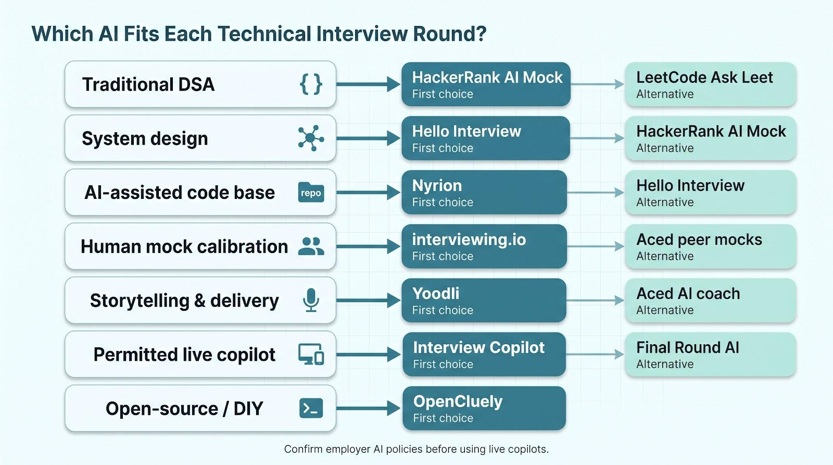
|
Interview round |
First choice (permission lane) |
Alternative |
Why it works |
|
Traditional DSA |
HackerRank AI Mock (practice / employer-visible) |
LeetCode Ask Leet |
Voice follow-ups plus a huge question bank |
|
System design |
Hello Interview (practice) |
HackerRank AI Mock |
Diagram reading and deep trade-off prompts |
|
AI-assisted code base |
Nyrion (practice) |
Hello Interview |
Staged repo tasks and agent direction |
|
Human mock calibration |
interviewing.io (practice) |
Aced peer mocks |
Senior-engineer probing versus free reps |
|
Storytelling & delivery |
Yoodli (practice) |
Aced AI coach |
Filler-word analytics and pacing feedback |
|
Permitted live copilot |
Interview Copilot (permission-sensitive live) |
Final Round AI |
Résumé grounding and concise overlay |
|
Open-source / DIY |
OpenCluely (DIY) |
N/A |
Full local control, no vendor lock-in |
Treat this grid as a starting point. Confirm the company’s AI policy, pick the row that matches your toughest round, and review pricing and privacy before subscribing.
Turn any LLM into a trade-off coach
Even the free tier of ChatGPT or Claude can build interview muscle if you frame the prompt correctly. The goal is to make the assistant question your reasoning, not hand over code.
Use the sequence below as a single prompt or save it as a snippet:
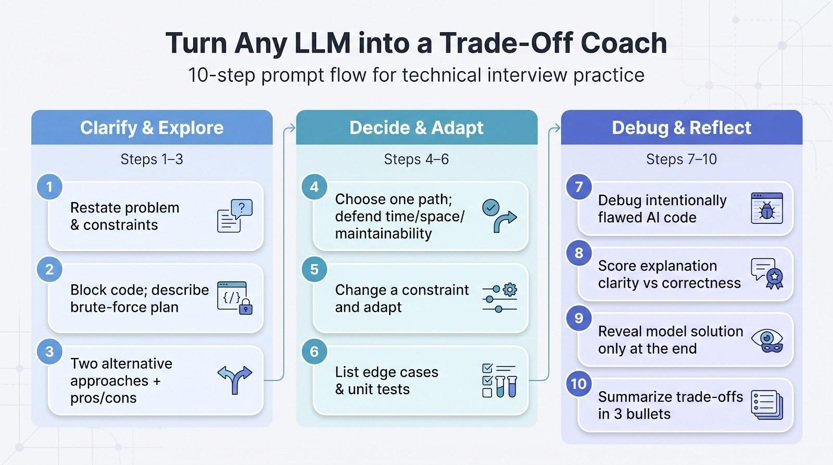
- Ask me to restate the problem and its constraints.
- Block all code until I describe a brute-force plan.
- Push for two alternative approaches and a quick pros-and-cons table.
- Make me choose one path and defend time, space, and maintainability.
- Change one constraint (tighten memory or add concurrency) and see how I adapt.
- Request edge cases and unit tests before implementation.
- Provide intentionally flawed AI code for me to review and debug.
- Score my explanation clarity separately from correctness.
- Reveal your model solution only after my final answer.
- Summarize the trade-offs in three bullets I can reuse during the interview.
This structure builds the higher-order skills interviewers prize: clarifying requirements, weighing options, spotting model mistakes, and narrating your thought process. Try it on a new LeetCode hard problem, a system-design sketch, or a recent pull request; the content changes, but the reasoning habit sticks.
Privacy, employer rules, and recording consent
AI help matters only when it stays inside the interview’s guardrails.
Begin with the strict rule: if the company bans outside assistance, the discussion ends. No overlay, no second laptop, no side-monitor ChatGPT. Ask the recruiter early to avoid awkward mid-call surprises.
Even when AI is allowed, consent layers multiply. Most U.S. states permit one-party recording, but eleven require everyone on the line to agree; if caller and interviewer sit in different states, follow the stricter rule. A brief “Are you comfortable if I run local transcription?” is both courteous and protective.
Next, trace the data flow. Practice platforms may store audio, transcripts, screenshots, or résumés for feedback or model training. Live copilots often claim the overlay stays off screen share, yet managed devices or proctoring software can still surface unapproved apps. Check the privacy policy for retention periods and phrases such as “used to improve our models.”
Five questions to answer before enabling any assistant:
- Is external AI permitted for this round?
- Will prompts or transcripts be visible to the interviewer?
- Does the platform record audio or video?
- Can I review or delete my data later?
- Does the employer prefer or forbid specific tools?
Finally, remember that judgment gaps hurt more than code gaps. Two-thirds of developers in Stack Overflow’s 2025 survey say their biggest AI frustration is output that is “almost right, but not quite.” If you cannot defend every line or diagram box, switch the assistant off and answer unaided; integrity travels further than any shortcut.
Conclusion
Treat AI as a sparring partner, not a substitute. The right assistant sharpens your reasoning, surfaces blind spots, and lets you narrate decisions with confidence.
- Start with practice. For architecture drills pick Hello Interview; for high-volume algorithms choose HackerRank AI Mock or LeetCode Ask Leet; and for spoken delivery, use Yoodli.
- Mirror the real setup. When the employer’s platform includes its own assistant, rehearse there; HackerRank is usually the closest match.
- Follow the rules. Reach for Interview Copilot, Final Round AI, or LockedIn AI only when external help is explicitly allowed.
- Cover edge formats. Choose Nyrion for AI-assisted code-base rounds, interviewing.io for human calibration, Aced for peer rotation, and OpenCluely when local control matters most.
Confirm permission, capture current pricing, review privacy terms, and practice until you can turn the overlay off yet still defend every trade-off. Pair machine speed with human judgment, and you will enter the interview with quiet confidence and clear answers.