Operations | Monitoring | ITSM | DevOps | Cloud

Build better SLOs with RUM and synthetic SLIs

Well-designed service level objectives (SLOs) help you track the benchmarks your app needs to meet to deliver a successful user experience (UX). To track performance against these SLOs, many SRE teams are turning to real user monitoring (RUM) and synthetic monitoring for their service level indicators (SLIs), as these forms of data provide more direct measurements of UX than backend performance metrics.
Introducing Scout 1.0: A new SRE model powering Bits AI with frontier performance at a fraction of the cost

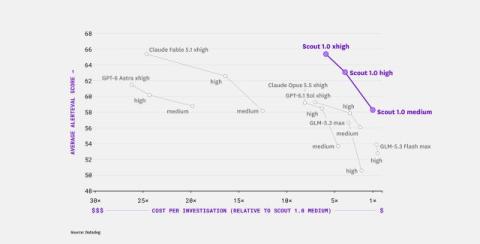
Today, we’re introducing Scout 1.0, Datadog’s first AI model specialized for investigating production issues. Scout powers Bits Investigation, our AI SRE. We trained Scout to reduce inference cost so that investigations are cheap enough to run an order of magnitude more often and earlier in an incident’s lifecycle. Key highlights include: Close dialog.

Monitor the performance of critical steps in user journeys with RUM operations

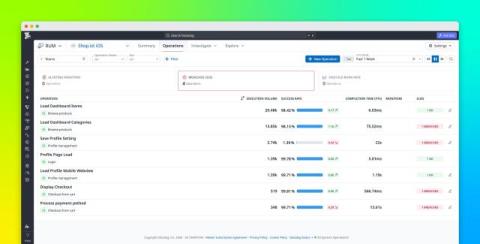
Frontend and mobile applications depend on technical steps that users expect to work in every user journey: loading search results, signing in, saving a payment method, or processing a payment. Datadog Real User Monitoring (RUM) captures detailed events about these interactions, including views, actions, resources, and errors. But examining those events individually does not always provide a direct answer to more fundamental questions: Did a critical application step work, and how long did it take?

How Kubernetes DRA can improve GPU utilization and cut costs

Organizations are spending more on GPUs as they move AI workloads into production, and improving GPU utilization is a key priority. But Kubernetes’s legacy device plugin model can limit those improvements because it constrains how workloads request and consume GPU resources. Teams must configure GPU partitioning before workloads are scheduled. Resource requests cannot distinguish GPUs by capability, and a workload can reserve an entire GPU while using only part of its capacity.

How Datadog defines service criticality at scale

Datadog runs thousands of internal services and has been increasing global footprint year after year. For most of that growth, we treated services uniformly when making deployment and reliability decisions. At our current scale, that approach became expensive. A change destined for production rolls out to data centers sequentially, so deployment time grows with every data center we add.

Unify data across Datadog BYOC with cross-cluster queries for teams and AI agents

Organizations may need to keep data in specific regions or infrastructure they control, whether because of data residency requirements, internal policies, or transfer costs. Datadog Bring Your Own Cloud (BYOC) extends the Datadog platform into those environments. Each BYOC deployment runs as a Kubernetes cluster with its own object storage, keeping data close to its source.

Define user actions on your web app with visual labeling in Product Analytics

Adding or renaming a product event has traditionally meant creating an engineering ticket. Datadog Product Analytics uses the same SDKs and configuration as Real User Monitoring (RUM), and those SDKs autocapture actions such as clicks and taps. But an automatically generated action name describes the element rather than the user intent behind it.

Run incident response in your FedRAMP High environment

Earlier this year, Datadog for Government achieved FedRAMP High certification, extending our GovCloud environment (US1-FED) to the federal government’s most sensitive civilian workloads. That certification now covers Datadog Incident Response, bringing paging, incident coordination, automation, and postmortem workflows into US1-FED. When a government system goes down, responders need to reach the right people, coordinate a fix, and keep stakeholders informed.

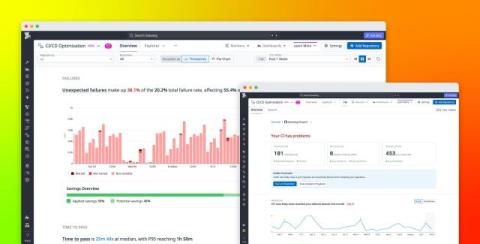
Ship faster, improve reliability, and control CI costs with Datadog CI/CD Optimization

AI-assisted development can increase the rate at which teams produce code, but teams only realize those velocity gains if CI can keep pace. More pull requests (PRs) mean more builds, tests, and pipeline executions. Slow jobs leave developers and coding agents waiting for feedback, flaky failures consume time in reruns and investigations, and unnecessary test execution increases runner demand as delivery volume grows.

Monitor Databricks with Datadog

Earlier in this series, we covered key metrics for monitoring performance in Databricks and discussed Databricks’ native resources for accessing those metrics and other key observability data, such as logs and data lineage. In this post, we’ll cover using the Databricks integration to bring that data into Datadog and monitor your Databricks analytics and AI/ML workloads alongside the rest of your end-to-end data pipelines and distributed infrastructure. We’ll show you how to.