
What a Modern Business Tech Stack Should Look Like
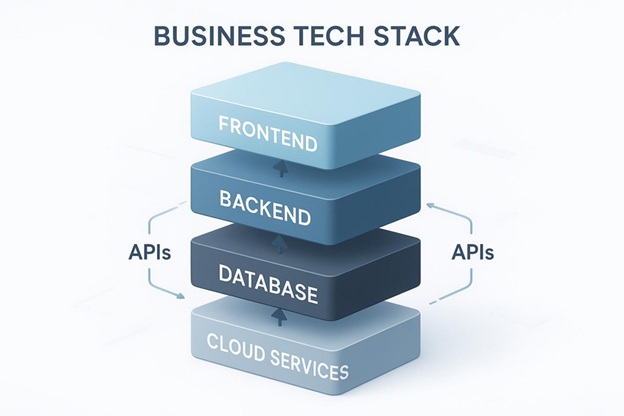
In today’s fast digital market, the real question is not if your business needs tech, but which tech will help you move forward. A modern business tech stack is more than a pile of apps. It’s a carefully chosen set of digital tools and systems (like programming languages, frameworks, databases, front-end and back-end tools, and APIs) that work together to run day-to-day operations, support new ideas, and help the business grow.
It supports your online presence and helps your teams work more smoothly. If you get it right, you can move faster than competitors; if you get it wrong, you can fall behind.
For new founders and established companies trying to improve how they work, it helps to understand the basics. When starting out, it often makes sense to choose free tools or low-cost plans, such as free cloud storage that can handle your early data needs.
These “tool stacks” change all the time. Platforms come and go, and new options show up every year. Businesses often review their tools and switch over when something fits better-similar to how team messaging has shifted from Spark to Slack, then to Rocket, and so on. This is not about chasing trends. It’s about building a setup that meets today’s goals and can still adjust later.
What Is a Modern Business Tech Stack?
A modern business tech stack is the full set of technologies a company uses to build, run, and grow its digital products and services. This can include the operating systems and programming languages used by developers, the databases that store key information, and the cloud systems that host everything. Ideally, it works as one connected setup that helps teams run processes faster, communicate better, and create better customer experiences.
The tools you pick matter because they shape what your business can do. They affect what products you can build, how easily you can connect to other services, how fast work gets done, and which skills you need when hiring.
A tech stack is not a fixed list. It changes over time as your needs and the market change.
How Does a Tech Stack Support Business Operations?
A well-built tech stack works like the main wiring of a business. It helps different departments run smoothly using systems that share data and support the same goals. These tools can speed up workflows, track work progress, and support many daily tasks. From automating repeat work to showing real-time customer data, the right stack helps teams do more with fewer steps.
Here are some real results people report:
- Over 70% of small business leaders say digital tools improve efficiency and lower costs.
- Deloitte studies show digitally advanced small businesses earn about twice as much per employee and are three times more likely to grow their team.
A strong tech stack supports sales, marketing, customer service, inventory, and finance. It can turn messy work into clear, trackable processes.
What Are the Common Types of Tech Stacks?
Older tech stacks were often simple. A well-known example is LAMP (Linux, Apache, MySQL, PHP) for web apps. These setups worked well at the time, but today’s options are much wider. With SaaS tools and cloud computing everywhere, teams now mix many tools to build solutions that fit specific needs.
Modern stacks are often grouped by what they focus on, such as:
- Full-stack: front-end + back-end
- Mobile stacks: iOS and Android tools
- Special stacks: data science, AI, or IoT
The key is not the “best” tool name-it’s whether the tools match your business. A startup may focus on flexible, low-cost tools. A large company may focus on scaling and strong security.
Why Tech Stack Decisions Affect Business Success
Every tech choice you make today shapes what you can do later. These are not “IT-only” decisions-they are business decisions. Your stack affects how fast you can build, how well you can scale, how safe your data is, and how easy it is to hire and keep skilled people. Bad choices can cost a lot and cause problems across the company.
A good tech stack can push growth forward. A poor one can slow everything down and waste time and money. The goal is to build a foundation that supports your plans, instead of blocking them.
How Stack Choices Influence Growth and Agility
The right stack helps you grow and react fast. It supports quick feature releases, good security, and fast changes when the market shifts. McKinsey research shows companies with flexible architectures release new features four times faster than those using large “all-in-one” systems. That speed matters when customers expect quick fixes and competitors move fast.
Mistakes can be expensive. One global manufacturer spent six months and $2.3 million fixing performance issues after picking a cloud platform that didn’t match their data needs. During that time, competitors shipped major features. Also, upgrading older systems (often needed because of past stack choices) can shift 60-80% of maintenance budgets back into new work, which shows how much stack strategy affects innovation.
Should Tech Stacks Evolve with Business Strategy?
Yes. A tech stack that never changes is old thinking. Stacks change for three main reasons: growth, budget, and staying current.
- Growth: Tools that work for a small team may break down with larger teams, more users, and more complex work.
- Budget: As revenue grows, you can pay for better tools that improve speed, quality, and employee experience.
- Staying current: New tech changes what customers expect. For example, AI tools are now common, pushing many companies to add AI-ready systems that lower project time and reduce dev work.
Your tech stack should support your business plans. It should never become the main goal by itself.
Core Components of a Modern Business Tech Stack
A modern tech stack is made of different parts that work together. Each layer has its own job, and choices at one layer affect the others. Knowing these layers helps you build a setup that can grow and stay easy to maintain.
Frontend Technologies: User Experience and Accessibility
The frontend is what users see and use. It includes the user interface and the code running in the browser. Frontend tools shape user experience, accessibility, and speed, which affects engagement and sales. Common frameworks include React, Angular, and Vue. For example, Airbnb moved to React in 2017 and, as documented in their engineering blog, improved performance by 50%.
Many companies use design systems (like Uber’s Base Web) to keep the look and behavior consistent and speed up development. Speed improvements like code splitting, lazy loading, and modern image formats can cut load times a lot, like Notion’s 2018 rebuild showed.
For apps that need both web and mobile, tools like React Native or Flutter can share one codebase, though teams still need to think about performance trade-offs.
Backend Infrastructure: Stability and Scalability
Backend services run the core logic, connect systems, and handle data access. They support stability, security, and scaling. Architecture choices matter:
- Monoliths can be easier early on but often slow down growth later.
- Microservices (often managed with Kubernetes) let you scale parts independently and deploy faster, but add extra work for monitoring and service-to-service communication.
A strong API plan also matters. Stripe’s API approach is a good example of balancing fast changes with backward compatibility so users aren’t disrupted. Auto-scaling cloud services and serverless functions help handle traffic spikes without manual work. Common backend options include Node.js, Java, .NET, Django/Python, and Ruby on Rails.
Database and Data Architecture
This layer stores and organizes your data, so it’s a core part of any stack. It often includes:
- Relational databases: PostgreSQL, MySQL
- NoSQL databases: MongoDB, DynamoDB
- Warehouses and pipelines: for reporting and analysis
Real-time data processing is now common for recommendations, analytics, and operations. Netflix processes billions of events daily to personalize content, and DoorDash uses streaming analytics to improve delivery decisions in seconds. Tools like Apache Kafka or AWS Kinesis support these event streams. Data Mesh ideas (used at Spotify) organize data by business area so teams can move faster. Gartner predicts 70% of new apps will include AI by 2025, which makes strong data pipelines even more important.
Cloud Services and Hosting Platforms
Cloud hosting is now a standard part of modern stacks. Statista reports over 85% of enterprises are moving to cloud-first plans. AWS, Google Cloud, and Azure offer many services you can pick based on needs and cost.
Cloud-native design often includes microservices, containers (like Kubernetes), and API-based communication. This allows parts of the system to scale without breaking everything else. Instead of scaling “up” one big server and pushing manual updates, cloud-native systems scale “out” and support continuous delivery and built-in recovery. This fits companies that expect growth or work across regions.
Security and Compliance Solutions
With more cyber risks and stricter laws, security and compliance must be part of the stack from day one. A single breach can damage trust and lead to large fines. IBM’s 2023 Cost of a Data Breach Report found companies with strong zero-trust designs saved about $1.5 million per breach on average.
Common security parts include:
- Identity-based access and secrets storage (for example, HashiCorp Vault)
- Microsegmentation (like Google’s BeyondProd model)
- Automated security checks in CI/CD pipelines
Compliance needs (GDPR, CCPA, ISO 27001, SOC 2) also change over time, especially in finance and healthcare. Systems should support data location rules and strong audit trails early, and use tools that make audits and threat detection easier.
Integration and Automation Tools
Many companies use hundreds of apps. Integration and automation tools help those systems share data and avoid silos. APIs and API gateways act as connectors across the stack. Shopify’s App Store shows how a platform can support thousands of integrations while keeping performance and security.
Automation through CI/CD pipelines reduces release time and lowers deployment risk. Middleware, auth services, and encryption tools also help move data safely between systems. The goal is connected tools with less manual work and more reliable operations.
Collaboration, Productivity, and Communication Platforms
A modern stack should also support the people using it. Communication and productivity tools keep teams aligned. For small teams, Slack or Pumble for chat and Trello or ClickUp for tasks are common. As teams grow, tools like Asana (with AI features) or Monday.com (with detailed workflow setup) can help.
For larger companies, Microsoft Teams is widely used because it connects well with Microsoft 365 and many third-party tools. These platforms support project tracking, file sharing, document editing, notes, whiteboards, and scheduling.
Analytics and Business Intelligence Tools
Modern businesses need ways to understand performance and make decisions. BI tools combine data across the company and show it in reports and dashboards. Common tools include Microsoft Power BI, Tableau, and Looker.
Product and behavior analytics tools focus on how people use your product. Tools like Contentsquare, Google Analytics, Amplitude, and Mixpanel help you see which features are used, where users get stuck, and what paths lead to conversion. This data helps with pricing, feature plans, and marketing.
How to Choose the Right Tech Stack for Your Business
Picking the right stack is not about finding a “perfect” combo. It’s about choosing what fits your business. Every option has trade-offs: some tools save time but limit customization, others scale better but need more upkeep. Focus on what helps your business most-not what’s trending.
Start by defining your goals. What are you building, who is it for, and what parts must never fail? Those answers guide the stack you choose and help it grow with your company.
Scalability and Performance Needs
A key factor is whether your stack can grow with you. Your tools should handle more users, more data, and more transactions without major rewrites or slowdowns. Modular design helps parts of the system grow as needed. Many cloud platforms (like AWS) can add servers automatically so you don’t need to guess capacity upfront.
Performance also matters: UI speed, API response time, and data processing all affect user experience. Poor matches between tools can create slow systems and higher upkeep. Strong teams pick front-end and back-end tools together so responsiveness and reliability match the product plan.
Total Cost of Ownership and ROI
Stack choices also affect your budget. Total Cost of Ownership (TCO) is more than licenses and servers. It includes maintenance, security work, incident response, and often the biggest cost: people. If your stack needs rare experts, hiring becomes expensive and slow, and delivery risk goes up.
Look at the full cost over time. Simpler tools can win over “fancy” ones if they reduce ongoing effort. Track results using:
- Technical measures (uptime, latency)
- Developer output (deploy frequency, recovery time)
- Business impact (customer satisfaction, revenue growth)
Paying for tools that match long-term goals often avoids costly workarounds later.
Talent Availability and Support Ecosystem
It helps to pick tools that many developers already know. Popular languages and platforms make hiring and onboarding easier and lower long-term risk. Mature ecosystems often have strong documentation, community help, and lots of ready-to-use libraries.
New or very specialized tools may cost more and take longer to staff, or require extra training. A good balance between new ideas and practical hiring helps your team focus on building the product instead of fighting obscure issues.
Vendor Lock-In and Future Flexibility
Vendor lock-in is a real risk. Some platforms are easy to start with but hard to leave later, which can limit options and raise costs. It helps to choose tools with clear upgrade paths and reasonable switching costs. For example, a small online store might start on a basic Shopify plan and later upgrade or move to a custom site.
Modular architecture, clean APIs, and clear boundaries reduce lock-in. Infrastructure-as-code and steady CI/CD practices also make it easier to swap parts later without a major rewrite. Aim for the simplest setup that fits today and still leaves room to change direction.
Security, Compliance, and Data Privacy
Security must be part of the stack from the start. Ignoring it can lead to breaches, fines, and brand damage. Whether you store user data, take payments, or track internal metrics, your stack should support encryption, authentication, access control, and audit logs early.
Compliance (GDPR, CCPA) matters even more for global businesses or regulated fields like finance and healthcare. Pick tools that make audits easier (ISO 27001, SOC 2) and support automated threat detection. Build systems that can keep data in certain regions when laws require it, and create audit trails from day one. Doing this early costs far less than fixing it later.
Popular Tech Stack Combinations and Their Benefits
Some teams build stacks from scratch, but many start with common combinations that already work well together. These stacks help teams ship faster, hire more easily, and reduce early risk while still allowing growth.
MERN Stack: MongoDB, Express, React, Node.js
MERN is a strong JavaScript stack for single-page apps and fast prototypes. It includes:
- MongoDB: a flexible NoSQL database
- Express.js: a backend framework
- React: a UI library
- Node.js: a runtime for backend code and APIs
A big benefit is that every layer uses JavaScript. That reduces context switching and speeds up onboarding. It’s a good fit for startups and small teams building MVPs and lighter apps.
Django with React and PostgreSQL
This setup mixes Python on the backend with a modern JavaScript UI and a reliable relational database:
- Django: a Python framework with built-in auth, admin tools, ORM, and routing
- React: for the UI
- PostgreSQL: a strong open-source relational database
This stack works well for internal tools, dashboards, and operations platforms where data accuracy, reporting, and a strong backend matter.
Serverless Architectures and Cloud-Native Options
If you want strong scaling without managing servers, serverless can be a good choice. A common setup is:
- React: frontend
- AWS Lambda: backend code that runs on demand (pay for usage)
- DynamoDB: NoSQL database with very high scaling
With serverless, you don’t manage servers, and costs are based on usage. This lets teams focus on app logic. Cloud-native options more broadly include microservices, containers (Kubernetes), and API-first design. These systems are built for distributed setups, fast recovery, and continuous deployment, which fits fast-growing companies.
Comparing Stack Choices for Different Business Sizes
The best stack often depends on company stage:
- Small Startups/MVPs: Often choose MERN or Ruby on Rails with Hotwire for speed, lower starting costs, and faster iteration.
- Growing Mid-Sized Businesses: Often use Django + React + PostgreSQL, or Next.js + Node.js + a database that fits their needs, for a good mix of speed and scaling.
- Large Enterprises/High-Compliance Industries: Often choose Spring Boot + Angular + MySQL/PostgreSQL for stability, scaling, and strong security features (common in fintech, healthcare, logistics).
The best match depends on your goals, team skills, and plans for growth.
Steps to Build and Improve Your Business Tech Stack
Building and improving a tech stack is ongoing work. It takes planning, small changes over time, and regular reviews. The goal is a tool setup that works today and can adjust later.
Auditing Current Tools and Identifying Gaps
Start with an audit of the tools you already use. List every tool, such as project management, CRM, accounting, and marketing apps. This helps you see what works, what is underused, and what overlaps. Check what the team actually uses versus what is installed but ignored.
Next, find the gaps:
- Where do workflows slow down?
- Where is work repeated?
- Which processes have weak tool support?
- Can current tools support growth?
Team feedback helps a lot because they see the daily friction. This clear picture gives you a base for smart changes.
Setting Priorities Based on Business Goals
After the audit, set priorities based on business goals. Ask: “Which tools will help the business most?” Define what success means for your product: who the users are, performance needs, compliance limits, and how often you might need to change direction.
Balance speed and long-term plans. Don’t build an MVP so complex that it slows learning, but don’t build something so fragile that every feature needs a rewrite. A staged approach works well: start with a common, well-supported stack, keep parts modular, use clean APIs, and set up steady CI/CD early.
Phased Implementation and Testing
Make changes in phases to reduce risk. A typical rollout might look like:
- Phase 1: Stabilize the foundation. Focus on reliability, basic monitoring, and strong testing.
- Phase 2: Improve scalability. Add caching, tune databases, and use Kubernetes if it clearly helps.
- Phase 3: Speed up feature delivery. Add microservices, AI insights, and stronger automation after the base is stable.
DevOps practices help from the start. CI/CD pipelines shorten release cycles and reduce deployment risk. Test at every step so new tools don’t break business operations.
Best Practices for Managing and Updating Tech Stacks
A tech stack is never “done.” It needs regular care so it keeps supporting the business instead of becoming dead weight.
Routine Tech Stack Audits and Updates
Review your stack often-every quarter or at least twice a year. Check if tools still support key processes and goals. Update versions for security fixes and new features, and remove tools that no longer help or repeat other tools’ jobs. This prevents technical debt and keeps the stack lean and safe.
Also stay aware of new tools and trends. You don’t need to chase every trend, but ignoring change can leave you behind. Regular reviews help you judge new options based on real needs, including AI features, without getting pulled into hype.
Integrating New Tools without Increasing Complexity
As your needs grow, you’ll add tools. The goal is to add them without creating more mess. Choose tools with open APIs and strong integration support. Focus on connected “toolboxes” rather than isolated apps.
Example: a cloud POS should connect cleanly to payments and the CRM. This avoids manual work, keeps data flowing, and lowers overhead.
Avoiding Tool Overlap and Redundancy
Too many tools can confuse teams and slow work. A crowded stack wastes money, increases training time, and can cause data conflicts. Regularly check whether tools can be combined or replaced. When possible, pick tools that cover multiple needs and work well with the rest of the stack. Keep things simple so the stack stays manageable.
Ensuring Team Training and Vendor Support
Tools only help if people know how to use them. Pick vendors with strong support, clear docs, and a product plan that shows they will stick around. Training sessions, tutorials, and active user groups help teams learn faster.
Encourage sharing inside the team too-small tips on project tools, customer tools, and workflows can save hours. When people learn and share often, productivity goes up and daily problems get solved faster.
Common Pitfalls When Assembling a Business Tech Stack
Picking and managing business tech can be hard, and many teams make the same mistakes. Knowing these risks helps you avoid them and build a stronger foundation.
Risks of Overengineering and Complexity
A common mistake is overengineering-adding too much too early, often to “future-proof” or use trendy tools. A popular framework may not fit your needs. Some new tools may not have strong community support or long-term stability. If key team members leave, complex or uncommon tools can become a major problem.
For MVPs, extra complexity slows learning. Stick to the simplest setup that meets today’s needs and has a clear path for growth.
Neglecting Integration and Data Flow
Many companies use hundreds of apps. If your tools don’t connect well, you get data silos and fragile manual processes. Teams can waste time making systems talk to each other instead of building product features. Plan for integrations early, and choose tools that support strong APIs and clean data exchange.
Underestimating Security Requirements
Security can’t be added at the end. Skipping security steps can lead to breaches, fines, and brand damage. Recent global averages put breach costs around $4.45 million, making this a leadership issue, not just an IT issue.
Your stack should support encryption, strong authentication, access controls, and audit logs from the start. Zero-trust designs and security checks in CI/CD pipelines are smart steps that can save huge costs later.
Ignoring Long-Term Maintenance
Shortcuts can help you ship quickly, but ignoring maintenance builds technical debt. Old libraries, security holes, and weak integrations pile up and slow future work. Picking tools only because they are cheap or free can lead to expensive fixes later if they don’t scale well.
Choose tools with clear upgrade paths and strong community support. Plan time and budget for updates and refactoring. Also avoid switching stacks mid-project without a clear migration plan-this can destroy schedules and budgets and force full rebuilds.
Frequently Asked Questions about Business Tech Stacks
Tech stacks raise a lot of questions. Here are some common ones to help make things clearer.
What Is the Difference between Legacy and Modern Stacks?
The main differences are architecture, scaling style, deployments, and speed of change.
- Legacy Stacks: Often use a single large app where parts are tightly linked. They often scale by buying bigger servers, and deployments are manual or scheduled. Changes are slower, and costs often include large upfront hardware and licensing.
- Modern Stacks: Often use cloud-based services and smaller parts that can be built and deployed separately. They scale by adding more service instances, and updates can be automated through CI/CD. They usually have better fault handling and usage-based pricing.
Modern stacks focus on speed, scaling, and resilience. Legacy stacks often slow growth and new product work.
How Often Should Businesses Review Their Tech Stack?
A good rule is at least once a year, and also whenever major business changes happen. Fast-growing startups or fast-moving industries may benefit from quarterly reviews.
These reviews should check:
- Do current tools still match core processes?
- Are there updates needed for security and features?
- Are any tools no longer useful or now redundant?
This reduces technical debt and keeps the stack aligned with business goals.
When Should a Company Consider a Major Stack Overhaul?
A major overhaul is big and should happen when the current stack actively blocks growth or smooth operations. Common signs include:
- Scaling problems: performance issues with more users or data
- Slow product work: teams spend most time maintaining instead of improving
- Weak integrations: data is fragmented and systems break often
- High upkeep costs: TCO becomes too high due to maintenance and staffing issues
- Security/compliance risk: can’t meet new security or legal needs
- Vendor lock-in: one vendor limits your options and raises costs
A full rebuild is usually a last option. Many companies can move in phases with a clear plan to avoid downtime.
Key Takeaways for Designing an Effective Business Tech Stack
Building an effective business tech stack is ongoing work, not a one-time project. The best stack is not the one with the newest tools. It’s the one that helps your business build faster, adapt to change, and grow. That means matching tech choices to business goals, planning for scaling, and building systems that can handle change.
Early tech choices are easy to make and very expensive to undo. A structured, data-based review process can reduce risk and help you plan ahead. Over time, fast shipping compounds, and a smart mix of front-end and back-end tools, scalable frameworks, and a well-managed software stack can support long-term business growth.