
How to Plan a Successful UAT: Roles, Timeline, and Readiness Checklist

Image Source: depositphotos.com
You're two weeks from launch. Development says they're done. QA signed off. Then you hand the system to actual users and watch everything fall apart. Buttons nobody clicks. Workflows nobody understands. Features that technically work but make zero sense in real life.
That's what happens when you skip proper User Acceptance Testing planning. UAT isn't just the final testing phase. It's your last chance to catch the gap between what you built and what users actually need. Miss this step and you're fixing production issues while angry customers flood your support inbox.
Planning UAT well means knowing exactly what success looks like before users touch anything. You need clear entry and exit criteria in testing so everyone knows when to start and when you're actually done. You need a user acceptance testing template that captures real scenarios instead of happy-path fantasies.
What UAT is and why it matters
User Acceptance Testing validates that your system works for the people who'll use it every day. Development testing proves code works. QA testing proves requirements are met. UAT proves the system solves real problems without creating new ones.
QA verifies that clicking "Submit" saves data to the database. UAT verifies that sales reps can actually close deals using your new CRM without calling IT every five minutes.
You're testing business workflows, not technical functions. You're catching the requirements nobody wrote down because they seemed obvious until the system went live.
[Image: Diagram showing the testing pyramid with UAT at the top, representing end-to-end business validation]
UAT scope and success criteria
You can't test everything. Focus on what matters most to users and business outcomes.
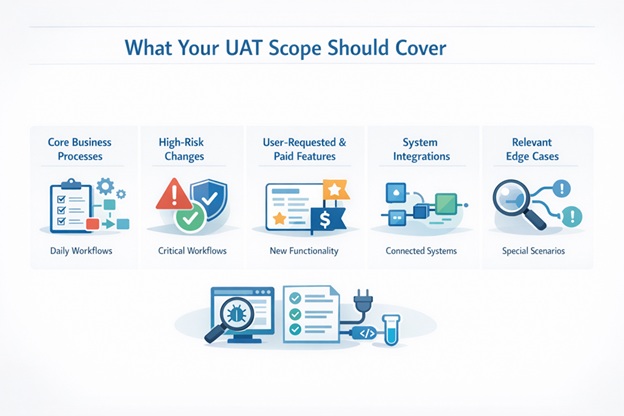
Your UAT scope should cover:
- Core business processes that happen daily
- High-risk changes that affect critical workflows
- New features users requested or paid for
- Integration points where systems talk to each other
- Edge cases that happen often enough to matter
Define what "passing UAT" actually means before anyone starts testing. Success criteria should specify:
- Zero critical defects that block business operations
- Acceptable defect counts by severity level
- Performance benchmarks users will notice
- Mandatory features that must work correctly
Write these down. Get stakeholders to agree. Reference them when someone tries to ship with known issues.
Key UAT roles and responsibilities
UAT fails when nobody knows who's supposed to do what. Assign these roles before planning anything else.
UAT roles and responsibilities break down like this:
- Business Owner: Approves scope, provides users, makes go/no-go decisions, signs off on results
- UAT Coordinator: Schedules testing, tracks progress, manages communication, escalates blockers
- End Users/Testers: Execute test scenarios, document issues, validate fixes, represent real usage patterns
- Business Analyst: Writes test scenarios, clarifies requirements, validates that tests match business needs
- QA Team: Supports test execution, helps reproduce defects, verifies fixes before retesting
- Development Team: Fixes defects, provides technical support, explains behavior when users find confusion
Notice QA doesn't run UAT. Business users do. QA supports them but shouldn't drive execution.
[Image: Visual showing UAT team structure with business users at the center]
Build the UAT timeline (end-to-end)
Most UAT timelines are fantasy. You can't squeeze two weeks of testing into three days because someone moved the launch date up.
Build your timeline backward from the deployment date. A realistic UAT testing process timeline includes preparation (environment setup, test scenarios, user training), execution (running tests, logging defects, initial fixes), resolution (addressing remaining issues, retesting), and sign-off (final validation, documentation, deployment prep).
Plan for four to five weeks minimum. Add 20% buffer because half your users will go on vacation or critical issues will surface late.
Prepare UAT inputs and test assets
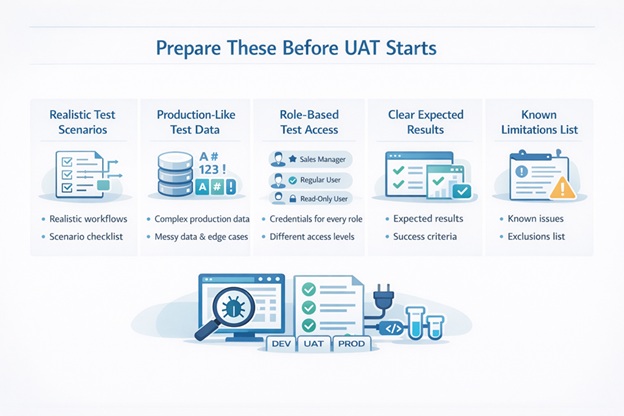
Users can't test without the right materials. Prepare these before UAT starts:
Test scenarios describe realistic workflows users actually perform. Not "click these fifteen buttons." More like "process a rush order from your biggest customer while they're on the phone."
Test data needs production complexity. Real customer names. Actual product catalogs. Messy data with special characters and edge cases.
Test credentials for every user role. Sales manager access. Regular rep access. Read-only access.
Expected results documentation so users know what success looks like.
Known limitations list so users don't waste time reporting things you already know about.
Set up the UAT environment and access
Your UAT environment should feel like production without the risk of breaking production. It needs production-like infrastructure, realistic data volumes, integrated systems, proper security controls, and isolation from other testing.
Lock the environment once UAT starts. No surprise deployments. No configuration changes. Stability matters more than getting one more fix in.
[Image: Screenshot showing a well-organized UAT environment dashboard]
Run readiness checks before starting UAT
Don't start UAT until you're actually ready. Check that all functionality is deployed, QA completed their testing, test scenarios are reviewed, test data is loaded, users are trained, and defect tracking is configured.
Your UAT entry and exit criteria should be verified before announcing testing is open. Start when these boxes are checked, not when the calendar says so.
Execute UAT and manage defects
Track everything in one place. Triage defects daily. Severity 1 blocker? Development drops everything. Cosmetic issue? Document it and move on.
Retest fixes immediately. Don't let fixed defects pile up waiting for retest. Communicate status constantly through daily standups, written updates for stakeholders, and real-time escalation for blockers.
Watch for patterns. Ten defects in one module means something's fundamentally wrong there. Adjust scope when reality hits rather than compressing testing time.
Close UAT and secure sign-off
Review exit criteria to confirm you met them. Present results showing pass rates by scenario, unresolved defects and their impact, and risk assessment for known issues.
Get written sign-off. Email works. Formal sign-off document works better. Verbal agreement doesn't work when production breaks and everyone forgets they approved shipping with known issues.
[Image: Sign-off meeting with stakeholders reviewing UAT results]
UAT readiness checklist
Use this UAT readiness checklist before starting:
Environment Readiness
- UAT environment deployed and stable
- Production-like data loaded and validated
- All integrations configured and tested
- User access and permissions set up
- Environment locked from changes
Test Assets Ready
- Test scenarios written and reviewed
- Expected results documented
- Test data prepared for all scenarios
- Training materials complete
Team Preparation
- UAT roles assigned and accepted
- Users trained on new functionality
- Defect tracking configured
- Communication plan established
Entry Criteria Met
- All functionality deployed to UAT
- Critical QA defects resolved
- Business owners approved starting UAT
- Timeline and milestones agreed
Execution Plan Set
- Daily standup scheduled
- Defect triage process defined
- Escalation path established
- Retest process documented
Conclusion
Planned UAT is the difference between confident deployments and crisis war rooms.
You need clear roles so everyone knows their job. You need realistic timelines that account for how testing actually happens. You need entry and exit criteria that prevent premature starts and subjective endings.
Development proved the code works. QA proved requirements are met. UAT proves users can actually do their jobs with your system. Get that wrong and you're just shipping code. Get it right and you're shipping solutions that work.