


|
By Tomas Koprusak
Your uptime is probably better than your customers think. But the proof sits in your UptimeRobot dashboard, where only your team can see it. Starting today, you can put it on your website. SLA badges let you set an uptime target for your monitors, then embed a live badge that shows the uptime you actually delivered, colored against that target. Add it to your site footer, your docs or your GitHub README, and get the result by email at the end of each period.
|
By Tomas Koprusak
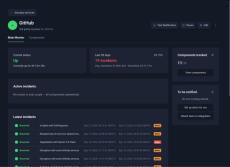
Your checkout might run on Stripe, your files on AWS, and your images on a CDN. When one of those providers has an incident, part of your product breaks with it, and your own monitors can stay green the whole time. Starting today, UptimeRobot monitors beyond your own infrastructure. Third party monitoring lets you add the services your product depends on, select the components you actually use, and get an alert through your existing channels when their status changes.
|
By Tomas Koprusak
Managing monitors has meant one of two things: the dashboard, or writing your own API calls. There is now a third. The official UptimeRobot CLI is live on npm, and it drives every monitor, incident, and status page in your account from the shell you already have open. It is free, open source under Apache 2.0, and works on every plan including the free one.
|
By Tomas Koprusak
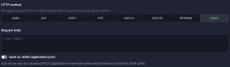
If your API answers on QUERY, you can now point a monitor straight at it. QUERY joins HEAD, GET, POST, PUT, PATCH, DELETE, and OPTIONS in the HTTP method list for HTTP, keyword, and API monitors. You can find it under the “Advanced settings” when editing or adding your monitor. QUERY became a standard in June 2026 as RFC 10008. It’s safe, idempotent, and it carries a request body.
|
By Tomas Koprusak
We’re happy to introduce you to the first agentic uptime monitoring setup! Now your AI agents can continue their coding, testing, and deploy flows into setting up the monitors, including a free account. The agent submits your site’s URL and your email, you confirm with one click in the email you receive, and you have a working monitor plus a free account. No registration form, API key, or dashboard configuration needed.
|
By Tomas Koprusak
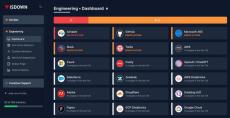
For 15 years, UptimeRobot has answered one question for millions of people: is my site up? Today we’re taking on a related question that’s become just as important: is everything my site depends on up? We’ve acquired IsDown, which tracks the status of more than 6,000 cloud and SaaS providers in one place. Here are the details on what it is, why we bought it, and what we’re building with it.
|
By Tomas Koprusak
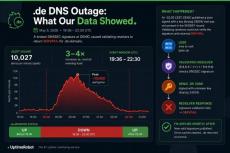
In the evening of May 5th, 2026, large parts of the German web briefly went dark. For a few hours, anyone trying to load a.de address through a major DNS resolver got errors instead of websites. Bahn.de, Amazon.de, and Spiegel.de were among the affected. Major brands like Telekom, DHL, and Sparkassen felt it too, along with hosting providers Hetzner, Strato, and Ionos.
|
By Laura Clayton
Most website monitoring tools look similar until the first real incident. That is when alert speed, false positives, check coverage, and day-to-day usability matter more than a long feature page. UptimeRobot often comes up early for a reason: it is easy to start with, clear to manage, and focused on the checks many teams need first. Still, it is not the only option worth looking at.
|
By Kristian Kusenda
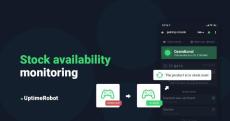
Are you one of those trying to desperately get your hands on a new RTX 3080, 3070, 3060 Ti, & 3090 in 2021? Or maybe you prefer the new PlayStation 5 or Xbox Series X console. Basically, any item that’s on pre-sale or hard to get (including the uniquely designed piece of clothing for your girlfriend). If your favorite online store doesn’t have a “watchdog”, we have the best solution for you. Now how would you know it’s already back in stock? There’s an easy way!
|
By Diana Bocco
Port failures don’t always take a service offline. A port stops accepting connections, times out intermittently, or gets blocked by a firewall change, while everything else looks healthy. When that happens, users feel the break long before uptime checks notice. This article reviews port monitoring tools from an operational point of view. It looks at how they detect closed or slow ports, how alerts behave in noisy environments, and where basic checks fall short during real incidents.
|
By WPBuilders
Learn how to monitor the uptime and downtime of your website for FREE! This is a great tool!

|
By WPBuilders
This is a video tutorial gives a step by step process to configure Uptime Robot to monitor your website and alert you if your website goes down.
- September 2026 (2)
- August 2026 (2)
- July 2026 (2)
- May 2026 (1)
- April 2026 (2)
- February 2026 (2)
- November 2025 (1)
- September 2025 (1)
- August 2025 (1)
- July 2025 (2)
- April 2025 (2)
- March 2025 (2)
- February 2025 (1)
- October 2024 (1)
- September 2024 (2)
- August 2024 (1)
- July 2024 (3)
- June 2024 (1)
- May 2024 (3)
- April 2024 (1)
- March 2024 (4)
- February 2024 (3)
- January 2024 (1)
- December 2023 (1)
- October 2023 (5)
- September 2023 (2)
- August 2023 (3)
- July 2023 (4)
- June 2023 (2)
- May 2023 (4)
- April 2023 (3)
- March 2023 (1)
- February 2023 (3)
- December 2022 (2)
- June 2022 (1)
- September 2021 (1)
- August 2021 (1)
- June 2021 (1)
- May 2021 (2)
- April 2021 (1)
- March 2021 (1)
- October 2020 (1)
- June 2020 (1)
- September 2019 (3)
- May 2019 (1)
- March 2019 (1)
- February 2019 (1)
- January 2019 (1)
- December 2018 (1)
- November 2018 (1)
- September 2018 (4)
- July 2018 (1)
- February 2018 (1)
- January 2018 (1)
- September 2017 (1)
- June 2016 (1)
Downtime Happens. Get Notified! 50 Monitors, Checked Every 5 Minutes, Totally Free!
UptimeRobot is an uptime monitoring service that helps users to get acknowledged of the downtimes of their websites/servers and also track their performance.
Simple-yet-powerful features:
- Multiple types: Check HTTP(s), ping, port and keywords.
- Get alerted: Via e-mail, SMS, voice calls, Telegram, Slack, Microsoft Teams, push, web-hooks...
- Reach the stats: View uptime, downtime and the response times.
- Maintenance windows: Define time periods in order to not get monitored.
- Public status pages: Share the stats with your teammates and/or visitors (demo).
It is actively used by 600,000+ users with a much greater number of monitors being checked regularly.
The Pro Plan offers additional features including 1-min monitoring, SSL certificate checks, maintenance windows and more customization.