
How to Unlock Hidden Potential with the CapCut Voice Changer
Content creation today is no longer just about visuals—it’s about sound, emotion, and personality too. While high-quality video editing grabs attention, the audio can make or break your content. That’s where CapCut’s Voice Changer helps creators, from gamers and podcasters to TikTok creators and YouTube vloggers, discover that transforming their voice with CapCut adds depth, humor, and creativity to their videos. It’s not just about sounding different—it’s about unlocking new ways to tell stories, create engagement, and express ideas. Whether you want to sound like a cartoon character, add dramatic flair, or disguise your real voice, this feature opens doors to creativity you may not have considered before.
Why the CapCut Voice Changer Is a Game-Changer
CapCut is widely loved for its simple, user-friendly editing tools. However, the Voice Changer is often overlooked in favor of flashy filters and transitions. The truth is, it’s one of the most versatile tools for creators because it gives you control over how your audience hears your story.
Here’s why creators are loving it:
Adds Entertainment Value
A voice shift can turn an introductory video into something instantly funny or engaging. Imagine narrating a cooking tutorial with a robot voice or reading bedtime stories for kids in a magical, fairy-tale tone.
Breaks Creative Limits
Sometimes creators feel boxed in by their natural voice. With the Voice Changer, you can take on different personas, experiment with moods, or role-play characters that bring your videos to life.
Increases Privacy
Not everyone wants their real voice out there. The Voice Changer enables users to remain anonymous while creating relatable and enjoyable content.
Perfect for Multiple Platforms
Whether you’re on TikTok, YouTube, Instagram, or making a podcast, this feature adapts to your content style. It works for entertainment, storytelling, gaming, and even marketing campaigns.
How to Unlock Hidden Potential with the CapCut Voice Changer Feature
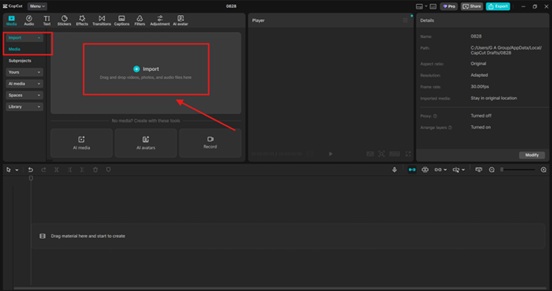
Step 1: Record or Import Your Audio
To get started, open CapCut Desktop Video Editing Software and upload your video or audio file. If you want to create something fresh, you can record your voice directly inside the app. This flexibility means you don’t need any fancy microphones or recording setups—you can use your computer’s mic. Speak naturally when recording, without trying to force a different pitch. The Voice Changer will handle the transformation for you.
Step 2: Explore and Apply Voice Effects
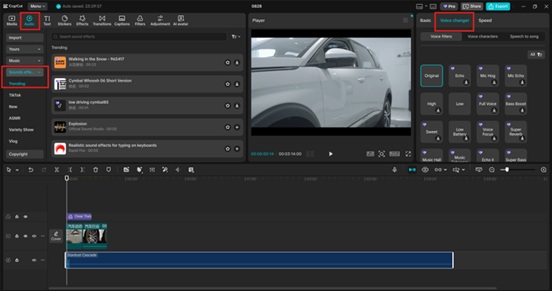
Once your audio is in the timeline, click on it and open the Voice Changer options. CapCut offers a variety of preset effects, such as:
- Robot – Adds a futuristic, mechanical tone.
- Chipmunk – Speeds up your pitch for a comical effect.
- Deep Voice – Creates a dramatic, powerful presence.
- Echo or Reverb Styles – Adds atmosphere for storytelling.
Experiment with different effects until you find one that fits your content’s vibe. For example:
- Use the chipmunk voice for lighthearted TikTok skits.
- Try the deep voice for narration in a suspense video.
- Add robot tones to spice up gaming content or futuristic edits.
Don’t be afraid to layer effects with background music or sound effects to further elevate the atmosphere. Use CapCut tools such as Text to Speech, Online Photo Editor, and AI Voice Generator to enhance your video.
Step 3: Fine-Tune and Publish
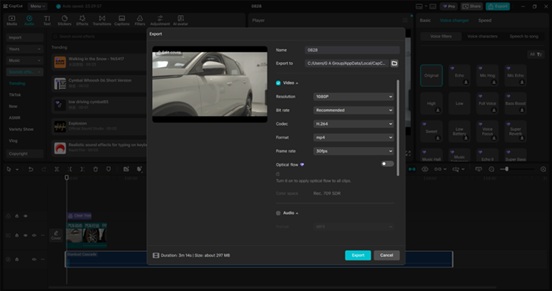
After selecting the right voice style, adjust the volume, trim unnecessary parts, and sync it perfectly with your video. CapCut makes this easy with drag-and-drop editing tools. Once you’re happy with the result, export your video in high quality and share it on your favorite platform. The fine-tuning stage is where you unlock hidden potential. A simple effect might sound good at first, but pairing it with the right visuals, text, and transitions will transform it into something unforgettable.
Creative Ways to Use the Voice Changer
If you really want to unlock the full potential of this feature, here are a few ideas to spark your creativity:
- Storytelling – Narrate short stories or skits with different character voices. Great for kids’ content or animated videos.
- Gaming Clips – Add funny or intense commentary that matches the mood of the gameplay.
- Podcasts & Intros – Use the tool to create unique opening segments that catch listeners’ attention.
- Marketing & Ads – Make product demos more entertaining by switching voices mid-explanation.
- Social Media Trends – Jump on trending challenges with a voice twist that sets your content apart.
Conclusion
The CapCut Voice Changer feature is more than a novelty—it’s a tool that allows creators to unlock hidden potential in their content. Whether you’re a casual TikTok user, an aspiring podcaster, or a YouTuber looking for fresh ways to engage your audience, this feature helps you stand out in a crowded content space. So next time you open CapCut, don’t skip past the Voice Changer. Experiment, play, and unlock a whole new dimension of creativity. Your voice has more power than you think—it just needs the right twist.