
How to Personalize Emails Without Creeping Out Your Audience

Designed by Freepik
Email personalization is a great way to make your subscribers feel noticed, but you have to be careful. On one hand, people feel appreciated when emails speak to their needs. On the other, some may feel uncomfortable if emails show you know too much.
How do you get it right? The secret is to treat your audience with respect, use data in a careful and honest way, and always think about how your message might make someone feel.
In this guide, we’ll look at how to customize your emails without making people uneasy. For reliable and flexible email sending, Emaillabs: email sending service can give you the tools you need for good personalization.
What Is Email Personalization and Why Is It Important?
Email personalization means using what you know about your subscribers to make emails that are right for them. It’s not just about adding a name in the subject line.
It’s about using details such as past purchases, where they’re from, what they browsed on your site, or what they’ve told you about themselves. It’s a bit like having a one-on-one chat instead of sending the same message to everyone.
Why go to this extra effort? Because it works. Generic emails are easy to ignore. People’s inboxes are full and they often delete emails that don’t match their interests.
Personalized emails get noticed and make people feel valued. This means more people read your emails, click your links, and buy what you offer. Personalization isn’t just a trend-it’s a tested way to boost loyalty and sales.
How Personalized Emails Boost Engagement
Personalization truly makes a difference. If your emails match what the customer likes or has done before, they are much more likely to get opened and acted on.
For example, studies show that emails with a personalized subject line get opened more. Once opened, well-written personalized content gets more clicks.
Beyond numbers, it builds a connection. It tells your customers you know their needs and interests. That personal touch can encourage loyalty and turn a one-time buyer into a repeat customer.
Types of Email Personalization
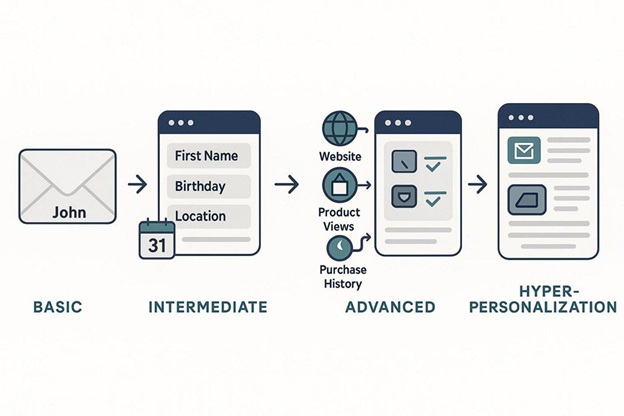
There are simple and more advanced ways to personalize emails. The easiest way is to use the person's name in the subject or greeting. But today, lots of brands do that, so it doesn’t stand out as much.
More advanced methods include:
- Showing different product suggestions based on what someone looked at or bought previously
- Offering content or deals based on where they live or their age group
- Sending entire sections of an email that match their interests
- Behavioral segmentation-this means making groups based on what they do, like clicking links or buying things, to send messages at just the right time
When Does Personalization Cross the Line?
The difference between helpful and creepy can be small. To some, personalized emails feel useful, while to others, the same message may feel like an invasion of privacy. The problem starts when personalization seems too detailed or comes from information the customer didn’t mean to share.
If emails feel like spying, people can lose trust-and might even unsubscribe or block you. The trick is to use enough info to be useful, but not so much that people get uncomfortable.
What Makes Personalization Feel Uncomfortable?
Some things that feel invasive include:
- Using data that customers didn’t knowingly give you, or wouldn’t expect you to have
- Getting this data from other companies or websites without clear consent
- Referring to private things they did on a different site or app
- Overly detailed mentions in your emails, such as a color they tried out or something they briefly looked at
- Sending too many follow-up messages after tiny actions, like viewing a page for a moment
Common Overpersonalization Problems
Here are some regular mistakes:
- Sending repeated recommendations for a product someone already bought
- Assuming too much, especially about sensitive topics like health or financial issues
- Making your emails so personalized they sound fake or manipulative, such as acting like you know people you don’t
What’s the Difference Between Good Personalization and Stalking?
Good personalization shows you respect your customer’s preferences, use their data fairly, and want to help. Stalking feels like you’re crossing the line and not respecting people’s boundaries. Instead of adding value, it makes people worry about how much you know about them. Personalization should make life easier for your subscribers, not creepier.
How to Collect Data Without Invading Privacy
Getting the right customer data helps you personalize emails, but there’s a right way and a wrong way to do it. Always be honest about what you collect and what you’ll use it for. Most people will share information if they understand how it will be used and feel in control.
If you stick to what customers told you directly-like their signup info or what they bought-you’re in safer territory. Don’t buy data from others, and don’t use info you have no right to. Give clear explanations and let people choose their preferences easily.
Zero-Party Data: Ask Customers Directly
Zero-party data is information people give you on purpose. This could be preferences, interests, birthdays, or answers to short surveys. Because it comes straight from the subscriber, it’s both accurate and makes them feel in control.
You can get this kind of data by:
- Using preference centers so people pick which emails they want
- Adding welcome quizzes to learn interests
- Giving quick polls or one-question surveys in emails
- Adding optional fields for things like birthdays at signup
The easiest methods are simple, fast, and even fun for the customer.
Behavioral Data: Tracking-But Not Too Much
First-party behavioral data is about what customers do on your website or in emails, such as what they clicked on or what they bought. This data is useful if used carefully. The key is to look for patterns, not single random clicks.
For example, instead of reacting to one brief visit to your pricing page, check if someone is coming back to it again and again. Also, always say what you’re tracking and why-it builds trust. Don’t use little details in your emails that call attention to how closely you’re watching, as that’s what feels creepy to many people.
Keeping Customer Data Up-to-date
People change. They may move, change their interests, or want different things. If you keep using old information, your emails will stop making sense. That’s why you need to regularly check your customer records, ask for updates, and allow people to change their preferences.
Some ways to keep your data fresh:
- Send out regular requests for feedback or to confirm their interests
- Let people easily update their information
- Check what they actually do, not just what they said when signing up
- Have a data system that keeps everything accurate and up-to-date
If you collect data but never update or use it well, customers will see it as a waste-or even as you not caring about their privacy.
Best Ways to Personalize Emails and Still Respect Privacy
To be respectful in your personalization, always think about the balance between using personal data and your subscribers’ comfort. It’s about more than using a name-it’s deciding what content and style will match what your audience wants, while building trust.
If you follow best practices, you can keep customers happy, improve results, and avoid turning people away. Personalized emails should feel like a service, not like someone is watching everything a customer does.
Personalize the Basics: Names, Subjects, Send Times
Start with simple things-add the subscriber’s first name in the greeting or subject. But don’t overdo it with full names unless your brand is very formal. Most people prefer you keep it simple and friendly.
You can also customize the subject line to include what a person is interested in or did recently. Try to send emails at times when your customer is most likely to open them-using what you know about their habits helps here.
Segment Your Audience Instead of Getting Too Detailed
Don’t try to create a different email for every subscriber. Instead, group your list into segments based on things they have in common, like past actions, locations, or interests. Send each group the content that fits them best. This way, you’re still sending relevant information, but you don’t risk making it too personal or invasive.
Be Careful With Sensitive Topics and Assumptions
If a topic is personal-like health or money-don’t mention it unless the person has said it’s okay. Don’t make guesses about someone’s situation if you’re not sure. Acting on the wrong data can cause embarrassment or even upset your customers. Always play it safe in sensitive areas.
Give Recommendations, But Don’t Get Too Specific
Suggest products based on solid indicators, like something someone looked at several times or left in their cart. Always explain why you’re making a suggestion-let the customer know what it’s based on (for example, “You might find these helpful since you searched for [category]”). Stay general, especially if you only have a small amount of data.
Match Relevance With Comfort
Find the right balance of helpful recommendations and general information. Regularly review your strategy. If you received your own email, would you find it useful, strange, or intrusive?
Check your open rates, clicks, feedback, and watch unsubscribe numbers. If unsubs spike after a new tactic, stop and rethink. The goal is to make your customers’ day better, not make them wonder what you know about them.
How to Build Trust and Be Open About Personalization
Trust is at the center of good email personalization. People are more likely to engage if they trust your brand and know what’s happening with their data. Be open about how and why you collect information, both in your privacy policy and within your emails.
Think of this as an ongoing conversation. Give easy ways for people to set their preferences and always be ready to answer questions. This builds a relationship and shows you respect their choices.
Explain How and Why You Use Data
Tell subscribers what information you use and why. For example, when sending a recommendation, include a note like “Because you browsed [item], you might like…” This removes some of the strangeness and helps subscribers understand your intent.
Surveys show people trust brands more if they explain their data use. This also helps people see the value in sharing their details, making them more likely to keep interacting with your emails.
Make It Easy to Opt Out and Manage Preferences
Let customers easily unsubscribe or change what emails they get. Use a preference center where they can update their interests or decide what topics they want. This gives them control and means you’ll send more relevant emails-reducing the chance they’ll get annoyed and leave your list.
Watch for Signs of Subscriber Discomfort
Don’t just track opens and clicks. Keep an eye on unsubscribe and complaint rates, and listen to feedback. If people are annoyed or concerned, you’ll see it in your numbers-then you can make changes. Ask your audience for their opinions, either through surveys or just by inviting responses to your emails. Because customer needs change, keep adjusting your approach.
Real-World Cases: What Works, What Doesn’t
Looking at examples can help show what’s effective and what crosses the line. Personalization goes well when customers expect it and understand why the email is personalized. But if your email knows things the customer hasn’t shared, or makes wrong guesses, it can upset people.
Examples of Good Personalized Campaigns
Some successful examples include:
- Sending birthday or anniversary discounts
- Personal recommendations based on clear browsing or purchase history (with an explanation)
- Emails tailored to preferences set by customers themselves
- Using behavioral groups to time abandoned cart reminders or spotlight recently viewed products
In these cases, the personalization is useful, logical, and appreciated because it’s what the customer expects.
When Personalization Goes Too Far
Some well-known mistakes:
- Target once sent baby product coupons to a teenager after using their data to guess she was pregnant-before her family even knew. While accurate, the use and timing were wrong and caused a lot of distress.
- Brands referring in emails to tiny details, like the color someone used in a tool, can be off-putting.
- Continually pitching a product someone already bought, or making big guesses from little data (like wedding promotions after pinning a few wedding pictures), can make people feel uncomfortable or misunderstood.
- Using data bought from another company, or that the customer didn’t agree to share with you.
The lesson: Just because you have the data, doesn’t mean you should use it.
Email Personalization Checklist: Stay Helpful, Not Creepy
Use this simple checklist to keep your personalization respectful and effective. Review these steps regularly against your current practices:
- Use basics like first names-but skip full names unless the situation fits.
- Segment your audience instead of trying to personalize every detail for every person.
- Be direct about data collection-explain what you collect and why, and use things like preference centers to let people share what they choose.
- Think before you use behavioral data-look for ongoing patterns, not just one-time actions.
- Stay away from sensitive topics unless someone has clearly agreed.
- Mix personalized and general content to keep things comfortable and useful.
- Offer easy unsubscribes and preference controls so people can choose what they want to get.
- Check feedback and metrics often for signs people are uncomfortable.
- Let people know why you’re making a recommendation-this makes it feel natural.
- Keep your writing human and friendly, not robotic or overly formal.
- Test regularly and keep improving your personalization based on actual results.
Final Thoughts
Email personalization is expected by today’s customers, but you must keep it right on target without being invasive. The best approach is to be open, gather data fairly, group your audience for relevance, and always watch for feedback.
If you get it right, your emails will help people and build stronger relationships. If you don’t, people will tune out, unsubscribe, or even lose trust. The aim is to use data with care and always put the customer’s feelings first. Done well, personalization will make your email marketing both smart and welcome.