
How to Enhance Your Racing Game Experience
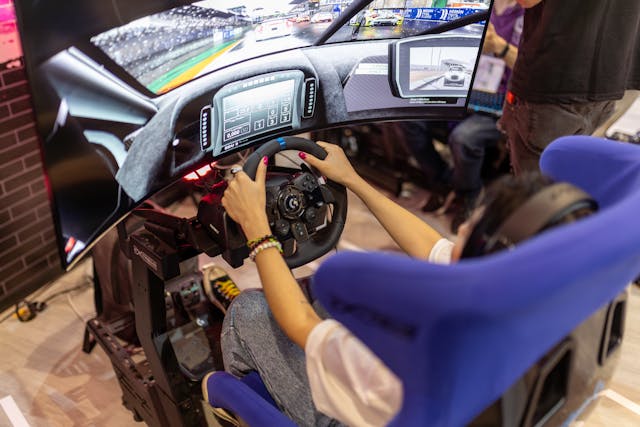
Most racers chase lap time, then wonder why the same mistakes repeat every session. The fix starts with comfort, repeatable controls, and settings that match your hardware. Small changes compound over a stint, saving energy and protecting focus across longer races.
You do not need every latest gadget, but you do need the right build order. Start with a stable seat, a sturdy mount, and a proven racing simulator rig that keeps wheel and pedals locked in place.
Add screens and input devices only after you sort fit, posture, and clear sight lines. Test one change at a time, then record telemetry or lap deltas to confirm progress.
Get Your Controls Right
Force feedback should inform, not punish, so tune it for detail over raw strength. Set overall gain to avoid clipping, then raise road effects until you feel kerbs without masking tire slip.
Keep wheel rotation consistent across cars unless the title supports automatic steering lock. Aim for smooth inputs that reduce corrective steering and cut heat buildup in long stints.
Pedal consistency builds braking confidence on every lap, especially under pressure. If you use load cell pedals, calibrate maximum force to match your comfortable threshold when tired.
If you use potentiometer pedals, remove dead zones and stabilize the base to prevent flex. Place heel points so ankles move, not knees, during trail braking and throttle modulation.
Quick checklist for weekly control checks:
- Recalibrate wheel center and pedal range before ranked races.
- Verify no clipping in force feedback graphs during heavy kerb strikes.
- Confirm shifter gates engage cleanly and do not wobble under load.
Ergonomics matter as much as settings, because small posture faults drain attention. Keep elbows slightly bent, wrists straight, and shoulders relaxed to preserve fine motor control. Match seat distance so you fully depress the brake without hip rotation.
For workstation basics that translate well to sim seats, review OSHA’s guidance on neutral posture and display placement at the U.S. Department of Labor website. See the OSHA Computer Workstations eTool for posture references that reduce strain and fatigue.
Set Up Your Space
Your rig area should control light, reflections, and temperature so your eyes and hands stay steady. Place screens at eye level, angled to reduce glare from windows or ceiling lights.
Use a neutral wall color behind displays to reduce contrast jumps during night stages. Keep a small fan pointed at your torso, because airflow reduces sweat and improves grip on long races.
Screen size and distance affect perceived speed and braking points in surprising ways. A single large monitor positioned at an arm’s length improves readability without straining neck muscles.
Triple monitors widen peripheral vision and improve spatial awareness, but demand careful alignment and matching refresh rates. Virtual reality boosts presence, yet requires regular breaks to prevent fatigue that hurts late-race decisions.
Cable control and power stability keep your inputs consistent during intense sessions. Route force feedback and pedal cables away from power bricks to cut interference.
Use a surge protector with enough headroom for wheel peaks and motion actuators. Label every cable and port so troubleshooting takes minutes, not hours, before an endurance event.
Tune In-Game Settings
Treat graphic settings like any other performance part, because stable frame pacing improves timing. Target a steady frame rate above your display refresh if your system allows it.
Enable adaptive sync to reduce tearing, then lower scenery details that do not affect braking markers. Prioritize shadows under the car and other reference cues for clearer traction changes in corners.
Field of view should match your screen geometry, not personal taste or habit. Use an online calculator or the game’s built-in tool to input screen size and distance.
Correct FOV prevents “tunnel vision” and reduces over-correction on corner exit. After adjustment, re-learn braking points, then record sector times to confirm consistent turn-in and apex speeds.
Steering and force feedback filters should remove noise without hiding important texture. Increase smoothing only until oscillations disappear on straights.
Set minimum force to wake up details on entry without vibrating on grid. Save profiles for each car class so you can switch quickly during league calendars.
Choose The Right Hardware
Plan upgrades in the order that yields the biggest gains per dollar and hour spent. First, secure your seat, wheel base, and pedals so nothing shifts under load.
Second, add a shifter or handbrake only if your series demands it. Third, expand displays or invest in VR when you have smooth frame rates and good cooling.
Match wheel base torque to your mounting strength and driving style for better control. Mid-range direct drive units provide rich detail at modest levels when firmly mounted.
High torque bases help on heavy cars, but only if your rig and posture are rock solid. If your mount flexes, spend budget on bracing before chasing higher torque ratings.
Pick pedals for repeatability over marketing claims, because brake feel wins races. Load cell systems reward muscle memory and scale well with progressive elastomers. Hydraulic units can feel natural but require maintenance that some home users skip.
Whatever you choose, lock the pedal deck, record calibration values, and standardize shoe choice for consistent pressure feedback.
Race Day Routine
Pre-race routines turn setup work into predictable lap times during split-second decisions. Warm up with five clean laps that include hard braking, kerb hits, and quick direction changes. Check telemetry for brake peak variance and mid-corner speed drift from your practice baseline. Adjust only one setting before qualifying, then focus on lines, references, and clean exits.
Mental freshness beats raw aggression when traffic tightens and tires fade late in stints. Schedule short hydration breaks between races and stretch wrists, neck, and hips.
Keep a small towel and spare gloves ready so grip does not collapse under heat. For motion sickness prevention in VR, review research summaries from the National Library of Medicine on simulator sickness, then plan gradual exposure sessions for new tracks.
Post-race reviews are where durable improvements happen across a season. Save replays from races with unusual incidents and note repeat mistakes by corner and lap.
Compare inputs from your fastest clean lap against the race median to find sustainable gains. Archive best setups with version notes so future changes do not erase things that already worked.
Final Takeaways
A steady build order, consistent ergonomics, and clear records make gains feel routine. Start with fit and stable mounts, then refine controls and frame pacing for predictable cues.
Upgrade hardware only after you can measure the benefit with cleaner laps and calmer hands. Treat every change like a hypothesis, then keep what helps you place higher without extra effort.