
How to Download Instagram Videos to Your Phone: A Comprehensive Guide

With social media ascendant today, sites like Instagram have become an abode of video fun. Most funny videos, how-tos, or those memorable moments with friends will entail downloading Instagram video to a phone for viewing offline.
This guide offers a number of different ways in which media and videos on Instagram can be downloaded onto an Android phone or iPhone with the aim of ensuring that you never miss out on your favorite scene or video.
Download Instagram Video to Android Phone with Video Downloader for Instagram
Video Downloaders for Instagram is considered one of the best ways for an Android user wishing to download Instagram video swiftly. It allows easy saving of videos to the Android device. These are the full instructions:
- The app: Download the second app, Video Downloader for Instagram, from the Google Play Store.
- Copy the link to video: Open Instagram, navigate to the video which you want to download, tap on the three dots at the top right corner, and select "Copy Link."
- Open the App: Open the Video Downloader for Instagram app.
- Paste the Link: The app will automatically detect the copied link. If not, paste it into the designated field.
- Downloading: Touch the download button to start the download. The video will be saved on your phone gallery.
This method is quite simple and allows fast download of Instagram videos; hence, it is widely accepted by Android users.
Download Instagram Video to iPhone with Instant Save
Another simple way to save Instagram videos is an iPhone application called 'Instant Save.' Another safe example is the app available only for an iPhone to download any videos. Here is how:
- Download Instant Save: Get the app from the App Store.
- Copy the Video Link: Just like Android; open Instagram, locate the video, click the three dots, and select 'Copy Link.'
- Open Instant Save: Launch the app on your iPhone.
- Paste the Link: The app will automatically detect the copied link. If not, paste it manually.
- Download: By clicking the download button, your preferred video will be available on your camera roll.
Using Instant Save is a good how-to download Instagram video on your phone; so that you can watch your favorite clips anytime, anywhere.
Download Instagram Videos in Batch and Transfer Them to Phone
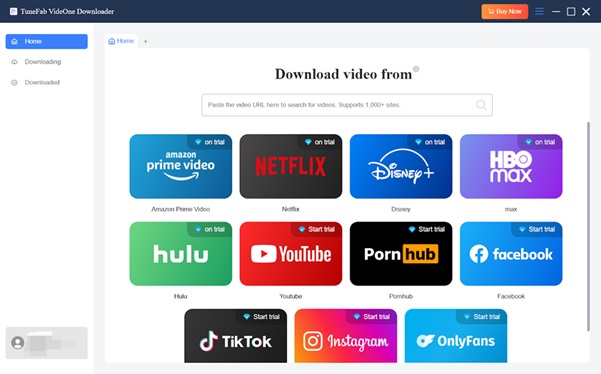
Here is a perfect tool for those wanting to download multiple videos from Instagram at once; it can batch download Instagram videos and convert them into MP4 format that is perfect for transferring to your phone. This is how one would use TuneFab VideOne Instagram Downloader.
- Download and Install: Download TuneFab VideOne Instagram Downloader from the official website and install it on your computer.
- Copy Video Links: Find the Instagram videos you want to download and copy their links.
- Paste Links into TuneFab: In the software, paste your copied links into the search box.
- Select Output Settings: Choose MP4 as your output format. Refer to the screenshot below for guidance:
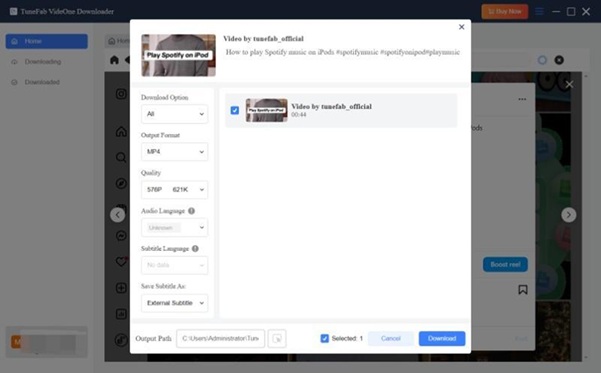
- To download the videos: Click the download button, and they will be saved to your computer. You can monitor the downloading process with the following screenshot:
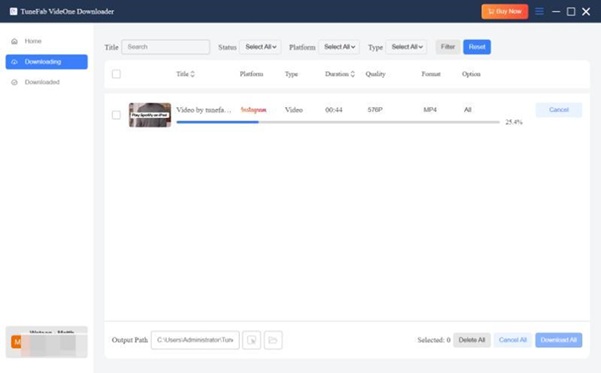
- Transfer to Phone: Once downloaded, connect your phone to your computer and transfer the videos to your device.
TuneFab VideOne allows for batch downloads of Instagram videos while also providing high-quality files for viewing on your phone.
Conclusion
Downloading Instagram videos on your phone is quite simple on both Android and iPhone.To save videos, it is really easy using applications like Video Downloader for Instagram or Instant Save. For users who want to download multiple videos, TuneFab VideOne Instagram Downloader is a solid solution. Now you know how to download an Instagram video to your phone that you can watch offline at any time.