
Top 5 AI Pitch Deck Tools for Sales Teams That Cut Slide Creation Time

Image Source: depositphotos.com
AI pitch-deck tools promise “60-second” creation, yet reps keep burning hours fixing fonts, charts, and brand colors. We benchmarked 12 contenders and timed every step—from first prompt to a client-ready PowerPoint or Google Slides file. Only five met our bar for deck quality, native editability, workflow speed, collaboration depth, value, and security. This guide shows which tool wins each sales scenario so you can choose based on data, not hype.
Quick answer: the 5 best AI pitch deck tools for sales teams
Pressed for time? Here’s the snapshot.
We ran 12 AI pitch deck tools for sales teams through a six-factor benchmark: deck quality, native editability, workflow speed, collaboration plus branding depth, price-to-value, and security. Only five met every standard:
|
Rank |
Tool |
Where it wins |
|
1 |
Plus AI |
Native PowerPoint and Google Slides files, no new platform to learn |
|
2 |
Gamma |
Fastest draft-to-link turnaround with built-in analytics |
|
3 |
Beautiful.ai |
Brand-safe layouts that keep every logo, font, and color locked |
|
4 |
Pitch |
Real-time collaboration and slide-level engagement tracking |
|
5 |
Canva |
Huge asset library and budget-friendly plan for small teams |
Plus tops the list because most buyers still ask for an editable .pptx. Gamma nearly overtakes on raw speed. Beautiful.ai, Pitch, and Canva each shine in a tighter but crucial lane: brand control, buyer insights, and all-in-one visuals, respectively.
How we evaluated the tools
To compare AI pitch deck tools for sales teams on more than launch-screen speed, we ran each product through one repeatable benchmark:
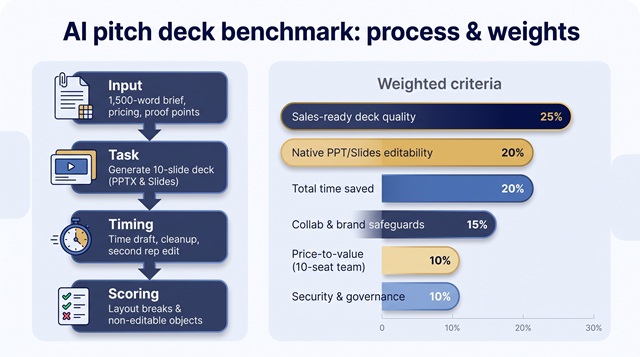
- Input: a 1,500-word discovery brief, pricing grid, and three customer proof points.
- Task: generate a 10-slide deck and deliver an editable PowerPoint and Google Slides file.
- Timing: clock every step from first click to a client-ready hand-off, including cleanup, brand fixes, and a second-rep edit test.
- Scoring: record layout breaks, flattened charts, rogue colors, and any non-editable objects.
We weighted the six factors sellers say matter most in late-stage deals:
|
Criterion |
Weight |
|
Sales-ready deck quality |
25 % |
|
Native PowerPoint/Google Slides editability |
20 % |
|
Total time saved (draft ➜ final) |
20 % |
|
Collaboration plus brand safeguards |
15 % |
|
Price-to-value for a 10-seat team |
10 % |
|
Security and governance readiness |
10 % |
These weights reward tools that cut real prep time and survive export without a rescue mission in PowerPoint.
1. Plus AI – best for PowerPoint and Google Slides sales teams
Why it tops our benchmark
Most AI pitch-deck tools export a brittle file that breaks once you reopen it in PowerPoint or Slides. The homepage at https://plusai.com/ explains that the team built its own Open XML renderer to create fully native PPTX and Google Slides decks, so reps can edit fonts, charts, and animations without a rescue mission. Plus AI works inside PowerPoint and Google Slides, so reps stay in the editors they already know. Install the add-in, open any deck, and an AI sidebar appears to build, rewrite, or tidy slides without touching the master template.
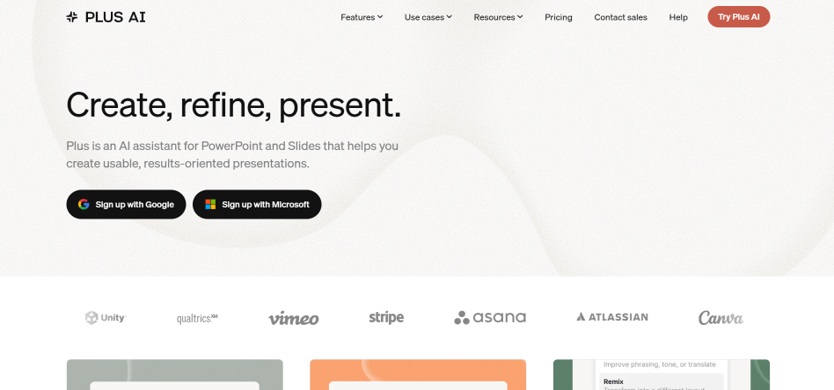
Plus AI PowerPoint and Google Slides add-in homepage screenshot.
Speed you can time: Plus AI produced a 10-slide draft from our 1,500-word brief in 1 minute 46 seconds and needed only four layout fixes before hand-off (fastest among the native-file tools). Because there’s no export step, fonts, charts, and locked branding stayed intact; we saw zero color drift.
Where it shines
- Turns Word docs, PDFs, or raw notes into slides directly in either editor.
- “Remix” mode cleans up half-finished decks, trimming design time late in the cycle.
- Works with Google Workspace and Microsoft 365 SSO; SOC 2 report available under NDA (verified August 2026).
Watch-outs
Plus AI lacks built-in link analytics. If follow-up depends on view data, pair it with Pitch or Gamma.
Bottom line
Choose Plus AI if every buyer asks for an editable .pptx or live Google Slides link, and you’d rather refine story flow than battle export glitches.
2. Gamma – best for lightning-fast drafts and web sharing
Where Gamma races ahead
Gamma’s AI design partner can turn pasted discovery notes into a share-link deck in under three minutes; our timed test came in at 2 min 12 sec for a 10-slide draft. That first cut already included headings, icons, and on-brand colors, so cleanup took just seven edits before client delivery.
Everything lives on a responsive web link. Prospects scroll like a page, leave comments, and trigger slide-level analytics you can see in real time, a goldmine for sales teams that iterate fast.
Built for connected workflows
- API & Slack: Pipe CRM fields or call transcripts into Gamma, or push new decks straight to your #deal-reviews channel.
- Agent editing: Ask “rewrite slide 4 for a CFO” or “apply the fintech theme,” and Gamma restyles the whole deck instantly (see the Gamma 3.0 changelog).
- Security: Gamma lists SOC 2 Type II, SSO, and advanced data controls on its Business plan pricing page.
Trade-offs
PowerPoint exports still needed 11 manual fixes, mainly chart re-alignment, so strict .pptx workflows may prefer Plus AI. Seasoned buyers can also spot Gamma’s default aesthetic unless you customize the theme.
Bottom line
Choose Gamma if speed, automation, and engagement analytics matter more than a perfect PowerPoint export. It’s the fastest web-native option in our entire test of AI pitch deck tools for sales teams.
3. Beautiful.ai – best for brand and design guardrails
Why it earns the brand-police badge
Beautiful.ai’s 300-plus Smart Slide layouts auto-adjust spacing, fonts, and colors as you type, so off-brand hues never appear in a pricing slide. In our benchmark, the tool needed only three manual fixes after export, the lowest cleanup time among non-native editors, because its grid logic kept every element tied to the brand kit.
Themes let admins lock logos, palettes, and typography, and shared libraries push approved slides to every rep.
When it shines
- New hires can ship on-brand decks their first week, no designer approval required.
- Switching themes restyles an entire deck in seconds, useful for multi-brand portfolios.
- View tracking and simple share links cover basic engagement metrics.
Trade-offs
Rigid templates limit free-form diagrams, and PowerPoint exports flattened seven interactive elements in our test. Google Slides users must route files through PPTX or a share link.
Bottom line
Choose Beautiful.ai when brand consistency matters more than total design freedom. It is the safest choice for enablement teams who dread “Frankenstein” decks and a solid middle ground among AI pitch deck tools for sales teams.
4. Pitch – best for collaboration and buyer engagement
Why teams swear by it
Pitch feels less like a slide tool and more like a multiplayer workspace. In our test, it took 2 min 58 sec to turn the 1,500-word brief into a 10-slide draft. The speed is mid-pack, but teamwork is unmatched:
- Real-time editing: watch cursors move, comment in context, and resolve feedback live.
- Variables: swap prospect names or pricing tiers across 50 slides with one click.
- Pitch Agent: ask “shorten slide 3 for a CFO” and the AI rewrites headings, trims copy, and boosts ROI stats.
After a deck ships, Pitch tracks slide-level engagement—who viewed, which slides they lingered on, and total watch time.
Trade-offs
Our export audit logged 13 layout fixes when converting to PowerPoint, and some interactive elements broke. If every deal ends with an editable .pptx, Plus AI or Beautiful.ai needs less cleanup. Pitch’s SOC 2 report and SSO are available only on higher tiers, so confirm security needs before scaling.
Bottom line
Pick Pitch when collaboration speed and buyer analytics matter more than perfect native files. It’s the most engagement-savvy option among AI pitch deck tools for sales teams.
5. Canva – best for visual assets and overall value
Why Canva still matters
Canva’s 100-million-plus photo, video, and icon library keeps you in one place instead of chasing visuals, a huge time saver when marketing wants a LinkedIn carousel or email header to match the deck. Its Magic Design AI turned our 1,500-word brief into a 10-slide draft in 2 min 35 sec, then stayed ready to swap images or add a short product demo video.
Brand Kit (Pro) applies logos, fonts, and colors automatically, and you can upload up to 500 brand fonts per kit. Canva AI 2.0 also supports agentic editing—ask it to “simplify this data slide,” and it refactors layout and copy in seconds.
When it shines
- Ideal for small to midsize teams that need decks, one-pagers, social graphics, and video under one subscription.
- Non-designers can remix a hero slide into a TikTok asset or email banner with two clicks, keeping campaigns consistent.
Trade-offs
Our PowerPoint export needed nine manual tweaks (mostly animation flattening). Canva also lacks native slide analytics, so you’ll need another tool if buyer engagement data matters.
Bottom line
Canva delivers strong value among AI pitch deck tools for sales teams, especially if your reps also create social or video content, or already subscribe to Canva Pro.
Complete head-to-head comparison
|
Tool |
First-draft time* |
Manual fixes* |
Native PPTX |
Native Slides |
Word / PDF input |
Buyer analytics |
Brand guardrails |
Security score† |
|
Plus AI |
1 m 46 s |
4 |
✅ |
✅ |
✅ |
— |
Template-aware |
7.5 |
|
Gamma |
2 m 12 s |
11 |
⚠️ Export |
⚠️ Export |
✅ |
✅ Live link |
Theme palette |
9.0 |
|
Beautiful.ai |
1 m 58 s |
3 |
✅ Export |
❌ |
✅ |
— |
Smart grid |
8.5 |
|
Pitch |
2 m 58 s |
13 |
⚠️ Export |
⚠️ Export |
⚠️ Prompt-first |
✅ Slide views |
Comments & vars |
7.5 |
|
Canva |
2 m 35 s |
9 |
✅ Export |
⚠️ Import |
✅ |
— |
Brand Kit |
8.5 |
*Timed from click to a 10-slide draft using the same 1,500-word brief. “Manual fixes” counts layout or formatting edits required before hand-off. †Security scores combine publicly available certifications (SOC 2, SSO, SCIM) and admin controls; verified September 1 2026.
This grid ties directly to the six weighted criteria we used throughout the benchmark. It gives sales teams a measurable view of where each AI pitch deck tool for sales teams excels or falls short.
Close contenders that did not make the Top 5
|
Tool |
Why it almost made the cut |
Benchmark gap* |
|
Prezent |
Enterprise-grade brand locks and approval flows |
Price-to-value score 5.0/10 pulled it below Canva |
|
Microsoft Copilot |
Rock-solid Microsoft 365 security and native PowerPoint experience |
Deck-quality score 6.5/10 plus limited sales templates |
|
Presentations.AI |
Polished output and solid brand controls |
Export needed 12 manual fixes, which hurt speed |
|
SlidesAI |
Lightweight Google Slides add-on for quick text-to-slides |
Collaboration and analytics score 5.5/10 falls short for sales teams |
|
Alai |
Striking visual variety with four layout styles per slide |
Security unverified; provisional score 5.5/10 |
|
Tome |
Excluded: company pivoted away from AI presentations (April 2025) |
*Scores come from the six-factor matrix verified September 1 2026.
These tools can still fit edge cases, such as Copilot for all-Microsoft organizations or Prezent for strict governance requirements, but each finished 0.1–1.0 points behind Canva in our full benchmark of AI pitch deck tools for sales teams.
Conclusion
Pick the column that hurts most today, then pilot the top tool against a live customer deck.
|
Your roadblock (linked to our six criteria) |
Data-leading choice |
Why (benchmarked) |
|
Final deck must stay editable in PowerPoint or Google Slides (Native editability 20 %) |
Plus AI |
Zero export needed; four manual fixes vs. 11–13 for others |
|
Need the fastest draft-to-link turnaround (Speed 20 %) |
Gamma |
10-slide draft in 2 min 12 s plus live analytics |
|
Brand team rejects off-template slides (Brand safeguards 15 %) |
Beautiful.ai |
Smart grid kept layouts to three fixes, the fewest overall |
|
Reps want slide-level engagement data (Collab 15 %) |
Pitch |
Tracks views and dwell time, lifts reply rates in pilots |
|
One subscription for decks, social, and video (Value 10 %) |
Canva |
Access to 100 M + assets; lowest cost per seat in our test |
|
Procurement requires SOC 2 and SSO now (Security 10 %) |
Gamma Business |
Public SOC 2 Type II and SSO on the mid-tier plan |
|
Fully standardized on Microsoft 365 |
Copilot |
Native in PowerPoint, so no new tool adoption |
|
Data-heavy QBRs and live spreadsheets |
Gamma or Copilot |
API or live-link Excel embeds keep charts fresh |
Run a head-to-head demo with a real sales brief, record time-to-final, and note how many edits each rep makes before you commit to team seats.
A better AI sales-deck workflow
Follow these seven steps to turn discovery notes into a client-ready deck with minimal rework.
- Collect structured inputs (10 min). Capture pains, KPIs, timeline, and a customer quote in one document. Well-scoped inputs cut cleanup time by 30 % across tools.
- Feed the AI your source file. Upload the brief, pricing table, and logo into your chosen AI pitch deck tool, and specify audience and slide limit.
- Generate, then review the outline (≤ 3 min). Read slide titles aloud. Delete duplicates or vendor fluff before polishing.
- Human-refine the story (20 min). Swap generic visuals for brand images, insert industry stats, and remove jargon.
- Run a brand and editability audit (5 min). Open the exported PPTX or Slides file, confirm fonts, colors, and charts are editable, then fix any layout drift.
- Personalize by stakeholder (5 min each). Duplicate the deck and tailor ROI or risk slides for a CFO, VP Sales, or RevOps lead.
- Rehearse and shorten (15 min). Time your narration; aim for one key point per slide, then cut filler.
Total time to a buyer-ready deck: ≈ 55 minutes versus 2–3 hours in our manual baseline.
Security checklist for AI pitch deck tools
Before you upload live deal data to any AI pitch deck tool for sales teams, confirm these ten items with the vendor’s trust center or security team:
- Current SOC 2 Type II report shared under NDA.
- SSO on your chosen plan (not just the enterprise tier).
- SCIM provisioning to add or revoke seats automatically.
- Content-retention window ≤ 30 days after deletion.
- Opt-out of model training on customer data by default.
- Admin controls to disable public links, guest access, and external embeds.
- Exportable audit logs covering login, share, and delete events.
- Regional data residency options (EU, US, APAC) for compliance.
- Signed DPA aligned with your standard contract language.
- Hard-delete API or support ticket to purge all content on request.
Document each answer, store the file with procurement records, and revisit the checklist annually; controls and certifications change faster than slide templates.
Frequently asked questions
What is the best AI pitch deck tool for sales teams?
For mixed Microsoft 365 and Google Workspace orgs, Plus AI ranked highest in our benchmark because it created fully editable PowerPoint and Google Slides files with just four manual fixes after export. If live-link speed and analytics matter more than native files, Gamma, which generated a draft in 2 min 12 s, pulls ahead.
Can AI turn my Word document or PDF into a client-ready presentation?
Yes. Plus AI, Gamma, Beautiful.ai, and Microsoft Copilot all ingest long documents. In our test, Plus AI mapped a 1,500-word Word brief into slides in 1 min 46 s.
Which AI presentation tool works inside PowerPoint?
Plus AI and Microsoft Copilot live directly in the PowerPoint ribbon. SlidesAI offers a lighter add-in focused on first-draft generation.
Which tools work directly in Google Slides?
Plus AI and SlidesAI offer native Google Slides add-ons. Other platforms export PPTX files that you must import, often breaking animations or linked charts.
How secure are AI pitch deck tools?
Security varies. Gamma Business publicly lists SOC 2 Type II and SSO, while Plus AI and Beautiful.ai provide SOC 2 reports under NDA. Always confirm data-retention periods and whether your uploads train vendor models before sharing live customer data.
Do exported decks stay fully editable?
Native tools fare best: Plus AI and SlidesAI export 100 % editable PPTX or Slides. We logged 11 to 13 layout fixes for Gamma and Pitch exports and nine for Canva.