
Security Camera Local Storage vs Cloud Subscriptions for Homeowners

Security Camera Local Storage vs Cloud Subscriptions at a Glance
If you want privacy and no monthly fees, choose local storage. If off-site backup matters most, choose cloud. If you need both, use a hybrid setup.
Since people want to supervise their houses, check the driveway, and keep an eye on their backyards, they tend to buy a security camera to help them. But once the cameras are installed, a new problem quickly emerges: where exactly are all the recorded videos stored? This is precisely where the choice between local storage and cloud storage subscription plans for security cameras has a critical impact.
How to choose between local, cloud, and hybrid storage
Local storage refers to storing video files within home devices, with storage media including built-in camera storage, micro SD cards, home base stations, or network video recorders. Cloud storage, on the other hand, uploads video clips to remote servers and usually requires subscribing to a paid plan. Some residents choose either of them while others choose a mixed-up solution. There is no one-size-fits-all plan, but the core question is: which storage setup fits your needs?
|
Storage Type |
Best For |
Main Advantage |
Main Tradeoff |
|
Local Storage |
Homeowners who value privacy and no monthly fees |
Footage stays on home devices such as built-in storage, microSD cards, HomeBase storage, or an NVR |
Hardware storage needs to be managed, and footage may be affected if the device is damaged |
|
Cloud Storage |
Homeowners who want off-site backup and less hardware maintenance |
Clips can be stored remotely and accessed through a subscription plan |
Monthly fees, retention limits, and plan rules vary by provider |
|
Hybrid Storage |
Homeowners who want both local control and extra backup |
Local storage handles daily recording, while cloud backup adds another layer for key clips |
May require more setup and possible subscription costs |
- Start with privacy, not features
Before considering gigabytes, retention days and plan pricing, you should take privacy as the priority. It means that if most of your recordings are everyday events such as deliveries, pets, passing cars, or family arrivals, local storage may be enough. However, if you want to keep your storage safe after unexpected damage to your home hardware devices, cloud storage or a hybrid setup becomes more appealing.
For the first type, a security camera with local storage without a subscription can record clips without using cloud storage in the center of the system. For many homeowners, that feels cleaner. The camera is watching private spaces around the home, so it is reasonable to want more control over where those recordings live. This does not mean cloud storage is automatically bad. If you are a frequent traveller, manage a secondary property or worry about losing footage due to damage to storage devices, cloud backup can be useful. Therefore, start by considering privacy before picking up a storage plan.
- Security camera local storage is usually better for avoiding monthly fees
One of the main reasons that homeowners choose local storage for their security camera packages is cost. Monthly cloud storage plans may initially seem inexpensive, but over the years, the cumulative cost can be substantial, especially when multiple cameras are installed. Local storage requires a larger upfront investment. Users purchase cameras, base stations, memory cards, or storage hard drives themselves and rely on this hardware to store recordings. Depending on the device package, basic video storage functionality may not require subscribing to a monthly cost plan.
This is why homeowners often compare security cameras by storage type, not only by resolution or night vision. A camera with strong image quality is helpful, but if the recording setup depends on a plan you do not want, it may not be the right fit long term.
- Cloud storage is better when off-site backup matters most
Cloud subscriptions make sense for a different kind of homeowner. Cloud storage can be useful if your priority is having footage stored away from the house. Besides, a cloud storage solution is also convenient for users who do not want to manage their storage capacity themselves. Using this storage method, you do not need to check memory cards, hard drives or base stations. You can just pay for a plan and review clips through the application. However, you also need to check the fine print. How many days are clips kept? Does the plan affect video quality, clip length, or smart detection features? Can you download clips easily? A low monthly price can look different once you multiply it by several cameras or compare it over three to five years.
Therefore, the security camera "cloud vs local" decision is not simply "free vs paid." It is privacy and control on one side, off-site backup and convenience on the other.
Event recording uses far less space than continuous recording
Storage requirements largely depend on the recording method of the camera.
Event recording saves video clips when the camera detects movement, pedestrians, vehicles, or other activity types supported by the system. This mode is fully sufficient for most households.
In contrast, continuous recording saves long video segments, and some devices can record continuously around the clock. This mode is suitable for areas with high traffic or residents who want a complete timeline recording, but it will occupy a large amount of storage space. Plus, it also takes more time to playback and retrieval because there is much more footage to search through.
One camera can be simple but several cameras need a system
For a single camera, built-in local storage or a microSD card is a very suitable choice. The setup is easy to understand. The camera records, the footage stays with that camera, and you review clips in the app.
Once you install more cameras, separate storage can become messy and difficult to manage. One camera has more space left than another. One card needs replacing. One device has different settings. You may still get the coverage you want, but managing everything camera by camera takes more effort.
That is why multi-camera homes often benefit from HomeBase storage or an NVR-style approach. A shared storage hub can make the system feel more unified, especially for homes with cameras at the front door, driveway, garage, backyard, and side entrance.
Internet outages and power outages are different problems
Whether local storage security camera systems can still work when the internet goes down is widely discussed. To be honest, it depends on the camera system.
Local storage can reduce dependence on cloud uploads because video files are stored on local devices. Under certain device configurations, as long as the camera and storage device are continuously powered on as required and the local connection is normal, recording can continue even if the network is temporarily interrupted. However, functions such as remote viewing, push notifications, application synchronization, and cloud backup will be restricted until the network is restored.
However, when it comes to the power outage, the operating statuses of battery-powered cameras, wired cameras, routers, base stations, and video recorders will all exhibit different changes. If uninterrupted recording during outages matters to you, look at the full chain of power supply, such as camera power, storage power, network connection, and backup power.
Local storage can solve some problems, but it cannot eliminate all dependencies. The safest approach is to first consult the product details and then pre-judge the operating status of the recording and playback functions during the network outage.
Be aware of the access rights
For storage space, access rights are also crucial. It is common for many people to hope that their family members can view surveillance footage. But sharing a single set of login credentials is not an ideal solution.
The difficulty of privilege management will largely increase if multiple people share the same account password. If someone moves out of their residence, changes devices, or no longer needs access privileges, it is difficult to cleanly revoke access rights and trace who modified the device.
Therefore, a prudent approach is to use family sharing or user permissions when the camera system supports them. Keep one admin account, then give other people the level of access they actually need. Someone may need to view clips but not change device settings. Another person may need broader control. It is important to differentiate the access rights of different family members.
Which setup is best for security cameras?
For multi-camera homes that want local storage plus centralized management, a shared HomeBase setup can feel much easier to manage than separate storage in every device. The eufyCam S3 Pro 4-Cam Kit + 1 TB Hard Drive is one example.
This type of HomeBase setup is a strong fit for multi-camera local storage, especially when homeowners want to manage porch, driveway, garage, and backyard cameras from one place. HomeBase S380 includes 16GB of built-in storage, supports expansion up to 16TB, and basic local recording does not require a monthly storage fee. Source: eufy PDP.
Optional cloud backup or third-party services may have separate terms, subscription fees, storage limits, and data retention policies, so homeowners should review the details before enabling them.
This solution also includes 4K video, MaxColor Vision for low-light scenes, SolarPlus 2.0, and radar plus PIR motion detection, which gives multi-camera households a local hub for everyday recording instead of making each camera feel like its own separate system.
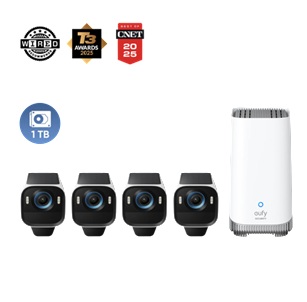
eufyCam S3 Pro 4-Cam Kit + 1 TB Hard Drive
Conclusion
If you want to save on monthly fees, store daily surveillance footage locally, and use event recording mode for daily home activities, security camera local storage is usually a more suitable option. If off-site backup is worth the ongoing cost to you and you wish to reduce the manual maintenance of storage devices, cloud storage will better meet your needs. If you want to use local storage as the foundation while enabling cloud backup for specific cameras or scenarios, a hybrid storage solution will be the ideal choice.
Before purchasing outdoor security cameras, consider three questions. First, do I want my footage stored mainly at home or remotely? Second, am I recording short events or long continuous videos? Third, am I managing one camera or a full multi-camera system?
After clarifying the answers to these three questions, choosing a storage solution will be much simpler. The optimal local storage configuration for security cameras should align with your privacy needs, budget, and the actual daily usage scenarios of your household.