
How AI Video Tools Like Face Swap Are Expanding Creative Workflows
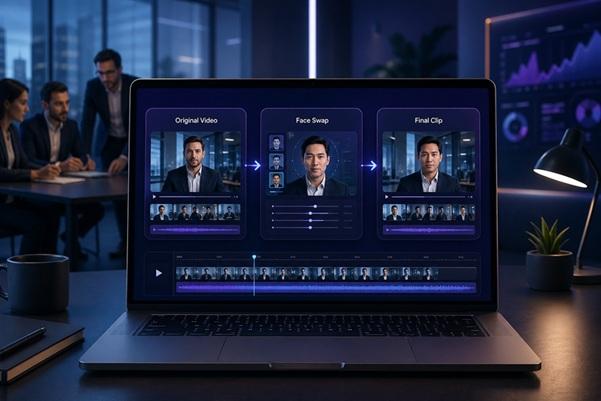
I have spent a lot of time looking at how businesses create content, and one thing has become very clear to me: video is no longer a separate creative format. It has become part of everyday communication.
Marketing teams use video for campaigns. HR teams use it for training. Product teams use it for explainers. Founders use it for updates. Even internal documentation is becoming more visual.
The challenge is that video production has not always kept up with this demand. Traditional production still has value, but it can be slow, expensive, and hard to scale. That is why I have been watching the rise of tools like face swap videos with more interest.
GoEnhance provides an effective AI video generator that helps turn simple inputs into polished video content, which makes it useful for teams that need fast, flexible creative output.
Why Business Video Workflows Are Under Pressure
Most teams now need more video than they can comfortably produce.
A marketing team may need:
- social media clips,
- product explainers,
- ad variations,
- customer education videos,
- and event promotion assets.
At the same time, internal teams may need:
- onboarding videos,
- training updates,
- process walkthroughs,
- and localized communication materials.
That is a lot of video. The issue is not always creativity. Often, the real problem is production capacity.
A single video can take days or weeks if handled through a traditional process. When updates are frequent, that model becomes difficult to maintain.
What AI Video Tools Change
AI video tools are not only useful because they create content faster. Their real value is that they make video workflows more flexible.
Instead of treating every video as a full production project, teams can now create smaller, more targeted pieces of content. This is especially useful when the goal is not cinematic quality but clear communication.
In my experience, AI-assisted workflows work best for:
- short-form marketing content,
- internal training clips,
- localized versions,
- social media tests,
- and quick concept validation.
This kind of content does not always require a studio. It needs clarity, speed, and enough polish to be trusted.
Practical Uses for Face Swap in Workflows
Face swap technology often gets discussed as an entertainment feature, but I think that misses the bigger picture.
In business workflows, it can support practical use cases when used responsibly and with permission.
For example:
- a training video can be adapted for different regions,
- a presenter-style clip can be localized,
- a marketing concept can be tested with different audience profiles,
- or a campaign can be refreshed without reshooting the entire video.
That can save time, especially for teams working across multiple markets.
Of course, this also requires clear internal rules. Consent, transparency, and brand safety matter. Any use of face swap in a business setting should be permission-based and reviewed before publication.
Why Unified AI Platforms Are Becoming More Useful
One pattern I have noticed is that teams do not want to manage too many tools.
A content workflow can already involve writing tools, design tools, video editors, project management platforms, analytics tools, and storage systems. Adding five more AI tools can create confusion instead of efficiency.
That is why platforms like GoEnhance AI are interesting. They bring several video-related capabilities into one place, including AI video generation, image animation, and face swap.
For a small team, this matters because context switching is a real cost. Every extra tool means another login, another interface, another billing cycle, and another learning curve.
Where AI Video Helps Teams Most
AI video tools are especially helpful in workflows where iteration matters.
Here is how I usually compare the value:
|
Workflow Need |
Traditional Challenge |
AI Video Advantage |
|
Marketing variations |
Requires multiple edits or shoots |
Faster version testing |
|
Training updates |
Old videos become outdated |
Easier content refresh |
|
Localization |
Requires new presenters or voiceovers |
Easier visual adaptation |
|
Social content |
High volume demand |
Quick short-form output |
|
Concept testing |
Production cost is risky |
Low-cost creative drafts |
The point is not that AI handles every stage perfectly. It is that it allows teams to move from idea to testable asset much faster.
The Human Role Still Matters
I do not believe AI video tools remove the need for human creative judgment. If anything, they make judgment more important.
When generating video quickly, it becomes easier to publish too much average content. That is not helpful. Teams still need to decide:
- whether the message is clear,
- whether the visuals match the brand,
- whether the video feels trustworthy,
- whether the content is appropriate for the audience,
- and whether the output supports the business goal.
AI can generate options. People still need to choose the right ones.
Risks Teams Should Manage
There are also risks worth taking seriously.
Face swap tools, in particular, should never be used without permission. In professional environments, that can damage trust quickly. AI-generated video should also be reviewed carefully for visual errors, misleading details, or unnatural movement.
I usually recommend a simple review checklist:
- Is the person or subject used with consent?
- Is the content accurate?
- Does the video avoid misleading claims?
- Is the output consistent with brand standards?
- Would the team be comfortable explaining how it was created?
If a video fails any of these checks, it should not be published.
What This Means for Creative Operations
The deeper shift is not only about AI tools. It is about how teams think about content operations.
Video is moving from a slow production asset to a flexible communication format. That changes planning, budgeting, and team structure.
Instead of producing a few large videos per quarter, businesses may create many smaller videos each month. Some will be public. Some will be internal. Some will be experiments.
AI video tools make that model more realistic.
Final Thought
AI video tools like face swap are expanding what teams can do with limited time and resources. They help create variations, refresh content, localize communication, and test ideas faster.
From my experience, the best results come when businesses treat AI as a workflow enhancer, not a replacement for strategy or creative standards.
Video demand will only keep growing. Teams that learn how to use AI responsibly will have a real advantage—not because they create more content, but because they can create better options, faster.