
CapCut for Real Estate: AI Voice Narration for Property Tours

Listing videos have proved a potent display of property available on the internet; however, not all videos with good frames cut through the market. The CapCut Desktop Video Editor has been designed as an all-in-one editing tool that enables real estate professionals to design a property tour with AI voiceover, action transitions, and high-definition pictures. CapCut gives the opportunity to create high-quality, compelling virtual tours even in the case of absence of a professional narrator and a studio where it is possible to shoot.
The AI voice generator is one of the most useful features of CapCut for anyone who needs to create content about the real estate market. Rather than going to a voice talent, paying and recording him/her manually, we have a quicker way, with just a few clicks, you can convert your copy into an automated natural-sounding script. This saves us a lot of time, effort, and budget.
What will we do to make an effective video tour of an estate property with the help of the CapCut AI text-to-speech, visual, and optimization features?
Why Choose CapCut for Real Estate Videos?
CapCut Desktop combines ease of use with powerful editing tools designed for creators at any skill level. With drag-and-drop editing, customizable text effects, and voice syncing, it’s perfect for real estate professionals aiming to showcase properties with minimal resources. Here's why it's ideal:
-
Text to Speech: Instantly turn written descriptions into voiceovers.
-
AI Video Upscaler: Improve clarity and detail of property visuals.
-
Timeline Editor: Sync narration with visuals effortlessly.
-
Transitions & Effects: Create smooth walkthrough experiences.
-
High-Resolution Export: Deliver videos in 1080p or 4K quality.
Step-by-Step Guide: Creating a Real Estate Video with AI Voice Narration
Step 1: Launch CapCut and Start a New Project
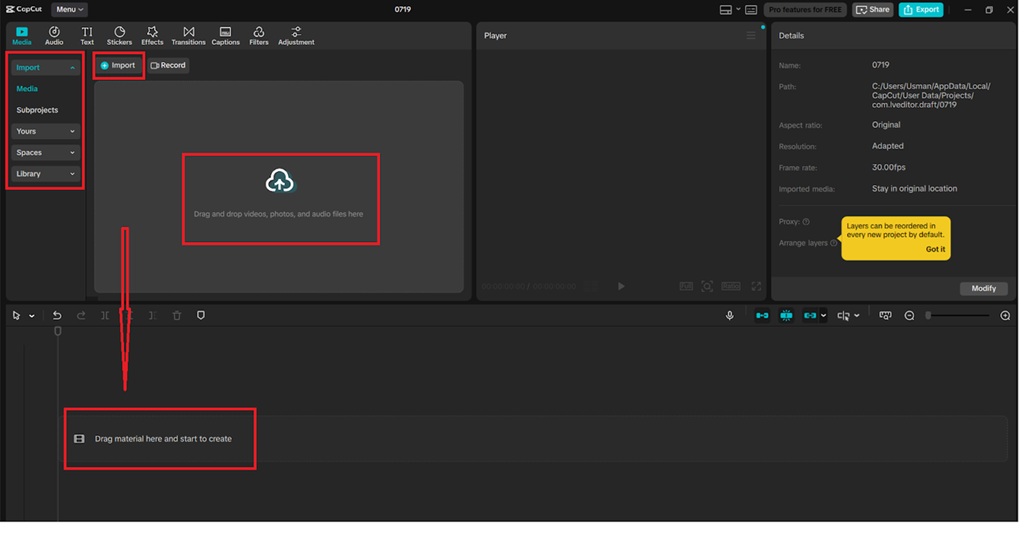
Click on CapCut Desktop, and you will get a new project option. Once you have your raw property footage or images, go to the "Media" tab, select the "Import" option, and drag your files to the timeline to start assembling your property tour sequence.
Step 2: Write and Add AI Voice Narration
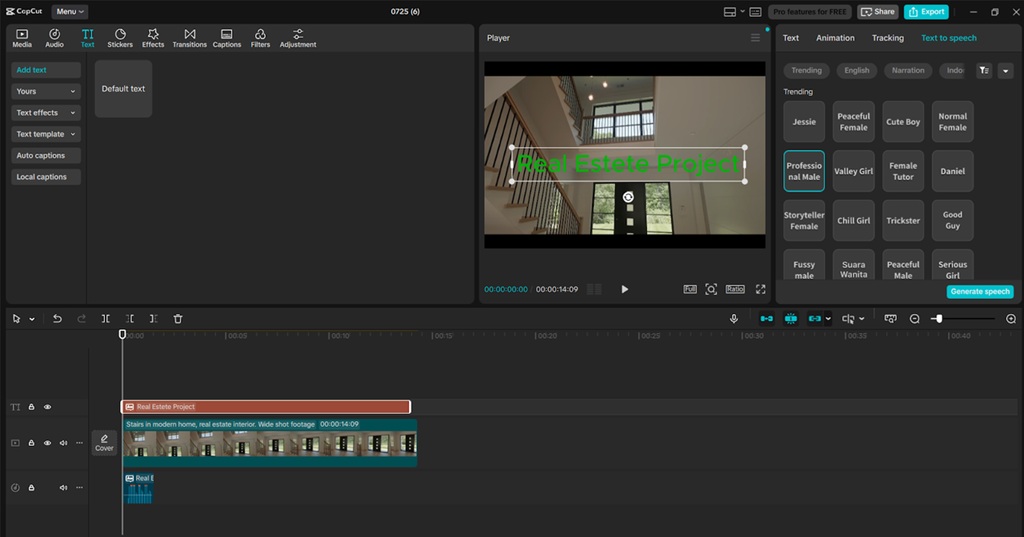
Write the script of your property. This can be in the form of the living room description, kitchen description, outside space, or even the local facilities around your property. In CapCut, open the toolbar and go to the "Text" option and then "Text to speech". Paste your text in the box, select the voice style (e.g., calm, narrative, professional), and press "Generate speech". The voice-over will go along with your timeline, and it will be supplied alongside your visuals. This is where the text to speech AI of CapCut can make your video quite an engaging one.
Step 3: Add Text Annotations and Transitions
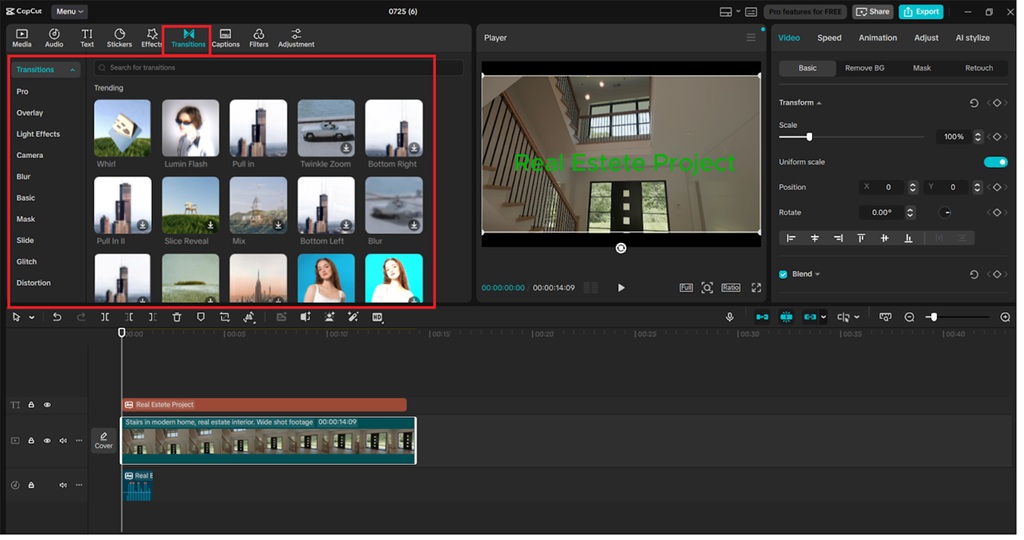
The text tool can be used to get eye-catching on-screen information like 3 Bedrooms, Sea View Balcony, or Fully Renovated Kitchen. To implement a smooth transition, such as a camera, slide, or zoom into or out of any scene, visit the tab labeled as "Transitions". This sustains the flow of the property tour and visually takes the viewers through the areas.
Step 4: Enhance Visual Quality with AI Video Upscaler
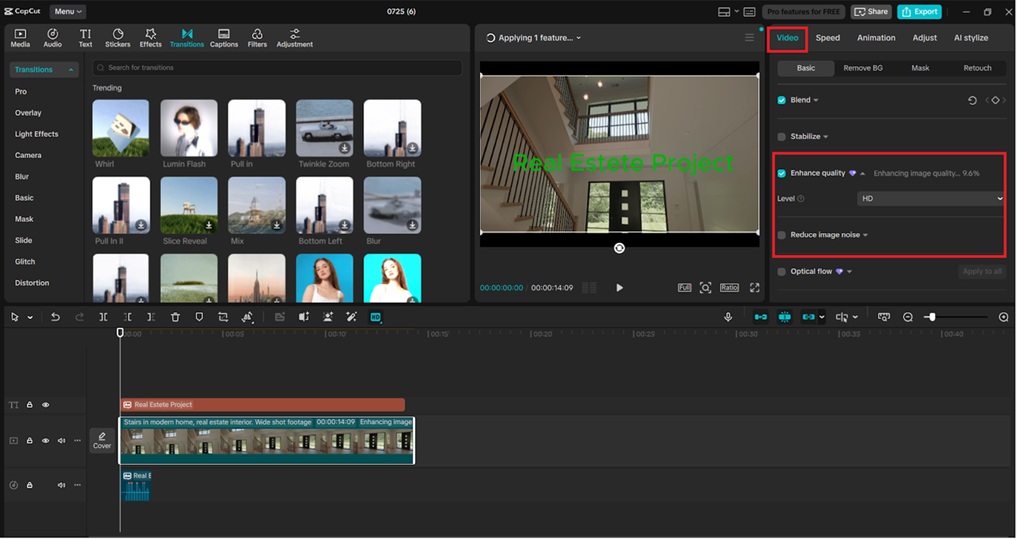
In case your video is blurry or captured using low light, visit the right-hand corner and go to the tool, "Enhance quality". Or you can add filters or use AI Video Upscaler to make your videos more resolute, in case you have the files in 480p or 720p. It is useful to make your property sharp and inviting, particularly on expensive listings.
Step 5: Export Your Video in HD
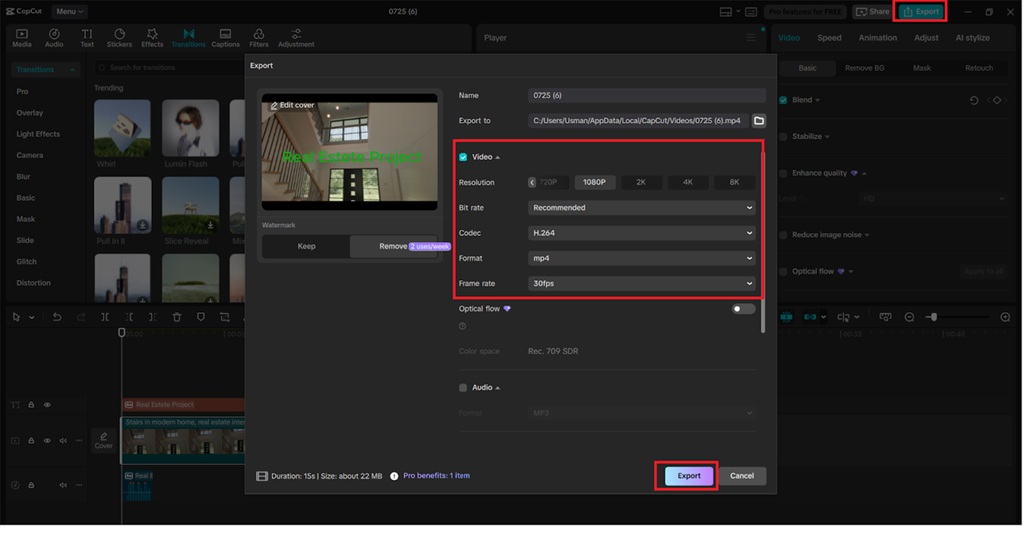
As soon as your images and voiceover have been made to fit together just right, press the "Export" button in the upper right corner. Select desired resolution (recommended to be 1080p when working with real estate videos), and format (if you plan to place your video on the Internet, use MP4 as it works best). Give a relevant filename and save the video. Your AI property tour is now ready to go on YouTube, social, or listing sites.
Real Estate Scenarios That Benefit from AI Voice Narration
CapCut is a tool that can assist in making content you can use as a real estate agent or property manager:
-
Virtual Open Houses: Sell virtual tours of homes that will be played 24 hours a day on the internet with a pre-recorded voiceover description.
-
Property Walkthroughs: Take the viewers in every room, providing some explanatory narration and annotations.
-
Neighborhood Overviews: Include voice over to maps and points of interest nearby.
-
Introductions of the Agent: Build AI videos that do not even need you to be camera-ready, even when you are not ready.
You can be locating a comfortable studio or a luxury villa, but a video with a professional narration generates trust and lets the potential buyer associate himself or herself with the space.
Final Thoughts
Being a video editor, CapCut is also an efficient real estate marketing toolkit. Such functionality as the AI voice generator, text to speech AI, and the AI video upscaler allows creating finished, high-impact videos to help a listing stick out in a saturated market.
CapCut provides all the tools you need to create your real estate content and target more online users instead of considering finding voice professionals or video editing specialists to help you with your project.