
GA4 Alternative: What Engineering Teams Should Check Before Switching

A GA4 report shows fewer purchases than the order system, a row says data was withheld, and the BigQuery export does not match the screen. Marketing wants to know which number is right, and the data team has to answer.
Here is how to tell which GA4 limits you can fix in settings, which ones mean it is time for a GA4 alternative, and how to switch without losing a month of numbers.
Key takeaways
- GA4 thresholds are system defined. Google says you cannot adjust them, only widen the date range.
- Standard properties keep exploration data for 2 or 14 months. Set it to 14 today if you have not.
- The daily BigQuery export stops at 1 million events a day on a standard property. Streaming export has no volume limit but costs $0.05 per GB and may have gaps.
- Run the new tool next to GA4 for at least 4 full weeks before you turn anything off.
- Judge both tools against your order table or CRM, not against each other.
What should you check before replacing GA4?
Check four things: whether your problem is a GA4 setting or a hard limit, what the BigQuery workaround would cost, whether the new tool can join visits to orders or deals, and how close each tool gets to your real order count. Only switch when a parallel run proves the new tool is closer to the truth.
| GA4 limit | What you see | What to check in an alternative |
|---|---|---|
| Data thresholds | Rows withheld for demographics or search queries | Does it ever hide rows? When? |
| Sampling in explorations | Estimates above 10 million events per query | Are reports on raw events? |
| 2 or 14 month retention | Old explorations come back empty | How long is raw data kept? |
| 1 million events a day export cap | Daily BigQuery export pauses | Can it write to your warehouse with no cap? |
| Consent mode modeling floor | Declined visits are missing on small sites | What does it record when consent is denied? |
| Config quotas | No room for a new dimension or key event | Limits on custom fields and events |
Which GA4 limits can you fix without switching?
Some of the pain is settings. In Admin, under Data retention, a standard property can keep event data for 2 months or 14 months. The default is 2. It only affects explorations and funnel reports, where engineers dig. Change it to 14 before you decide anything.
The BigQuery export cap has two fixes. Google's BigQuery Export help page says the daily export allows up to 1 million events a day and lets you filter out events to stay under it. Drop noisy events like scroll first. If you still go over, turn on streaming export. It has no volume limit, but Google says it is best effort, may contain data gaps, and adds $0.05 per GB.
The rest are hard limits. Google's data thresholds page says thresholds are system defined and cannot be adjusted. Google's GA4 360 comparison table caps standard properties at 50 event scoped custom dimensions, 25 parameters per event and 30 key events. Google's consent mode page says modeling needs at least 1,000 events a day with analytics storage denied for 7 days, plus 1,000 daily users who grant consent on 7 of the last 28 days. Below that, declined visits are simply not reported. If one of these is your real problem, a setting will not help.
What does the BigQuery workaround cost?
Google Cloud's BigQuery price list says the first 1 TiB of on demand queries each month is free, then $6.25 per TiB in US regions.
Monthly query cost = (TiB scanned per month minus 1) x $6.25
Say a team runs 40 scheduled report queries a day, each scanning about 25 GiB. That is about 29.3 TiB a month, or about $177. If the same queries used SELECT * with no date filter and scanned 300 GiB each, the bill grows about twelvefold. Partition by date and select only the columns you need.
The export also never holds revenue that closes later in a CRM or by phone. If that is the gap, your choice is a different kind of tool, not a cheaper query: a marketing attribution platform that also sees CRM revenue, not another pageview counter.
How to migrate off GA4 without losing data
1. Write the tracking plan
List every event, its parameters and its owner. Map each GA4 event name to its name in the new tool, and note your transaction ID field so purchases can be matched one to one.
2. Export the history you need
Pull the raw events you will want later into your warehouse now. GA4 keeps them 14 months at most.
3. Install in parallel
Ship the new tag or server events next to GA4. Use one time zone and one currency in both.
4. Connect revenue, not just visits
If deals close in a CRM, check that the click ID from the landing URL is saved on the lead record. A marketing attribution platform such as ObserviX connects ad platforms, the website and the CRM and sends verified conversions back. Whatever you test, ask to see one real deal traced to its ad click.
5. Reconcile every week for 4 weeks
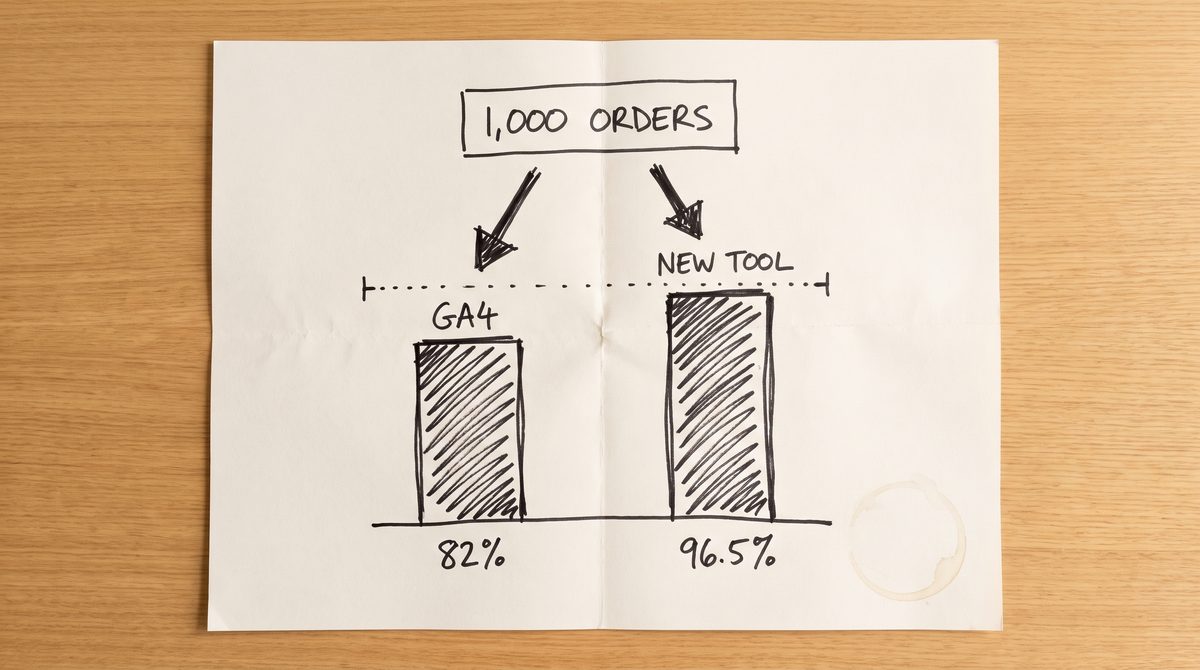
Use one formula: capture rate = events in the tool / events in your source of truth x 100. Say the order system shows 1,000 orders in a week. GA4 shows 820 purchases, so 82%. The new tool, which also sends purchases from the server, shows 965, so 96.5%.
Comparing the two tools to each other only tells you they differ by 145. Comparing both to the order table tells you which one is closer to the truth. Cut over when the rate holds steady for 3 weeks in a row and every gap has a written cause.
Common questions
Can I turn off data thresholds in GA4?
No. Google says they are system defined. A wider date range sometimes brings withheld rows back.
Does changing GA4 retention to 14 months bring old data back?
No. It only applies from the change forward, so set it as early as you can.
How long should GA4 and a new tool run side by side?
At least 4 full weeks, so you cover a month end and a few campaign launches.
Should I delete the GA4 property after switching?
Not right away. Keep it collecting for a few months as a backup while the new numbers earn trust.
Start with one check this week. Pull last week's order count from your store or CRM, divide GA4's purchase count by it, and write the capture rate in the ticket. That one number tells you whether you need a new tool or just better tagging.