Operations | Monitoring | ITSM | DevOps | Cloud

Microsoft SCOM Tips & Tricks

This one is for all the Microsoft SCOM geeks out there — 99 practical tips & tricks to make managing SCOM way easier. The tips compiled here draw from community experts, SCOM-focused blogs, Microsoft’s official documentation, and the hands-on experience at NiCE. You may already know some of them, but having them all organized in one place makes it easy to reference and put them into practice.

Almaden Achieves SOC 2 Type II Compliance

At Almaden, our mission has always been simple: help organizations deliver exceptional digital employee experiences with confidence. Today, we’re proud to share a major milestone in that commitment. Almaden, Inc. has successfully achieved SOC 2 Type II compliance. This accomplishment reflects not just a security checkbox, but a rigorous independent validation of how we protect our customers’ data every single day.

I let Claude investigate a production incident with Honeybadger's MCP server

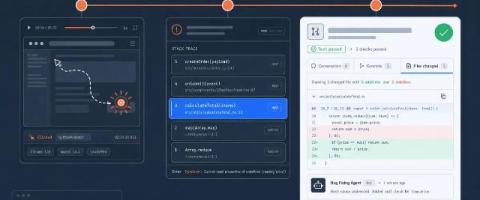
In this demo, Kevin shows how you can use Honeybadger's MCP server with Claude to investigate a production incident — going from a natural language prompt to a complete incident dashboard in minutes. Honeybadger is an application health monitoring platform that helps developers catch errors, track performance, and stay on top of incidents. The MCP server lets AI assistants like Claude query your Honeybadger data directly, so you can investigate issues conversationally without digging through dashboards manually.

Monitoring and Optimizing a Hybrid Cloud Environment | WhatsUp Gold

This webinar focuses on Monitoring and Optimizing a Hybrid Cloud Environment. Downtime is an expensive inconvenience. Yet many IT teams still face monitoring blackouts due to rigid licensing models and outdated failover strategies. In this session, we’ll introduce a smarter approach: High Availability by Design. Whether you're scaling operations or modernizing infrastructure, this session will enable you with the tools and insights to build a resilient, future-ready monitoring strategy.

Wireless Workstation Connect in Public Safety | Zebra

Streamline your entire workflow, from the street to the station. Zebra's Wireless Workstation Connect transforms your Zebra mobile computer—the same one you use for e-citations and evidence capture—into a complete desktop workstation. This video shows how your officers can use their handheld device in a patrol car or at their desk and instantly get a full-screen experience without ever having to remove the device from their pocket. Empower them to write detailed incident reports, analyze evidence, and access mission-critical applications on a large monitor with a full keyboard and mouse.