Operations | Monitoring | ITSM | DevOps | Cloud

An overview of Grafana SSO: Benefits, recent updates, and best practices to get started

Grafana began as an open and composable platform for data visualization. Today, Grafana has evolved into an all-in-one observability platform, providing everything from infrastructure and application performance monitoring to load testing and incident response. As organizations extend their use of Grafana, efficient and secure authentication and authorization is essential.
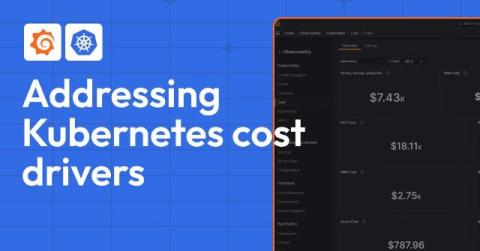
Understand your Kubernetes cost drivers and the best ways to rein in spending

In the previous blog post in this two-part series, we discussed the critical signals you need to monitor in your Kubernetes environment to ensure optimal resource provisioning. These signals include high CPU and memory utilization, frequent pod evictions, slow application performance, and other indicators that your resources are over- or under-provisioned. Monitoring these signals is essential for maintaining an efficient, cost-effective, and environmentally sustainable Kubernetes environment.

Monitor these Kubernetes signals to help rightsize your fleet

Organizations that run Kubernetes clusters in cloud native environments should do so in a way that’s both operationally efficient and cost effective. However, many organizations don’t prioritize cost optimization until it becomes a pressing need. This may be due to a directive from senior leadership, a significant scale-up or migration of Kubernetes clusters, or an unexpected surge in the cloud bill.
Kubernetes Monitoring Demo: How to Lower Costs and Improve Fleet Efficiency | Grafana

The Kubernetes Monitoring app in Grafana Cloud helps you visualize infrastructure costs across providers, identify unallocated and idle resources, and visualize and optimize Kubernetes resources. In this video, Vijay Tolani shows how to lower costs and improve fleet efficiency with the Kubernetes Monitoring app in Grafana Cloud.
Deep dive into any tile - introducing our Data Explorer

With the release of the Data Explorer, users can now dig into the data behind any tile and slice, dice and explore as needed. This is perfect for those ad-hoc ‘scratchpad’ style scenarios where you want to get some answers without creating yet another dashboard. A couple of weeks ago, we released an awesome new feature that we haven’t had a chance to showcase yet. It’s called The Data Explorer, and I think it’s pretty cool. Let’s dive in!

How to authenticate with third-party APIs in your Grafana app plugin

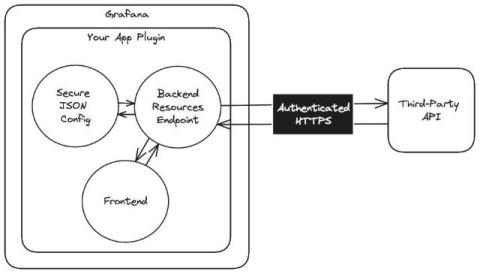
Whether they’re for synthetic monitoring, large-language models, or some other use case, Grafana application plugins are a fantastic way to enhance your overall Grafana experience. Data for these custom experiences can come from a variety of sources, including nested data sources. However, they can also come from third-party APIs, which usually require authentication to access.

Get Your LGTM Stack and Observability Questions Answered at the Ask the Experts Booth | Grafana Labs

The Ask the Experts booth at ObservabilityCON, GrafanaCON, and other Grafana Labs events are one of the biggest highlights for attendees. Richi Hartmann, from the Office of the CTO, talks about the Ask the Experts concept in depth. If you're heading to one of our events with an Ask the Experts booth, be sure to bring your technical questions. The Grafanistas who work on the LGTM Stack, solutions, and features are there to help.

Grafana Labs bug bounty: What you need to know about our new partnership with Intigriti

Grafana Labs is happy to announce that we have partnered with Intigriti, a leading bug bounty platform, to expand our bug bounty program. This collaboration will enable us to work more effectively with security researchers from around the world in a scalable, sustainable way. Moving to a platform that handles initial triage will allow us to focus on valid reports and expand our scope, covering a wider range of Grafana Labs developed products and services.

How to use the Grafana Geomap and Worldmap Panels

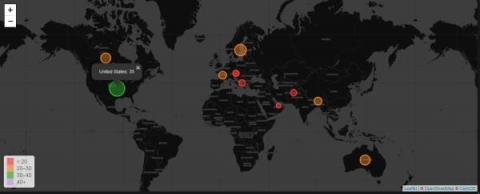
Grafana Geomap panels visualize geographical data on a map, making it easier to see spatial relationships and patterns. They are useful for monitoring metrics across different locations, such as server performance or application usage in various regions. The panels help identify regional issues quickly, allowing for faster troubleshooting and response times.

How to set up Grafana Mimir using Ansible

Gerard van Engelen is a seasoned DevOps engineer who ensures the quality of products by drawing parallels between complex issues and simpler, everyday scenarios. This approach helps in delivering value, ensuring that products are not only built correctly but also offer the right functionalities. Ansible is popular with system administrators and DevOps professionals who use it for automating IT tasks such as configuration management, application deployment, and orchestration.

How to set up an open source database monitoring stack with Grafana Cloud

One of the great powers of Grafana is the open source community behind it — a community that provides a breadth of ready-to-use dashboards, plugins, exporters, and instructions that make a million tasks easier. The sheer scale of it all means whatever you need probably already exists somewhere. To illustrate this, I want to share an example of how to use these tools as a base for building a comprehensive database monitoring solution.

How Mux cut metrics volume by 60%, increased retention times, and improved developer productivity with Grafana Cloud

Every time the platform engineering team at San Francisco-based startup Mux deploys new software, there are two must-have components: proper access controls and observability. But until recently, their observability stack left the team frustrated, reactive, and largely in maintenance mode.

Introduction to Ingesting Logs into Loki with Fluentd and Fluent Bit | Zero to Hero: Loki | Grafana

Have you just discovered Grafana Loki and plan to use FluentD or Fluent Bit as your telemetry collector? Or are you trying to decide which agent is right for you? In this "Zero to Hero" episode, we cover the basics of FluentD and Fluent Bit, highlighting their differences and helping you determine when to use one over the other. Additionally, we guide you through configuring both agents' Loki plugins to write logs directly into Loki.

New: Explore Profiles Demo - A Queryless Experience to Manage and Analyze Profiling Data | Grafana

In this video, Ryan Perry (Co-founder of Pyroscope and Engineering Director at Grafana Labs) demonstrates Explore Profiles, a Grafana app plugin that helps you quickly and easily derive insights from your profiling data — without having to use complex query languages. Grafana Cloud is the easiest way to get started with Grafana dashboards, metrics, logs, and traces. Our forever-free tier includes access to 10k metrics, 50GB logs, 50GB traces and more. We also have plans for every use case.

The new, queryless UI for Grafana Pyroscope: Introducing Explore Profiles

We are excited to share a significant update for Grafana Pyroscope users and the broader open source community: the launch of Explore Profiles, a new application that makes it easier and faster to surface meaningful insights from your profiling data. Explore Profiles is a Grafana app plugin designed to integrate seamlessly with Grafana Pyroscope, the open source continuous profiling backend, providing a smooth, queryless experience to browse and analyze your profiling data.

A complete guide to LLM observability with OpenTelemetry and Grafana Cloud

In the fast-paced world of technology, change is constant — and nowhere is that more evident today than in the flood of new features and advancements involving large language models (LLMs). They power various applications, from chat bots to advanced copilots. And as these LLMs and applications become more sophisticated, it will be vital that they work well and reliably. This is where observability, with the help of OpenTelemetry (using OpenLIT), plays an essential role.

Get insights from logs without writing a query: Explore Logs is in Public Preview

Whether it’s 3 in the morning and you’re trying to resolve an outage, or you’re testing a new feature and you need to resolve a recurring issue so you can move on to your next task: time is of the essence. Wouldn’t it be great if your observability tooling could direct you to your “aha” moment, without you needing to fumble with writing a query?

Explore Logs - A new queryless experience for Loki | Grafana

Mat Ryer takes you through the new way to explore your logs using a queryless, click-based user experience for Grafana Loki. Grafana Cloud is the easiest way to get started with Grafana dashboards, metrics, logs, and traces. Our forever-free tier includes access to 10k metrics, 50GB logs, 50GB traces and more. We also have plans for every use case.

How to visualize Azure Resource Graph data with KQL

Using SquaredUp, you can query Azure Resource Graph with KQL to pull Change history, Azure Service Health and maintenance schedules. For the uninitiated, Azure Resource Graph is a series of tables holding information on Azure resources and how they are related. Its data is used many places within Azure itself (such as the Azure Portal’s native search) and it’s data can help us with many use cases as it is designed to help with queries at scale.

Grafana Cloud updates: Kubernetes Monitoring enhancements, browser tests in Grafana Cloud k6, and more

We consistently roll out helpful updates and fun features in Grafana Cloud, our fully managed observability platform powered by the open source Grafana LGTM Stack (Loki for logs, Grafana for visualization, Tempo for traces, and Mimir for metrics). In case you missed it, here’s a roundup of the latest and greatest updates for Grafana Cloud this month. You can also read about all the features we add to Grafana Cloud in our What’s New in Grafana Cloud documentation.

SQUPCAST Ep. 8: Relayed from behind enemy lines

In this episode we're chatting with Matthew Long from our engineering team about how our Relay Agent get's behind enemy lines to surface all your juicy on-prem enterprise data into our fancy cloud dashboards. We'll cover the classic server deployment and chat about some container-based options too.

Performance testing with Grafana k6 and GitHub Actions

By running performance tests continuously and automatically, you can identify and correct performance regressions as they occur. One way to do this is by integrating performance testing into your development process. In this step-by-step post, we explore how to do just that, using Grafana k6 and GitHub Actions. k6 is an open source load testing tool to test the performance of APIs, microservices, and websites.

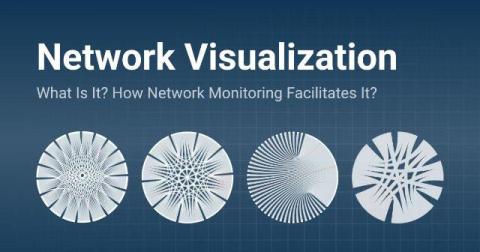
What is Network Visualization & How Network Monitoring Facilitates It

Tired of endless data and complex graphs? Learn what network visualization is and how network monitoring helps you achieve it to visualize your network. Networks are the backbone of business operations, connecting everything from data centers and office branches to cloud services and remote workers. As these networks grow increasingly complex, managing, maintaining and understanding the various flows of traffic in larger networks becomes a significant challenge for many companies.

API monitoring with Traefik, Grafana, and OpenTelemetry (Grafana Office Hours #28)

Maytham Alfouadi (Solutions Architect) and Immánuel Fodor (Product Manager) from Traefik Labs give us a demonstration of how to do API monitoring with Traefik, Grafana, and OpenTelemetry. They talk about Traefik, an open-source reverse proxy, among other things, that is now included by default in k3s and Rancher. They are joined by Usman Ahmad and Nicole van der Hoeven, both Senior Developer Advocates at Grafana Labs.

Observing exchange rates: How to keep tabs on currencies during the summer travel season

It’s summertime in the Northern Hemisphere, and for many people that means it’s also travel season. But before you depart for your dream holiday, don’t forget the essentials: passport, suitcase, and … Grafana? That’s right. If you’re headed to a different country, odds are you’ll use a different currency when you get there. And you can use Grafana to track changes in the exchange rates so you can get the most bang for your buck.

Introducing dashboard variables

We’re excited to announce the general availability of dashboard variables in SquaredUp. With this new feature, dashboards you create are flexible and reusable. Instead of hardcoding specific objects within the tiles on a dashboard, you can use variables to create just one dashboard to be reused across all your objects of the same type – be it your pipelines, apps, or microservices. Viewers of the dashboard can then select which objects they are interested in on the fly.

Notifications feature deep dive

In this blog, I wanted to take a deep-dive into our Notifications feature and explain some of the product design decisions we made. Notifications is one of the most frequently used features of SquaredUp. We designed this feature to be quick and easy to set up, with a primary focus on delivering timely notifications to the appropriate audience.

Retail Observability | Softcat + Grafana

Grafana empowers retailers to deliver unmatched customer experiences, reduce costs, and optimize delivery with omnichannel observability. Innovate faster, increase agility, and watch your business thrive. Grafana Cloud is the easiest way to get started with Grafana dashboards, metrics, logs, and traces. Our forever-free tier includes access to 10k metrics, 50GB logs, 50GB traces and more. We also have plans for every use case.

Upgrade with confidence: Strategies for updating your self-hosted Grafana instance

At Grafana Labs we believe in shipping features early and often, and in recent years we’ve doubled down on that philosophy. We no longer wait for the yearly major release to give you access to the next big thing. Instead, we regularly make new features, bug fixes, and security patches available to our self-managing users (Grafana OSS and Grafana Enterprise) throughout the year.

Announcing... Markdown magic

We're excited to share a small but mighty new feature. Our Text tile now supports Markdown! This allows you to include rich content on your dashboards such as headings, links, lists, images and more. At SquaredUp we know that a useful dashboard is more than just a few charts. With this update you can now provide key context to the data on a dashboard to help tell the right story. For example you might want to: You can easily do all that now, and more.

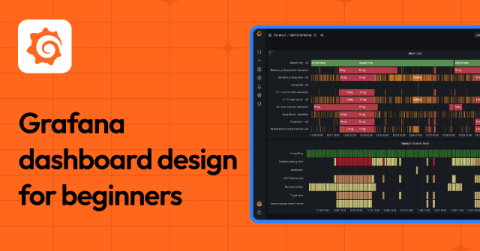
Getting started with Grafana: best practices to design your first dashboard

At its core, observability is about helping humans understand and optimize complex systems. It enables engineering teams to ask questions on the fly, and to learn not only when something goes wrong but why. Observability also allows organizations to proactively identify and address performance issues — before their end users even have a chance to notice.

Identify anomalies, outlier detection, forecasting: How Grafana Cloud uses AI/ML to make observability easier

At Grafana Labs, our No. 1 approach when building AI/ML tools is to enable humans (a.k.a. all of us!) to understand complex systems. In other words, we want to make observability still human, but less complicated. (Our second use case? Making social media more fun.) We believe that AI/ML tools in observability should work towards minimizing toil and the need for everyone in your organization to have the same deep domain knowledge about your increasingly complex stack.

Industrial IoT visualization: Why United Manufacturing Hub chose Grafana to power its IIoT platform

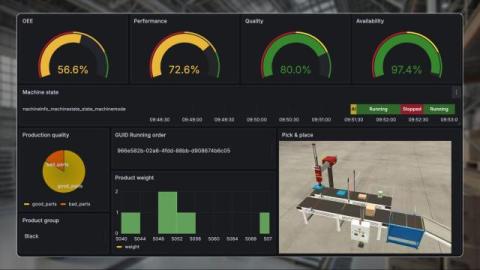
Denis Gontcharov is a data consultant who helps aluminum smelters break down data barriers. For the past five years, he has supported the aluminum industry with IT and data services as an independent consultant. Denis also works as a Developer Advocate at the United Manufacturing Hub. Jeremy Theocharis is co-founder and CTO at United Manufacturing Hub. He is an expert in industrial IoT with over seven years of experience leading large-scale IIoT projects in various industries.

The Top IT Dashboard Examples

A vital aspect of working in IT is that you need to effectively monitor a broad range of KPIs and metrics to ensure the smooth operation of your IT infrastructure. IT dashboards streamline this process as they are specialized dashboards designed to offer insights and track key performance indicators (KPIs) related to numerous aspects of IT operations and infrastructure.

Azure DevOps success with out-of-box dashboards & monitoring

In previous roles I have been both an Engineering Manager responsible for a team, and a Program Manager responsible for branching strategy and process around CICD pipelines. In both of those roles (but for very different reasons), my product's build quality has been critical to product success. The obvious "why" to this is no builds, no product, but the real why is much more nuanced.

Azure Virtual Machine out-of-box dashboard makes it easier to get started

I first started my career in IT support back in 2003 when VMs where something that was “coming” rather than mainstream, so I had the privilege of witnessing the birth of VMs first hand when my company made the switch from bare metal to VMware GSX running on top of Windows Server 2003.