
Operations | Monitoring | ITSM | DevOps | Cloud

The latest News and Information on Service Center Operations Manager and related technologies.

Microsoft showcase Squared Up WAC extension at Windows Server Summit

On May 22nd, more than 8,500 people gathered online for Microsoft’s long-anticipated Windows Server Summit (WSS) – the annual virtual event that covers the latest and greatest in all things Windows Server. It is where industry experts announce and demo exciting new technologies every year – and we are happy to share that this year, Squared Up’s Windows Admin Center (WAC) extension has earned a spot on the list, plus the Microsoft stamp of approval.
Upgrading to SCOM 2019 Step-by-step

We’re delighted to introduce to you Leon Laude, system consultant and knowledge-sharing enthusiast. For our latest special guest blog, Leon has written a thorough step-by-step guide on how to upgrade to SCOM 2019. Having worked on Microsoft products – such as Windows Server, System Center, Hyper-V, Azure, Active Directory – for over 7 years now, Leon has amassed a stack of tips and tricks, and delights in sharing them with fellow SCOM users on thesystemcenterblog.com.

Looking Back At The First SCOM Management Pack Development Training In Amsterdam

On May 15 & 16 we hosted the first SCOM Management Pack Development training in Amsterdam. It was an interesting and exciting course as for a first timer in our region, all slots were sold out in the first three weeks after the announcement.

Reset Dependency Monitors

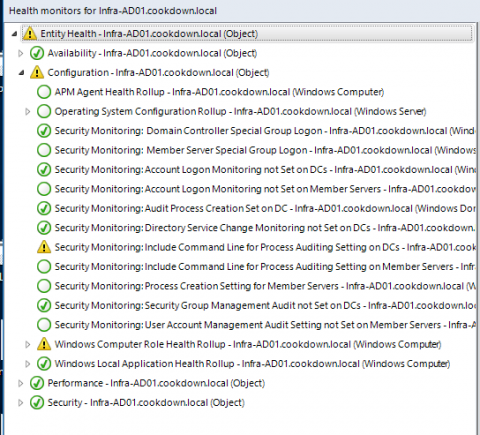
Resetting the monitor that triggered an alert is the best option in SCOM as it will allow the monitor to alert again, if needed. Working programmatically this is easy for alerts that are generated from a Unit Monitor. A Dependency Monitor can be more challenging, which is what we’ll address here. To properly reset your Dependency Monitor you will need to find the underlying Unit Monitor(s) and reset them.