
How IT Teams Are Deploying Remote Desktop Software at Scale in 2026

Installing remote desktop software on one laptop takes a few minutes. Rolling the same tool out across four thousand endpoints, spread across a dozen time zones and three device operating systems, is an entirely different engineering problem.
Global IT spending is projected to reach 6.37 trillion dollars in 2026, and a growing share of that is going toward exactly this kind of infrastructure work: making remote access reliable, secure, and centrally managed across a fleet rather than one machine at a time. Here is how IT teams are actually approaching that rollout this year, and where most of the real engineering effort ends up going.
Key Takeaways
- Deploying remote desktop software at scale is a configuration and identity management problem first, and a software installation problem second.
- Worldwide IT spending is forecast to hit 6.37 trillion dollars in the current year, with device and infrastructure budgets both climbing.
- The average IT support ticket costs roughly 15 to 16 dollars to resolve, which makes deployment efficiency a direct line item, not an abstract concern.
- Zero touch provisioning and centralized policy management have largely replaced manual, one by one installs for fleets of any meaningful size.
- Security architecture, particularly around identity and session logging, needs to be designed before rollout starts, not bolted on afterward.
Why Remote Desktop Deployment Looks Different at Scale
A single install is a checklist. A fleet wide rollout is an architecture decision. Once an organisation crosses a few hundred endpoints, manual configuration stops being realistic, and every choice, naming conventions, default permission levels, update cadence, has to be made once and applied consistently everywhere.
That shift changes who owns the project too. What starts as a desktop support task usually ends up owned by infrastructure or platform teams instead, since the rollout touches identity systems, network policy, and monitoring stacks that desktop support was never responsible for in the first place.
The scale of the fleet also changes what counts as an acceptable failure rate. A single failed install on one machine is a minor inconvenience. The same one percent failure rate across four thousand devices means forty separate support tickets landing at once, often on the same day the rollout wave goes live.
The Core Components of a Scaled Remote Desktop Rollout
Three pieces tend to determine whether a large deployment goes smoothly or turns into months of support tickets.
Centralized Deployment and Configuration Management
Pushing an installer through an MDM or configuration management platform, rather than asking each user to install software themselves, removes the single biggest source of inconsistency. Every endpoint ends up on the same version, with the same policy set, which makes troubleshooting dramatically simpler when something does go wrong.
Identity and Access Management at Fleet Scale
Every remote session needs to trace back to a verified identity, not just a device. At scale, this means integrating remote desktop software for IT operations directly with the organisation's existing identity provider, so access follows the same onboarding and offboarding triggers as every other system rather than living as a separate, easily forgotten permission set. Treating remote desktop access as just another application inside the identity provider, rather than a standalone system with its own user list, is what keeps offboarding from becoming a manual checklist item someone eventually forgets.
Remote Desktop Deployment Models: Comparison
Most organisations land on one of three general approaches, each with real tradeoffs at scale.
|
What Matters |
Manual Install |
MDM Pushed Deployment |
Zero Touch Provisioning |
|---|---|---|---|
|
Setup effort per device |
High, user or technician driven |
Low, centrally triggered |
Minimal, configured before shipping |
|
Consistency across fleet |
Low, drifts over time |
High |
Very high |
|
Best fit |
Fewer than 50 devices |
Mid sized fleets |
Large or distributed fleets |
|
Ongoing maintenance |
Manual, per device |
Centralized policy updates |
Centralized policy updates |
Zero touch provisioning has become the default recommendation for anything beyond a few hundred devices, largely because it removes human error from the setup process entirely. Devices arrive from the manufacturer already enrolled, pull their configuration automatically on first boot, and require no technician involvement at all beyond the initial policy setup.
Security Architecture for Enterprise Remote Desktop
Security cannot be an afterthought bolted onto a rollout that is already halfway deployed.
|
Key Principle: Every remote session should require multi factor authentication, log its start and end time, and expire automatically after a defined period of inactivity. None of these are optional at enterprise scale. |
Many teams pair remote desktop deployments with broader network access controls, and it helps to understand
How remote access VPNs are typically configured, since the two technologies often sit side by side in a layered security architecture rather than replacing one another. Reviewing established approaches to
Structuring access controls for DevOps teams offers a useful template, since the same identity first thinking applies whether the access in question is a build server or a remote desktop session.
The Economics: Why Deployment Efficiency Matters
Poor deployment planning shows up on a budget line, not just in a project timeline.
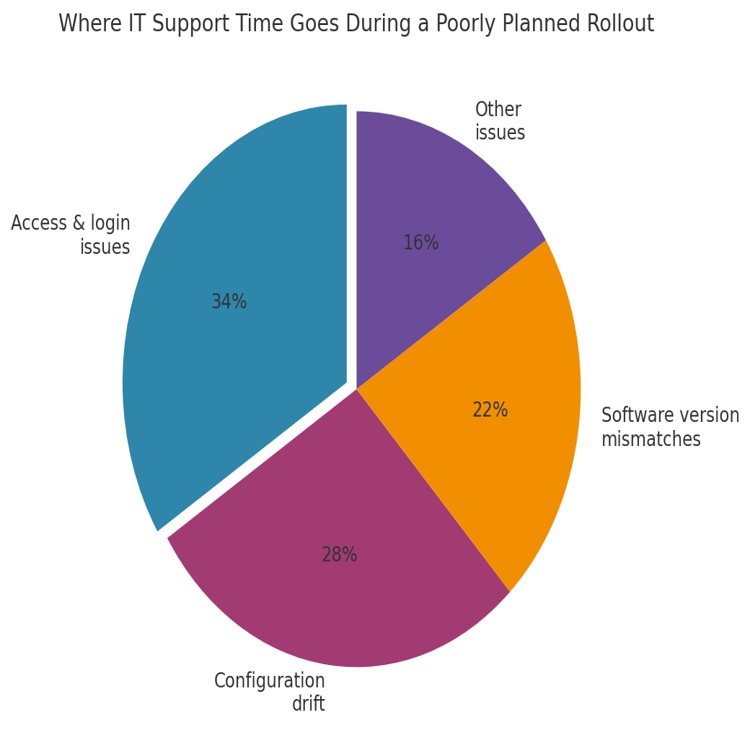
Chart: Breakdown of support time consumed during a poorly staged fleet rollout, by ticket category.
Worldwide IT spending is expected to reach 6.37 trillion dollars in 2026, up 14.2% from 2025, according to Gartner's latest forecast.
Every support ticket generated by a messy rollout costs real money. Industry benchmarks from MetricNet put the average cost of resolving a single IT ticket at roughly 15 to 16 dollars, and a poorly sequenced fleet deployment can easily generate thousands of avoidable tickets in its first month alone. That gap between a smooth and a messy rollout, once multiplied across every device in the fleet, routinely runs into six figures once labour hours are counted properly. Reviewing broader strategies for
modernising IT operations management makes the connection between deployment discipline and operating cost much clearer.
Common Deployment Pitfalls at Scale
A handful of mistakes show up repeatedly across large rollouts, regardless of industry.
|
Warning: Never roll out to an entire fleet in one wave. A staged rollout, even a fast one, catches configuration problems on a small slice of devices instead of several thousand at once. |
- Skipping a pilot group before the full rollout begins
- Leaving default permission levels broader than any role actually needs
- Failing to integrate session logging with existing monitoring tools
- Underestimating bandwidth requirements across satellite offices with weaker connectivity
These pitfalls rarely appear in isolation. A rollout that skips a pilot group is also more likely to miss bandwidth constraints at smaller sites, since nobody tested the deployment outside the well connected head office network. Reading through practical approaches to
Building more efficient IT operations tends to surface these blind spots earlier, since much of that thinking applies just as well to a single large rollout as it does to ongoing operations.
Best Practices for Rolling Out Remote Desktop Software Across a Large Fleet
A few practices consistently separate smooth rollouts from painful ones.
- Run a pilot with a representative cross section of devices, roles, and locations
- Bake identity provider integration into the plan from day one, not as a later phase
- Set update and patch cadence policy before the first device goes live
- Build a rollback plan for every wave, not just the first one
- Monitor ticket volume by category during rollout to catch systemic issues early
Teams already running mature incident response processes tend to have an advantage here. Applying the same thinking behind
Using AIOps to speed up incident response to a rollout's early weeks can catch patterns in support tickets that a purely manual review would miss until much later.
Video: “Secure Remote Access vs. VPN” — https://www.youtube.com/watch?v=fyJRyQKDkX4
This video covers some of the architectural differences worth discussing with the security team before a large rollout begins.
FAQs
How long does a fleet wide remote desktop rollout typically take?
It varies widely by fleet size and complexity, but a staged rollout across several thousand endpoints commonly takes six to twelve weeks, including a pilot phase, several rollout waves, and a stabilisation period afterward. Organisations with more complex identity or compliance requirements often extend that timeline further.
Should remote desktop deployment be owned by desktop support or infrastructure teams?
At scale, infrastructure or platform engineering groups usually take the lead, because the work spans identity systems and network policy beyond what desktop support traditionally owns. Desktop support remains essential for day to day troubleshooting once the tool is live, particularly during the first few weeks after each wave goes out.
What is the biggest cause of support tickets during a large rollout?
Access and login issues consistently top the list, usually tied to identity provider integration gaps or permission levels that were never stress tested before the wider rollout began.
Does zero touch provisioning work for a mixed device fleet?
Yes, most modern zero touch provisioning tools support Windows, macOS, and Linux endpoints, though the specific configuration steps differ by platform and need separate testing during the pilot phase.
How do you measure whether a rollout was successful?
Ticket volume per device during and after rollout is the clearest signal, alongside time to resolution for access related issues and the percentage of devices that needed manual intervention outside the automated process.
Conclusion
Deploying remote desktop software across a large fleet is fundamentally a systems problem, not a software installation problem. The organisations that get it right treat identity, configuration management, and security architecture as decisions made before rollout begins, not fixes applied after tickets start piling up. Getting that sequencing right in 2026 matters more than ever, given how much budget is now tied up in exactly the kind of infrastructure that makes distributed access work, and how quickly a poorly staged rollout can turn a routine software update into a month of firefighting.
References
Gartner, Gartner Forecasts Worldwide IT Spending to Grow 14.2% in 2026, Totaling $6.37 Trillion, 2026 — https://www.gartner.com/en/newsroom/press-releases/2026-07-27-gartner-forecasts-worldwide-it-spending-to-grow-14-point-2-percent-in-2026-totaling-6-point-37-trillion
MetricNet, IT Service Desk Benchmarking Data, cited via ProProfs Help Desk Statistics, 2026 — https://www.proprofsdesk.com/blog/help-desk-statistics/
Fortinet, What Is a Remote Access VPN? — https://www.fortinet.com/resources/cyberglossary/remote-access-vpn
Fact Check: All statistics and data points in this article were verified against original sources as of 20 August 2026. Sources are listed in the References section.